tertius said:
I've never heard of it before - how does DashDyno calculate power?
This is what the DashDyno Manual states:
Theory of Operation
A dynamometer, or dyno for short, is used to measure the power produced by an engine. Traditionally automotive dynos were either crankshaft dynamometers or chassis dynamometers.
Crankshaft dynos require the motor to be removed from the vehicle. The power is measured directly at the crankshaft, or flywheel, and is not affected by transmission and axle powertrain losses. Vehicle manufacturers spec crankshaft power on new cars and trucks.
Chassis dynos test the entire vehicle. The vehicle is tied down to a large machine and the drive wheels are placed over a rotating drum. The chassis dyno tests the entire powertrain system, not just the crankshaft power. This is a more realistic test since it measures the power delivered to the wheels, not just the crankshaft. As such, the power figures measured are always less than with a crankshaft dyno since the powertrain causes some power loss.
DashDyno SPD™ Dynamometer
DashDyno uses the OBD II computer port located on all 1996 and newer automobiles to compute engine power, acceleration times, fuel economy, and more.
DashDyno tests the vehicle in a completely real world situation that includes powertrain losses, drag from disk brakes and wheel bearings, tire rolling resistance, etc. – everything a vehicle sees on the street.
Aerodynamic drag is compensated for within the calculations. So, whether your vehicle has the aerodynamics of a Chevy Suburban or a Porsche 911, the power calculations can correct for losses due to wind drag.
Weather conditions affect the output of an internal combustion motor. A correction factor is applied to compensate the measurements for weather conditions and elevation. The industry standard document for horsepower and torque corrections is SAE J1349. DashDyno applies this correction factor to all horsepower and torque measurements.
Dynamometer Features
By applying these correction factors to the dyno results, a vehicle dyno'd in Denver on a hot day will give the same results as a chilly day in San Diego. Using the DashDyno, measurements generated are comparable with one another the world over.
The dyno runs are performed in a single gear. Any gear will work, however increased accuracy is obtained if the software has an increased measurement duration. For instance, the time to accelerate from 1000 RPM to 5000 RPM in 1st gear is a shorter duration than it would be in 3rd gear. Therefore, using 2nd or 3rd gear for dyno runs offers longer test durations for greater accuracy.
Extensive comparison testing on a Dynojet chassis dynamometer has shown the DashDyno to be extremely accurate.
For each car that I datalog, I have a profile file of the car, as per the instructions in the manual as below, and anytime I do a recording I only need to correct the data in the profile for the environmental conditions of temperature, humidity and pressure, which I can obtain from a very local weather station.
Dyno Setup File
The Dyno Setup files are created on the Files > Create Files > Create Dyno Setup menu option. A wizard will walk you through setting each file attribute:
Weight – weight of the vehicle including passengers during the run.
Gear Ratio – the overall gear ratio of the vehicle, which includes transmission and axle.
Tire Diameter – the vehicle tire diameter.
Temperature – current outside temperature.
Elevation – elevation at the test track.
Humidity – current outside humidity.
Pressure – current outside altimeter pressure available from http://www.nws.noaa.gov. Altimeter pressure is different than barometric pressure.
Drag Coefficient – drag coefficient of vehicle.
Frontal Area – the frontal area of the vehicle.
Once Dyno Setup file is created, the parameters can be reviewed at Files > View Files > View Dyno Setup.
The software measures the gear ratio for you. See Gear Ratio Screen on page 41 for more information.
Even if the dyno figures produced by the DashDyno were not 100% accurate with any other dyno analysis method, they are nonetheless comparable with each and every other recording produced by the DashDyno itself. As such, the figures produced can show +ve or -ve gains, which have been proven to me to be very repeatable, with several different vehicles of different manufacture which I've datalogged. As reported before, I've had my Z3MC on the static dynos at Evolve and Powerstation (both well respected outfits) and the DashDyno recordings compare very well to the figures produced for my car by those dynos. I rely absolutely on the information that the ECU gives to the DashDyno, since it's the exact same information that the ECU uses in fuelling the car to produce optimum performance. I follow an empirical approach with my modding, although my mods are based on my decent understanding of the science involved: If a mod shows a gain, I go with the idea and if it shows no gain or a loss, I ditch the idea. My ramcharger mod has been devised entirely from my understanding of ram pressure and some lateral thinking to other areas of interest of which I know something about.
If you're interested in the DashDyno here's the company's website:
http://www.auterraweb.com/

 But, are any of you guys any good at laying up carbon-fibre?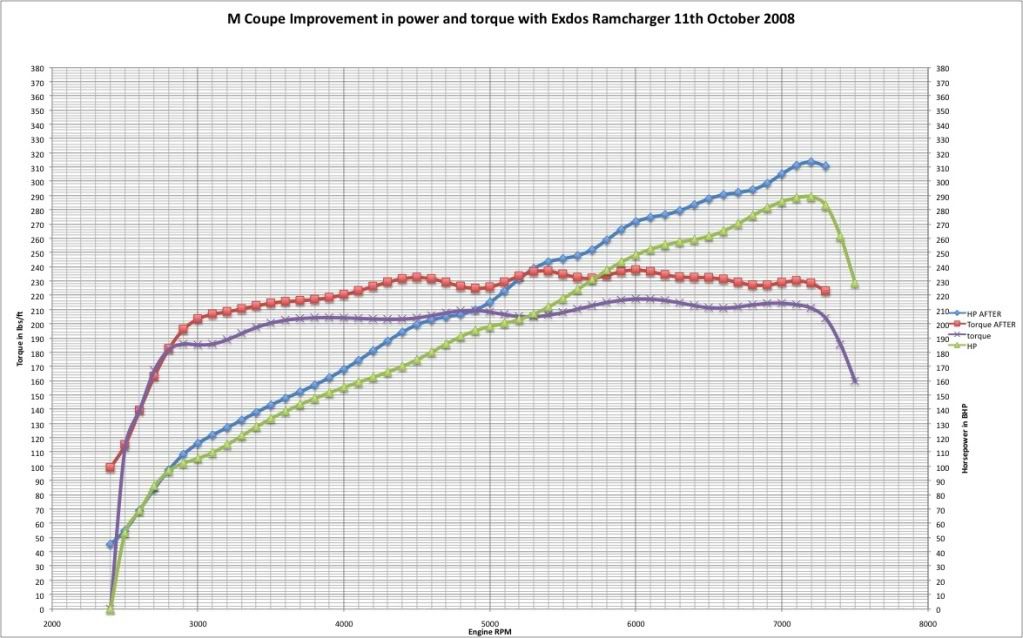


 olice: