MMI installation - question for the master

Jumping into this thread with what I hope is an easy-answer question (but I couldn't really find an answer on the website last night when I looked).
I've seen similar things to this before, and they always depend on you having the factory fitted USB socket in the centre storage bin. I only have the AUX socket (and a 12V cigarette lighter socket).
Does this MMI work with my 'poverty spec' audio setup?
Cheers.
 
enzed4 said:
Jumping into this thread with what I hope is an easy-answer question (but I couldn't really find an answer on the website last night when I looked).
I've seen similar things to this before, and they always depend on you having the factory fitted USB socket in the centre storage bin. I only have the AUX socket (and a 12V cigarette lighter socket).
Does this MMI work with my 'poverty spec' audio setup?
Cheers.
So you've got iDrive but with no USB? Do you have Bluetooth?
Well It's not a problem, because with this unit you don't need USB all you need is AUX.

Now as you've not got USB (and I'm assuming you don't have Bluetooth) then you probably don't have a MULF or Combox, so in that case your AUX signal would go directly to the back of the headunit (the normal route would be to the MULF/Combox and then via the optical to the headunit). So I believe the adaptor loom wiring for the back of the headunit has the sound output directly into the back of the headunit (as well as a fly-lead that goes to the AUX) so you may get away without having to run the AUX lead to the armrest. But you would have to test this before screwing everything back together.
 
AnubisZed said:
enzed4 said:
Jumping into this thread with what I hope is an easy-answer question (but I couldn't really find an answer on the website last night when I looked).
I've seen similar things to this before, and they always depend on you having the factory fitted USB socket in the centre storage bin. I only have the AUX socket (and a 12V cigarette lighter socket).
Does this MMI work with my 'poverty spec' audio setup?
Cheers.
So you've got iDrive but with no USB? Do you have Bluetooth?
Well It's not a problem, because with this unit you don't need USB all you need is AUX.

Now as you've not got USB (and I'm assuming you don't have Bluetooth) then you probably don't have a MULF or Combox, so in that case your AUX signal would go directly to the back of the headunit (the normal route would be to the MULF/Combox and then via the optical to the headunit). So I believe the adaptor loom wiring for the back of the headunit has the sound output directly into the back of the headunit (as well as a fly-lead that goes to the AUX) so you may get away without having to run the AUX lead to the armrest. But you would have to test this before screwing everything back together.
Thanks for the reply. I did have BT, but it was only for phone calls - there was no music streaming (A2DB) function. The dealer I bought the car from eventually fitted a Kufatec Fiscon unit which uses the CD output to provide BT music streaming, but it's not as integrated as the MMI seems to be (there's no output to the nav screen, which I'd like).
 
enzed4 said:
Thanks for the reply. I did have BT, but it was only for phone calls - there was no music streaming (A2DB) function. The dealer I bought the car from eventually fitted a Kufatec Fiscon unit which uses the CD output to provide BT music streaming, but it's not as integrated as the MMI seems to be (there's no output to the nav screen, which I'd like).
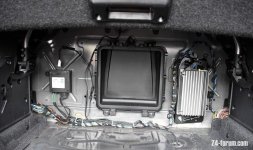
Arr OK, so I'd assume then that you'll have a MULF for the Bluetooth (OEM), which'll be mounted on the panel between the boot and cockpit, behind the carpet section in the boot (if that makes sense? :? ).
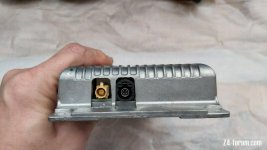
So, your AUX will go there then and not directly to the headunit. But that does mean that (in principle, as it would all need checking) you could fit the combined AUX/USB socket in the armrest, and then run the new USB cable to the MULF which would all then work from the iDrive system (USB plugs into the black connector on the MULF, as in the photo).

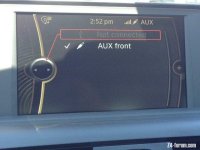
When you go to MEDIA option on the iDrive, and then into External Sources, there will be an AUX available option but is there anything else? Maybe a greyed out USB? As in the second photo.
 

Attachments

  • gkjhjghj.jpg
    gkjhjghj.jpg
    91.8 KB · Views: 1,130
  • image1.jpeg.jpg
    image1.jpeg.jpg
    39.3 KB · Views: 1,130
enzed4 said:
AnubisZed said:
enzed4 said:
Jumping into this thread with what I hope is an easy-answer question (but I couldn't really find an answer on the website last night when I looked).
I've seen similar things to this before, and they always depend on you having the factory fitted USB socket in the centre storage bin. I only have the AUX socket (and a 12V cigarette lighter socket).
Does this MMI work with my 'poverty spec' audio setup?
Cheers.
So you've got iDrive but with no USB? Do you have Bluetooth?
Well It's not a problem, because with this unit you don't need USB all you need is AUX.

Now as you've not got USB (and I'm assuming you don't have Bluetooth) then you probably don't have a MULF or Combox, so in that case your AUX signal would go directly to the back of the headunit (the normal route would be to the MULF/Combox and then via the optical to the headunit). So I believe the adaptor loom wiring for the back of the headunit has the sound output directly into the back of the headunit (as well as a fly-lead that goes to the AUX) so you may get away without having to run the AUX lead to the armrest. But you would have to test this before screwing everything back together.
Thanks for the reply. I did have BT, but it was only for phone calls - there was no music streaming (A2DB) function. The dealer I bought the car from eventually fitted a Kufatec Fiscon unit which uses the CD output to provide BT music streaming, but it's not as integrated as the MMI seems to be (there's no output to the nav screen, which I'd like).
Thanks again. Apologies if this is hijacking the thread, but it seems on-topic.
I have the 3.5mm Aux in the armrest. There is no USB option under 'AUX', not even greyed out, so as you say, no MULF/Combox.
Here is the panel in the boot of the car, with the Kufatec Unit on the left:
BT03s.jpg
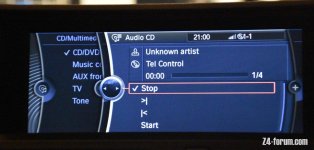
On the iDrive, I select CD/Multimedia, then CD/DVD, Tel Control, Start, and then can play music via bluetooth using the steering wheel controls (after pairing the phone using the factory BT pairing option under 'Telephone'.
 

Attachments

  • BT07s.jpg
    BT07s.jpg
    89.7 KB · Views: 1,113
Ok well I'm totally confuddled now :lol:
Yeah well the MMI will still work and I'd go with my original idea then, try it without the AUX plugged in and if it doesn't work then you'll have to run it and plug it into the socket in the armrest. :thumbsup:
 
@AnibisZed Related question. In your install video your idrive controller looks different/bigger. What is this as I think I’d prefer a larger one, after using a bigger controller in a friends car.
Cheers!
Rob
 
pariahrob said:
@AnibisZed Related question. In your install video your idrive controller looks different/bigger. What is this as I think I’d prefer a larger one, after using a bigger controller in a friends car.
Cheers!
Rob
What can I say, I like to have a big knob!! :rofl:
It's a lager one that slips over the original one, available from eBay, alliexpress, Amazon etc It illuminates the same as the original as well.
 
Haha. Good to know.
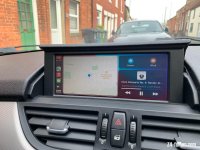
Thanks to you my MMI install went smoothly today. All works well and zero lag when switching to pdc. Mine seems to startup on CarPlay so that’s good.
Only thing to fix is to make it so Siri doesn’t shout at me. Currently way louder than music. But this thread has tips for that too.
Thanks Dave!
 

Attachments

  • 2687E714-F2EC-42F4-BE3C-01227E047FD0.jpeg
    2687E714-F2EC-42F4-BE3C-01227E047FD0.jpeg
    135.7 KB · Views: 1,559
Here's a funny one, to start the week off.

Popped out at the weekend to drop Mother's day gift off - slightly annoyed to find the MMI box all working fine (including answering back to me as normal) EXCEPT that music was not playing; the time on each track was ticking up, but no sound coming out. Tutted to myself and assumed a reboot would probably sort it next time I got in the car.

Arrived home, parked the car up, entered the house - to find music playing from the Alexa device we have in the kitchen. I was streaming TO this device from my phone before leaving in the car, so I obviously had not broken the connection before Android Auto fired up in the car and started playing again.

I'm sure the dog found in entertaining, albeit wondering why tracks kept skipping on him :rofl:
 
I get this with Spotify, you have to click an icon on the phone to tell Spotify to switch devices
 
AnubisZed said:
pariahrob said:
@AnibisZed Related question. In your install video your idrive controller looks different/bigger. What is this as I think I’d prefer a larger one, after using a bigger controller in a friends car.
Cheers!
Rob
What can I say, I like to have a big knob!! :rofl:
It's a lager one that slips over the original one, available from eBay, alliexpress, Amazon etc It illuminates the same as the original as well.

Hi Dave, have sent you a PM (not about your knob). :rofl:

Damian
 
AnubisZed said:
pariahrob said:
@AnibisZed Related question. In your install video your idrive controller looks different/bigger. What is this as I think I’d prefer a larger one, after using a bigger controller in a friends car.
Cheers!
Rob
What can I say, I like to have a big knob!! :rofl:
It's a lager one that slips over the original one, available from eBay, alliexpress, Amazon etc It illuminates the same as the original as well.

Hi Dave, have sent you a PM (not about your knob). :rofl:

Damian
 
Damo said:
AnubisZed said:
pariahrob said:
@AnibisZed Related question. In your install video your idrive controller looks different/bigger. What is this as I think I’d prefer a larger one, after using a bigger controller in a friends car.
Cheers!
Rob
What can I say, I like to have a big knob!! :rofl:
It's a lager one that slips over the original one, available from eBay, alliexpress, Amazon etc It illuminates the same as the original as well.

Hi Dave, have sent you a PM (not about your knob). :rofl:

Damian
Replied :thumbsup:
 
Updated my firmware yesterday, there is no information regarding updates on the vender's web page, just have to ask.
In fairness, their response to questions is very good :thumbsup:
Went from V1.1.2 to V1.1.5, no idea what differences there are yet.
 
Haven't seen much written about negative issues found with these units, but I have a couple of niggles.
Occasionally when I put my fob in the hole, the screen doesn't open. Not so often but enough to p*ss me off. Is this MMI related or does that happen sometimes anyway.
Second thing I tried earlier, using the audio with ignition off. I pushed the button on the CD/DVD player, screen opened but it was red. Switched off and tried again, this time it was OK, opened to the iDrive audio menu.

I'll contact the vendor about this, but wondered have you all found anything untoward.

Edit: Tried a few more times, usually it opens on ignition, when it didn't I just left it and after a delay of maybe 10~15 seconds it opened.
I'll keep an eye on it. Some web searching tells me I'm not the only one to have screen opening or closing issues
 
I've noticed a couple of similar things. Mine does seem to leave the screen 'open' quite regularly when I shut off the car, which it never did prior to installing the MMI. The screen will then shut when the car cuts power to everything (ciggy lighter, modules etc etc) about 40 seconds after locking. Not sure if I've noticed the screen NOT opening when inserting my fob - it wouldn't bother me anyway, as I'd actually prefer it if the car didn't do that :)

(do you have one of your shortcut buttons mapped to open/shut the screen? I have button '8' set to do this and use it all the time - unless my 8 year old is in the car who insists I do it using the car's voice control, which is rubbish 95% of the time but does seem to consistently understand this command!)

A few times I've noticed the screen is coloured all green or red too - again, I just assume it is still receiving a video signal from the MMI box which at that point is carrying no content.

For £160 I can forgive these minor quirks really (still in lockdown here though, so the car is being used very infrequently)
 
Timmyboybunter said:
For £160 I can forgive these minor quirks really

I thought that too :D

So, screen has stayed open or stayed closed a few times, so far I have just removed and re-inserted the fob which usually rectifies the issue.
I tested again after I posted, inserted the fob about 10 times. 8 it opened immediately, twice not, but this time I waited and after some delay bingo. As I mentioned maybe 10~15 seconds. I haven't tried that with the not closing situation though.

The red screen was only when using audio with ignition off, which I never usually do anyway. Again it was just sporadic.

I have set one of my buttons to open/close on demand, I'll try that next time.
 
Roddy the issues you have mentioned definitely are related to the Mmi box.

I never had any kind of issues prior to installing the Mmi box but since installing on the odd occasions have similar issues screen not opening or closing and having a red screen etc. But they don't happen that often at all and is easily rectified.

None of those issues really bother me since they don't occur that often at all and the benefits of the box far outweigh any negatives.
 
Silverstar said:
Roddy the issues you have mentioned definitely are related to the Mmi box.

Thanks for that confirmation. Vendor has been made aware and asked for video of the problems if possible so I assume they are willing to investigate.
 
Back
Top Bottom