MMI installation - question for the master

Silverstar said:
In my case I do have bluetooth and I needed to connect the MMi box to the AUX port to get sound. I tried without the AUX connection but there was no sound.
And that's the normal way it should be as the majority of the iDrive do have Bluetooth so will have the MOST optical. There are very few that won't have it so not many will be configured to have it directly to the quadlock :thumbsup:
 
A little update concerning the new style MMI boxes that are now being supplied.
I'm told that amongst the new way to connect it that they don't come with the adaptor loom to tap into your existing microphone. So I've put my thinking cap on and come up with this (** please note I do need to actually test this to make sure 100% that it will actually work but I'm very confident!)

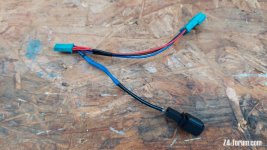
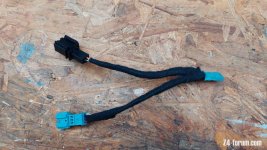
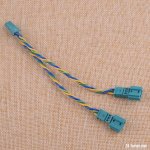
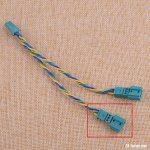
So you need to buy one of these 3 pol Y looms from eBay...
rrrrrrr.jpg

Now you need the male and one of the female plugs to connect with your existing microphone plug.
You then have an option as to what to do with the other end...
1) You can cut off the black plug on the loom...
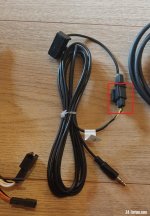
etyreytryy-2.jpg
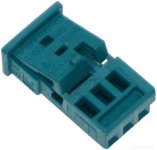
and then buy one of these 3pol plugs (with new crimps)...
kkkkkkk.jpg
and attach it so it just plugs into the new Y loom. Yellow wire to pin 1 and black wire to pin 2. Pin 3 is not used.

Or

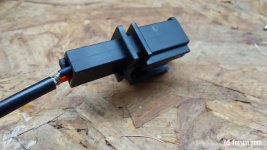
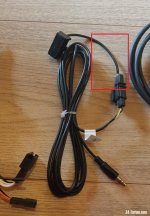
2) Cut a length of the supplied microphone wire (with the black plug attached)...
etyreytryy-3.jpg
cut off one of the female plugs on the new Y loom...
rrrrrrr-1.jpg
and then solder the white wire to the wire from pin 1 of the Y loom (Yellow in these photos but colours may vary depending on supplier) and the braid to the wire from pin 2 (again colours may change but green with yellow stripe here). Don't forget to heatshrink your soldering.
Pin 3 wire is not used in this instance.

So you should now have an adaptor loom for your existing microphone. In some options there can be two microphones, I chose the left one as this is the one that goes to the Combox or MULF and is used for Bluetooth calls etc.

I'm going to make one of these up with the bits and pieces I have laying around and test it on my (older) MMI box I have installed using method 2 above, that way I can use the black plug that fits the supplied microphone (with the older boxes you had two choices!).
I'll report back just as soon as I can.
 
UPDATE**
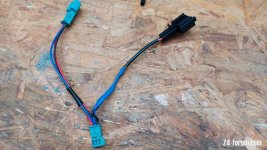
OK so I've made up a test microphone piggy-back loom and it works as expected :thumbsup:

I decided to use the microphone plug and length of cable with a spare Y cable I already had, made it up, plugged it in and spoke to Siri with no problem.

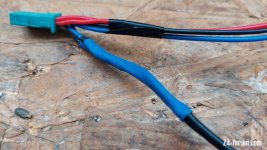
As you can see here the colours of my Y loom are different to those photos above, and I'd previousley already chopped one of the female plugs and some wire off for something else so only had a short piece to work with from the other end where it joins with the male plug and wires from the other female.
20210918_175746.jpg

In this instance the red wire from pin3 is not used so the cut end has just been taped up
20210918_175752.jpg

As you can see from this close up, one of the wires is just a shield braid and this goes to pin2 and the other (red here) goes to pin1
20210918_175818.jpg

This was soldered together and heatshrunk
20210918_175911.jpg

And then I gave it a coat of fibre tape to make it a bit more OE
20210918_180219.jpg

Doing it this way you do destroy the microphone that came with the MMI box but you then gain in that you are using the OE microphone so it all looks factory and neat.

Hope that helps :thumbsup: :driving:
 
Not sure if this has been mentioned
I decided to update my MMI, as usual the vendor provides no information and I rely on another BMW forum for news :headbang:
Then when I contact the vendor, they will supply my needs....

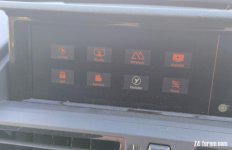
Anyhoo, Andream box, just installed CHL_V1.6.5. Reasonably uneventful except a brief red screen which is always scary.... then I noticed this:

IMG_20220112_101611.jpg

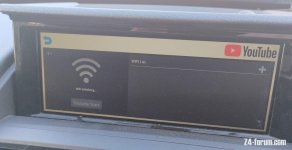
Youtube on the radio? Nah...... So I clicked it. Sure enough, it is the tube of you.
You can see there "Wifi Initializing". It initially searched for wifi and showed a list, my house and the neighbours. Obviously they will be useless when driving, so I assume it will use the phone, if it's wifi then a tethered connection, or it means BT which is already connected.

I don't really need Youtube, and don't want to risk bricking this unit, so I'll just leave it and check out what else maybe new.
One thing, the Exit icon has disappeared which isn't necessary anyway

IMG_20220112_101920.jpg
 
Roddy,
I've checked with my supplier and there is no update for my box so I don't have this option.


EDIT** The rest of this post has been removed as it didn't work :rofl:
 
I've decided Youtube isn't necessary after all, too much faff and I won't watch video while driving anyway, my wife reckons Google maps satellite is dangerous enough!
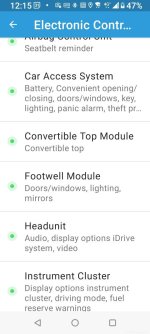
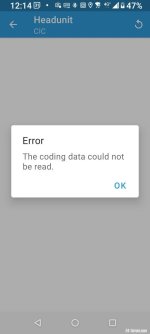
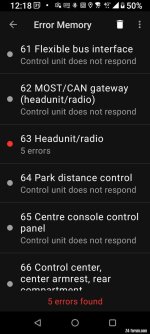
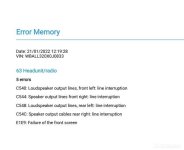
So it's been a while since installation, I haven't really used it much, but finally after a few MMI and Android auto updates I can say it's working well. I played with the sound earlier, and improved it a lot, but there seems to be one remaining issue which isn't really a big problem, coding gizmos can not see the head unit as the MMI is interrupting. I've read a lot about it on another forum, a thread relating to MMI boxes of all flavours currently at 439 pages :lol:

I tested today with Bimmercode: (apologies for big pics)

Screenshot_20220121-121517351.jpg Screenshot_20220121-121452923.jpg

Then Bimmerlink:
Screenshot_20220121-121900386.jpg Codes 21Jan.jpg

There isn't much to be coded on the head unit, so not a big deal, but I have read that an updated MCU may fix it, others have had success.
Anyone else tested for codes after MMI install?
 
Roddy said:
I've decided Youtube isn't necessary after all, too much faff and I won't watch video while driving anyway, my wife reckons Google maps satellite is dangerous enough!
So it's been a while since installation, I haven't really used it much, but finally after a few MMI and Android auto updates I can say it's working well. I played with the sound earlier, and improved it a lot, but there seems to be one remaining issue which isn't really a big problem, coding gizmos can not see the head unit as the MMI is interrupting. I've read a lot about it on another forum, a thread relating to MMI boxes of all flavours currently at 439 pages :lol:

I tested today with Bimmercode: (apologies for big pics)

Screenshot_20220121-121517351.jpg Screenshot_20220121-121452923.jpg

Then Bimmerlink:
Screenshot_20220121-121900386.jpg Codes 21Jan.jpg

There isn't much to be coded on the head unit, so not a big deal, but I have read that an updated MCU may fix it, others have had success.
Anyone else tested for codes after MMI install?

I remember reading somewhere that it maybe necessary to disconnect the MMI box when coding. It obviously must interfere with the signal.
 
This is very true, I've found that if I need to access the CIC then I need to disconnect the MMI first. No biggy really, takes around 5 minutes, but like you say it's not like you need to regularly, so not really a problem.

Alas I can't see there being many more, if any, further updates for the older MMI boxes now :thumbsdown:
 
AnubisZed said:
This is very true, I've found that if I need to access the CIC then I need to disconnect the MMI first. No biggy really, takes around 5 minutes, but like you say it's not like you need to regularly, so not really a problem.

Alas I can't see there being many more, if any, further updates for the older MMI boxes now :thumbsdown:

Not much to code on the head unit, I did code something pre-MMI installation, can't remember what.
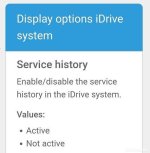
Any idea what this is? It's in the head unit, but I already see service info on my display.
Screenshot_20220121-210102132.jpg

In the unlikely event I need to code, is it just a case of unplugging the MMI above the glove box? Removing the head unit again is not going to happen in 5 minutes!

There seems to be an outstanding MCU update for my Andream, I'll hold off until I know what that will achieve.
 
Roddy said:
....
In the unlikely event I need to code, is it just a case of unplugging the MMI above the glove box? Removing the head unit again is not going to happen in 5 minutes!

There seems to be an outstanding MCU update for my Andream, I'll hold off until I know what that will achieve.
Unplugging the MMI box will give you a red screen only, it will not allow anything to work. You'd need to unplug the T loom and plug the original quadlock connector back into the rear of the headunit.
5 minutes!! Yes, using the plastic trim tool release and remove the surround trim for the headunit, then unscrew the 4 screws holding the headunit in, pull forward and remember to protect your trim with a cloth. For a bit more room, for a manual release the gear surround trim and then "yank" upwards on the gear knob. For an auto, again release the gear surround trim, for the later cars with the 8 speed auto, release the electrical plug to the right of the lever (under the trim) and then yank upwards on the knob.

On the quadlock connector don't forget to replace the MOST fibre optic lines back to the original quadlock.

And yes this is genuinly a 5 minute job, no need to remove anything else at all. :thumbsup:
 
Roddy said:
Quick question... again to AnubisZed.
Got my set up ready to go, just finding time..... The people at Andream suggest the following A# to B#, but I know your setting is with L# to B#, which works. What's the difference?
I've seen several versions of their manual, all different :) and none of them suggest L# to B#. Not doubting your video info at all, just curious.
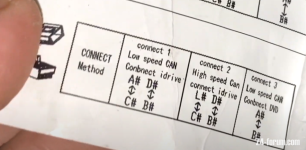
Closer inspection shows A# labelled "Low Can", B# is high Can :? ?


Connector A B.jpg

Choices choices.......

3 methods.jpg

I'm going to drag this up again, I know I settled the connection as A# to B# (Andream advice), and Dave had another connection, but I stumbled on a comment somewhere with this, F30 thread.

In order to be able to read/code CIC, use "connect 1" method in the image below. I was able to read/code the CIC unit once I connected it that way (this is the default method, it should come pre-attached in this configuration I believe)

Couple things to bear in mind.

If your disc drive is DVD compatible (I checked my VIN and it had a S697A code AREA-CODE 1 FOR DVD, Area Code 1 means North America), you can connect via method 3 (connect #A to #B). In essence you won't need to use the idrive harness that comes with the andream unit, however you will lose the ability to read cic module. you method 1 if you do want to read cic unit still
unknown.png

So other models had the same coding CIC issues, this was one solution, i.e connection 1, on F30 models anyway.

Also I recently watched a Bimmertech video of an install of their MMI unit into an E89, and they DO connect to the iDrive harness. This begs the question, if these units are all more of less the same, why didn't we need to connect to C#? If I've forgotten what the answer was, apologies. :oops:
 
Go with whichever works for the Z4. I've seen E9x (3 series) that have the iDrive controller cable connected and it's the same system as in the E89, but I've never seen a successful E89 installation with the same cable, so it's trial and error :thumbsup:
 
Hi Dave

Just upgrading my speakers and was also checking my MMI box as I have been having problems receiving phone calls. If a call comes in I can accept them using the dial/ok but cannot hear anything (via phone or WhatsApp). I had a look at the settings in the original BMW Dashboard and Bluetooth is not connected.
S there a particular setting in either the original dash or MMI settings I can check please?

Also, should the MMI box be able to display any texts sent as they don’t come up on the screen, just an option to cancel or reply.

Many thanks
 
Yoghurt said:
Hi Dave

Just upgrading my speakers and was also checking my MMI box as I have been having problems receiving phone calls. If a call comes in I can accept them using the dial/ok but cannot hear anything (via phone or WhatsApp). I had a look at the settings in the original BMW Dashboard and Bluetooth is not connected.
S there a particular setting in either the original dash or MMI settings I can check please?

Also, should the MMI box be able to display any texts sent as they don’t come up on the screen, just an option to cancel or reply.

Many thanks
There should be a setting in the box settings page (NOT the on screen phone settings) that gives you the option to answer via Android Auto/CarPlay or via the original Bluetooth. To use the Android Auto/CarPlay option then you need the Bluetooth connection between your phone and the mmi. If you use the original Bluetooth option then when you receive a call the mmi "should" switch over to the BMW iDrive Bluetooth calls screen to answer, and then the call will be heard. If it's not switching over then I'd suggest this setting is set to the mmi answer option, but without a Bluetooth connection for either being established.

As for messages, yes these should display. On Android Auto they can be found by going to the Bell icon, and they can be displayed and read or read out via Google Text to Speach*. And on CarPlay you'll find messages in the Messages app icon.
* Facebook Messenger messages no longer are recognised by Android Auto, this is a worldwide issue with all mmi boxes and all phones and has been ongoing for quite a while now with no inclination as to whether there will ever be a resolution to it!
 
Having read through this whole thread, I was left wondering if all this applied to the Mr12volt product which seems to have a really good spec and features OEM microphone integration as well as fibre optic audio…? Dave, I thought you had swapped over to this box these days ?
 
simnew said:
Having read through this whole thread, I was left wondering if all this applied to the Mr12volt product which seems to have a really good spec and features OEM microphone integration as well as fibre optic audio…? Dave, I thought you had swapped over to this box these days ?
I do indeed now have the 1st gen Mr12volt mmi installed :thumbsup: this post was originally started 3 years ago :driving:
 
I am trying to summon up the courage to install the new mr12volt box with OEM mic support and I have a few questions before I dive in.

Where does the cable from the car's microphone go so I can plug in the mic Y cable?

If I mount the MMI box behind the air vents, do I still need to drop the glove box for access?

I am thinking of getting one of these https://www.amazon.co.uk/LANMU-Exte...prefix=sd+card+extension+cable,aps,135&sr=8-6 SD slot extender so that if there is a firmware update, I don't need to get at the box.
 
DonDon said:
SD slot extender so that if there is a firmware update, I don't need to get at the box.

Speaking of firmware updates, since I installed my older style MMI box some four years ago I have not updated it once. Everything seems to work fine apart from the odd red screen on shut down but that corrects itself in a few seconds. So another question for the master, is there any real need to update the firmware?
 
Not all of the updates make any real difference. I've not updated mine for over a year, and it works perfectly fine :thumbsup:

And yes I bought one of those memory card extenders, but I never used it. One as I couldn't find a suitable place, but more importantly is that you need to unplug the box for the update process to work, so you still need to get at the box.

As for the position of the microphone, at 20:40 on this video I show the microphone position and how to access it...
https://www.youtube.com/watch?v=jY-pSPUz0IU&t=1240s
 
Back
Top Bottom