iPad or Laptop

I had a 17" at uni, I thought it was a good desktop replacement, I was wrong complete pain. Had it a year and sold it. Heavy, cumbersome needed a huge bag to take it anywhere and when I did the 2 mile walk to uni the bag was so big you would catch it on things bang the laptop in the process made me look like an idiot was hardly discrete. When ever I used it at a desk as a serious machine to do some work I thought 17" was too small and attached it to a 23" cinema display defeating the point. It was too big to use in bed, to big to be portable, then even tho it was massive the specs were no better than the 15" and that is more portable.

Better off having a portable 11/13 and a desktop if your serious. Otherwise the 13" and 15" have it covered for an all in one, they have a full sized keyboard and the screen res is really high which is why Apple binned it, no pros bought them and they were more expensive than the desktops.

18756_521556187913_6278703_n.jpg
 
Hmmm, are you technical? I am and my iPad (a gift from a supplier) frustrates me. It's good for surfing the web but trying to get it to do non standard stuff can be a pain. For example all my music is on a DNLA enabled NAS box, finding the right software to get the music from this to the pad without using iTunes was a nightmare. Finally sorted it but my music is not stord in the iTunes libaray. However my biggest issues with it is the apple buy in, iTunes, iCloud, Apps etc etc. Once you buy into apple you are a little stuck if you want to move away.

Mrs Sketchley has just brought herslef an ASUS Andriod (Ice cream sandwich) tabet it's half the cost of the iPad and much nicer device to use. Plus not corporate tie in like there is with apple and much nicer integration with the home setup.

My advice is unless you are alread a fully paid up member of the apple services like iTunes stay away. Furthermore if you have an Android phone and iPad it'll drive you bonkers.
 
I've got a 27" iMac upstairs as our main desktop computer, and also a 17" MacBook Pro which I use downstairs, mainly for browsing/email etc. We've both got iPads which are by the bed for night-time browsing.

I got the MBP with the matt screen as I wanted to edit photo's on it, but I never really did much. Took it to Florida once and bugger me, its heavy! Had it in a laptop rucksack thing (actually a BMW one) and just over 1 shoulder....crushed a nerve and in pain for weeks!

Have often thought of getting one of the new Air's, but would've thought the 11" too small, so your comments are interesting. I've only ever seen them in the store, so not really a good test.

The iMac hardly gets used really. Used to leave it on all the time, but turn it off now due to wasting power (like not used for weeks at a time!).
 
original guvnor said:
My MBA is only 11". The screen is about the same size as an iPad. I love mine. You won't get a crushed nerve carrying it either :)

+1 I use it for my pro work and play. Weighs nothing and I do a lot of quick editing on it. Never use the iPad now. But for my printing I use the Pro with the 2 matte 23" screens its easier to colour correct.

I would love a matt screen again on a laptop but you cant get away from the glossy now, and TBH doesn't matter if you have a matte screen if you dont do colour correct work, (although nice to see in the sunlight) the only way to get the best out of it is calibrating both your screen and printer and you need a getrag macbeth which are £1000 this calibrates each type of media to the ink you use which matches a screen profile you create using the screen calibrator. Complete pain I use about 20 different paper weights and finishes and you have to print out a colour chart of each and scan hundreds of bars so the software can create profiles for media type. Took me the best part of 2 days to do all of mine. Although some manufacturers of paper do make it easier I find the profiles aren't perfect and are slightly out worth doing it yourself.
 
I do have colour calibrating equipment, forget what its called now, but it came from colourconfidence.com. Its the bit that dangles in front of the screen etc. Also bought a colour accurate monitor at the price of about £900 that I no longer use. Never used it on the macs though, think I need an upgrade. Did go through a process of calibrating the printer as well when I was pissed off about prints not matching screen output etc.

Never did the camera though.

To be honest, I gave up. I hardly print now, so have let it slip.
 
Well yes calibrating your screen is only half the game. Basically it creates a neutral value for your screen that is used as a baseline to profile the printer, buying a colour correct screen usually has a larger gamut and a colour profiler built in which keeps the screen calibrated automatically with changing light and ambiance in the room, instead of manually creating a profile every month.

The other half is calibrating the ink your printer uses, if you use the same system which I do (Getrag Macbeth I dont think they make them now but it was Eye one) It creates a profile for the media your using by using the neutral profile of your monitor. So when you are editing you can proof the colours you select your paper type and your screen will produce a pretty accurate preview, so you can edit to output.

For example if your using Perma Jet or Illford stocks you might have a gloss, semi gloss, oyster matte ect and each one has a different weight from say 200-350gsm each one needs profiling, because each has a specific finish and each one requires a different amount of ink, and each one will render the same colour differently due to its finish.

You can download the profiles from the website for that paper which are made by the manufacturer but they wont perfectly match the profile your screen calibration has set. So worth doing them yourself the difference is only small but if your really anal then its worth it.

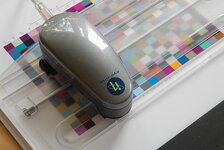
Anyway so you print a colour checker chart off your printer with the settings specified by your paper, then you place the paper in a template and you have a scanner mounted on top which you move like a guillotine across the paper, it scans each colour and then creates a profile which takes into account the ink you use and the paper type. Once you have a profiled screen and each paper type your colour is then in sync and your good to go.

This shows the template and the scanner that goes across the page.
437015748_c0f8188714.jpg

GretagMacbeth_EyeOne.jpg


i1pp_w1.jpg


Open up your document in PS, go to View ---> proof set up ---> Custom ---> then click device to simulate (which is your profile for the paper type) select your named profile eg 300GSM Permajet Oyster then click the simulate paper colour and simulate black ink check boxes. That will create the simulation of what it will look like when printed.

Edit the image to your taste.

File ---> Print

In the colour management you need to change the colour handling to Photoshop manages colour, then change the profile to the paper type your using (aka the profile you made)

Then depending on what printers you use you have to change the print colour and paper settings. So you turn off all the printers colour management because your profile has created it for you. Then set up your paper, so usually I would save out a preset for each. You set the paper type in the drop box to what ever your paper instructions tells you (My PermaJet Oyster tells me I have to select Premium semi gloss) This tells the printer how much ink to apply to the media. Then you set the DPI usually the highest 1440. Then print and it should come out as you see.

Just skimmed the surface but gives you an idea of how I set mine up. I make lots of prints for clients and my own personal prints so need to know what I create I can output correctly.

Obviously this is pretty intense, and not for the weekend warrior and it takes a long time to set up. But once done you can use the presets and it takes no time to make perfect prints. But is the best way to create a home lab that will be 99% colour correct. Some of the papers that I use like Illford stocks are £100 for 25 sheets so wasting is costly. But I love printing it was one of my majors at uni, my grandad also was a cold metal printer. I oversee all the printing at the newspaper I work for. We do loads of commercial printing from 50 to 100s thouands as well as fine art prints etc.

The print press we use at the Cumberland News has 8 towers which are a million each, prints our newspaper at 30,000 an hour of broadsheet between 40-60 pages. Its an amazing process. All the pages are simulated first like above then the plates made and then the machine starts chugging and it is quite a spectacle to watch.
 
Wow! Thanks for the write up. Like I said, I gave up. I set it up and then wouldn't print for ages, so would forget how to set the printer etc. Too complicated for me unless I got really involved, and that in turn stressed me out. But if you do it all the time, then I guess it becomes easier.
 
No probs :thumbsup:

Ye thats it, I certainly wouldn't be doing this for the odd print. Also I have access to all the equipment through work which means everything accessible no chance I would spend £1000 on printer profiling. Cheaper to have your prints done by a lab!

That said it feels really good after all of it for a perfect print. I have some Ilford baryta gloss paper with metal in it which creates this incredible shine the prints look like real life.

http://www.ilford.com/en/products/photo-inkjet/galerie-prestige/gold-fibre-silk/
 
kevinmarkwhite said:
I've got a 27" iMac upstairs as our main desktop computer, and also a 17" MacBook Pro which I use downstairs, mainly for browsing/email etc. We've both got iPads which are by the bed for night-time browsing
I guess it's an age thing
I'm typing this upstairs on my 27' iMac which I adore.
It's easy to read with the big display and magnified fonts.
Nobody else uses it much.
My wife seems to have a surgical connection to her iPadmini and the "kids" (both in their 20s) are permanently harnessed to iPhones.
I find the iPhone screen hurts my eyes so I tend to use it more as a phone. How weird is that?

I take other peoples' points about iTunes and Apple software but AFAIK you don't have to be paid up to use iTunes.
Transferring files can be awkward but Dropbox is effective and works between multiple devices.
 
I just specced up Toms Air on the Apple site, cos I'm going to Exeter tomorrow which has an Apple store.....

Luckily, its out of my price range (I'm a dreamer in toooooo much debt) so I'm safe. Although the wife does have 3 credit cards which (at the moment) all have £0 balance!!!!!

I also suspect its a build to order, due to the better processor and increased SSD etc, so thats another safety buffer!

Although I will be going in and spending some more time with the 11 inch version.
 
Titan said:
kevinmarkwhite said:
I've got a 27" iMac upstairs as our main desktop computer, and also a 17" MacBook Pro which I use downstairs, mainly for browsing/email etc. We've both got iPads which are by the bed for night-time browsing
I guess it's an age thing
I'm typing this upstairs on my 27' iMac which I adore.
It's easy to read with the big display and magnified fonts.
Nobody else uses it much.
My wife seems to have a surgical connection to her iPadmini and the "kids" (both in their 20s) are permanently harnessed to iPhones.
I find the iPhone screen hurts my eyes so I tend to use it more as a phone. How weird is that?

I take other peoples' points about iTunes and Apple software but AFAIK you don't have to be paid up to use iTunes.
Transferring files can be awkward but Dropbox is effective and works between multiple devices.

Not sure. We used to have PC's (I'm an IT engineer and work with PC's all day) but I got pissed off having to rebuild it all the time and fancied trying Apple. I did a course, thinking it would teach me about Macs....all it did was introduce me to word processing on a Mac - s**t that I'd learnt 20years earlier! So I ummed and arghed and this was the time they introduced the unibody design. I talked myself out of it and went to Florida instead!

Then, about 6 months later the bug came back, so rather than going in with a low spec machine to "test the water", I went for the top spec 17" matte screen MBP.

We still had the PC upstairs, but eventually my wife started using the MBP and got on with it, so we also got the iMac. However, she hates me spending hours upstairs whilst she's downstairs so I use it less and less. The MBP does everything I need, apart from the portability thing (see my earlier comments about its weight!).

So when the iPad came out, I didn't initially see the point - sort of halfway house between a smartphone and a laptop. Then I tried one and was hooked (Apple are like drug pushers!). They are so easy to use and portable, although ours never leave the house.

Basically, wasted a lot of money on kit because it was nice and shiny! I still don't understand OSX like I do XP. Just moving to Win7 at work (behind the times, I know!) But I can get by.

I find the display (resolution) on the MBP too small at times, but don't like to lower it cos then things are too big!
 
kevinmarkwhite said:
I just specced up Toms Air on the Apple site, cos I'm going to Exeter tomorrow which has an Apple store.....

Luckily, its out of my price range (I'm a dreamer in toooooo much debt) so I'm safe. Although the wife does have 3 credit cards which (at the moment) all have £0 balance!!!!!

I also suspect its a build to order, due to the better processor and increased SSD etc, so thats another safety buffer!

Although I will be going in and spending some more time with the 11 inch version.

Theres no need to spec it up to what mine is for day to day the standard spec is more than enough. I bought it to that spec because I want it to last 3-4 years and because I use it for work and needed to be able to process my 5DMKIII raw files which are quite intense. My machines get hammered Had 3 batteries on my last Macbook all had over 1500 cycles, which is probably why the logic board failed too much use.
 
Hi guys,

Thanks for the help and suggestions. We're switching to iPhones on our contracts this year and the iPad does seem like a lot of duplication with little extra functionality.

However have just been looking at the 13" MacBook Air and this looks the dogs for what I need. It has the USB ports and compatibility with Windows programs. Looks super fast and would sit alongside my desktop until it dies and ultimately replace it. I also think that with icloud etc it would perform well with the phones.

Specced up memory and processor it comes in at £1367. Is it that good and will I reap the benefits over a laptop?
 
Worth every penny, it is a fully fledged laptop.

But the standard spec with 8gb ram will probably do at £1029, or the upgraded spec with the 256 at £1209. The standard processor turbo boosts to 2.6ghz and benches over 7500 more than enough :thumbsup:

The 1.7 is overkill unless you really need it for processor intensive applications, reason I got it like I said is because I mine for work. Go have a look at them tho before you buy honestly the 13" feels vast compared to the 11 and now ive had it for about 2 months theres nothing more I would want from it. Its amazing. Battery life is insane, super fast its mind boggling how you get this much performance from such a small machine, best product on the market if you ask me.

Worth a watch

http://www.youtube.com/watch?v=o0xQLtwJz8U
 
I use an x-rite color munki for colour profiling and they do a bunch of free webinars on the subject if you're interested.

http://www.xrite.com/

On the Mac vs Windows thing, I offered my daughter a Macbook Air for school and she declined in favour of a Lenovo Yoga. It will be interesting to see how she get's on. Win8 is not my favourite OS
 
tomscott said:
kevinmarkwhite said:
I just specced up Toms Air on the Apple site, cos I'm going to Exeter tomorrow which has an Apple store.....

Luckily, its out of my price range (I'm a dreamer in toooooo much debt) so I'm safe. Although the wife does have 3 credit cards which (at the moment) all have £0 balance!!!!!

I also suspect its a build to order, due to the better processor and increased SSD etc, so thats another safety buffer!

Although I will be going in and spending some more time with the 11 inch version.

Theres no need to spec it up to what mine is for day to day the standard spec is more than enough. I bought it to that spec because I want it to last 3-4 years and because I use it for work and needed to be able to process my 5DMKIII raw files which are quite intense. My machines get hammered Had 3 batteries on my last Macbook all had over 1500 cycles, which is probably why the logic board failed too much use.

Ah-ha....but being a laptop, and therefore not really "upgradeable" I like to buy the top spec, to future proof it as much as possible. Like I said though...I'm a dreamer!
 
kevinmarkwhite said:
tomscott said:
kevinmarkwhite said:
I just specced up Toms Air on the Apple site, cos I'm going to Exeter tomorrow which has an Apple store.....

Luckily, its out of my price range (I'm a dreamer in toooooo much debt) so I'm safe. Although the wife does have 3 credit cards which (at the moment) all have £0 balance!!!!!

I also suspect its a build to order, due to the better processor and increased SSD etc, so thats another safety buffer!

Although I will be going in and spending some more time with the 11 inch version.

Theres no need to spec it up to what mine is for day to day the standard spec is more than enough. I bought it to that spec because I want it to last 3-4 years and because I use it for work and needed to be able to process my 5DMKIII raw files which are quite intense. My machines get hammered Had 3 batteries on my last Macbook all had over 1500 cycles, which is probably why the logic board failed too much use.

Ah-ha....but being a laptop, and therefore not really "upgradeable" I like to buy the top spec, to future proof it as much as possible. Like I said though...I'm a dreamer!

Yep my thoughts exactly. Although my desktop is 9 years old so no wonder its struggling!!!

Sent from some bloody gadget using Tapatalk
 
TBH it isnt the processor thats the bottleneck in modern computing its the HDD and the macbook air has the latest and fastest PCIX SSD technology as standard and was the first laptop to feature it. In day to day you probably wont notice the processor upgrade, but the PCIX will blow you away. Mine boots and shuts down in less than a second, insane.

Put an SSD in any modern computer and it will turn it into a different machine completely.
 
I'm really up for the Macbook air. Yes it's more than I was expecting to pay but I'm old enough to know that you get what you pay for. Hence the Zed rather than a Fiesta and a nice all carbon bike.
Looked at the reviews on Youtube and read some too. It looks exactly what I'd want although I'm fairly sure I wouldn't bother with Windows.....
I'd keep the standard processor and bump up the RAM. Not sure about increasing storage as in all honesty you could whack in an SD card or pen drive to increase that although it would slow performance slightly surely?
Also do I need the add on program licenses? £14 for the programs is cheap but are there any free apps that I could use which are as good? The advantage of paying is that I know work related stuff (all use Microsoft) could be opened and worked on. These are preinstalled and seem good value. Any thoughts?


Sent from some bloody gadget using Tapatalk
 
Back
Top Bottom