
You are using an out of date browser. It may not display this or other websites correctly.
You should upgrade or use an alternative browser.
You should upgrade or use an alternative browser.
E89 Android iDrive Screen Group Buy - NOW CLOSED
- Thread starter AnubisZed
- Start date


they must have updated it with the new processor and bigger ram upgrades.Lzar16 said:Built in

Do you still have the IDrive controller? I've sent you a PMvld said:Google Maps works great for me in offline mode. Just downloaded a large area, and I can now search any address or point of interest around.
I know I said in an earlier post that I would sell my iDrivey controller. I changed my mind, and not because I started to like it, but because it's so bad somebody might think I sold him a defective one:
[youtube]https://youtu.be/-hP0DInu7bk[/youtube]
How do we get our hands on the firmware updates?
Contact your vendor and ask them.Gary Petit said:How do we get our hands on the firmware updates?
I'm aware of an update, but the update is being updated as we speak so I'm awaiting the replacement update..... if that makes sense.
I'm running the update and basically there are a few tweaks and the new ID7 UI, but to be honest it's not very good. I personally think they have rushed the new UI just to be out there with it, but should have spent more time making it flow better, it's usable but I'm still thinking of going back to ID6.
Once I know anything concrete then I'll let you all know.
Dave 2 dogs
Senior member
Hi Dave
Is there a way to get the speedo dials up on my normal screen? Or is it something you can only do on android screen?
Is there a way to get the speedo dials up on my normal screen? Or is it something you can only do on android screen?
Dave 2 dogs said:Hi Dave
Is there a way to get the speedo dials up on my normal screen? Or is it something you can only do on android screen?
Hi Dave,
I assume you mean this screen...
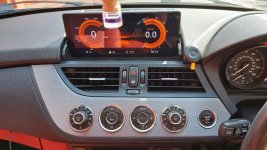
And by normal screen I assume you mean the iDrive pop up screen, well the answer is no, it's part of the Android set up.
Dave 2 dogs
Senior member
Thanks dave ,
So now the bulk buy is closed , where would I get something like that? Brought and fitted? Car audio shop ?
So now the bulk buy is closed , where would I get something like that? Brought and fitted? Car audio shop ?
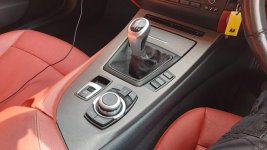
I'll see what price they'll still do from the factory for you. Would you want the iDrive controller?Dave 2 dogs said:Thanks dave ,
So now the bulk buy is closed , where would I get something like that? Brought and fitted? Car audio shop ?
Attachments
Dave 2 dogs
Senior member
Thanks Dave
Better leave it for now, I’m on the brink of ordering a re map, better not take the piss too much, you know what the girls get like!!! Was just dipping my toe in to see what options I have for later, thanks for the offer though
Better leave it for now, I’m on the brink of ordering a re map, better not take the piss too much, you know what the girls get like!!! Was just dipping my toe in to see what options I have for later, thanks for the offer though
Not a problemDave 2 dogs said:Thanks Dave
Better leave it for now, I’m on the brink of ordering a re map, better not take the piss too much, you know what the girls get like!!! Was just dipping my toe in to see what options I have for later, thanks for the offer though
TheThingIs
Member
Hey Dave, any news on the latest firmware updates?
Hi Dave, thanks for your video's I’ve watched on YT, especially android idrive screen for my wife’s Z. Only been a member for a few days so still finding my way around.
You’re obviously a guy who knows what he’s talking about, having watched the vids and read the many pages on this forum, I’ve decided to go for it and fit the unit. I probably wouldn’t have undertaken the fitment without the guidance and great support you provide. Great work Dave.
I’m waiting delivery of the kit which should be here next week.
Just one question regarding whether or not to disconnect the battery prior as I noticed in the video tones were activated when undoing harnesses from switches etc. Is there any risk of fault codes arriving from this when it’s all back together?
Steve
You’re obviously a guy who knows what he’s talking about, having watched the vids and read the many pages on this forum, I’ve decided to go for it and fit the unit. I probably wouldn’t have undertaken the fitment without the guidance and great support you provide. Great work Dave.
I’m waiting delivery of the kit which should be here next week.
Just one question regarding whether or not to disconnect the battery prior as I noticed in the video tones were activated when undoing harnesses from switches etc. Is there any risk of fault codes arriving from this when it’s all back together?
Steve
Hi Steve,Smurfy said:Hi Dave, thanks for your video's I’ve watched on YT, especially android idrive screen for my wife’s Z. Only been a member for a few days so still finding my way around.
You’re obviously a guy who knows what he’s talking about, having watched the vids and read the many pages on this forum, I’ve decided to go for it and fit the unit. I probably wouldn’t have undertaken the fitment without the guidance and great support you provide. Great work Dave.
I’m waiting delivery of the kit which should be here next week.
Just one question regarding whether or not to disconnect the battery prior as I noticed in the video tones were activated when undoing harnesses from switches etc. Is there any risk of fault codes arriving from this when it’s all back together?
Steve
Thank you, glad you liked it
Nothing that's disconnected with this install will raise any fault codes. Nothing wrong with disconnecting the battery though, to be fair shouldn't really do any electrical work on the car with it connected.
Best of luck and take your time.
Dave
Hi Dave, I’m well into the taking out out the panels etc ready to start the install, should be here tomorrow (so fed ex say).
Unless I’ve dreamt it! I’ve seen somewhere but can’t find again, a post where adding an aftermarket DAB unit that connects to the USB’s in the glovebox that come from the Android unit. Is this still the best unit you’ve come across or found better since?
If still your recommendation, thought I’d add to system whilst I’m doing the install. Big thanks again for the great vids.
Regards
Steve
Unless I’ve dreamt it! I’ve seen somewhere but can’t find again, a post where adding an aftermarket DAB unit that connects to the USB’s in the glovebox that come from the Android unit. Is this still the best unit you’ve come across or found better since?
If still your recommendation, thought I’d add to system whilst I’m doing the install. Big thanks again for the great vids.
Regards
Steve
Hi Steve,
Here is my video on fitting the DAB add-on for the Android screen....
https://youtu.be/dc0FoLMNY5w
Its all down to how good is the reception in your area as I'd probably use the Tune In Radio app, but again it depends if you have phone coverage at the time.
Here is my video on fitting the DAB add-on for the Android screen....
https://youtu.be/dc0FoLMNY5w
Its all down to how good is the reception in your area as I'd probably use the Tune In Radio app, but again it depends if you have phone coverage at the time.