windows 10

ihadablackdog said:
Stevo1987 said:
In 99.9 % of cases it is user error.
I beg to differ.

Ok, that might play a part in it, but how can it be user error if everything works before the update and then following the update, doing things the same way gives different results?

And in our instance, it was intermittent and only affected those with that update. Not 100% conclusive as to the cause but considering they use login scripts, it couldn’t be user error.

The only user error was mine for not blocking it in WSUS....which I did soon after!
Oops, I forgot to do this.... :poke: :poke: :D
 
Oh dear the computer is begging me to update to 2004 every time I power down.

Easy enough to ignore but I would prefer a permanent fix. I have a bug report in with Microsoft, awaiting an answer.
 
You have got to update it, what is life without risk? :o You can reduce that risk by backing up your present system files, so that you can restore them later if you wish. I have attached some screenshots on how to do this. :D

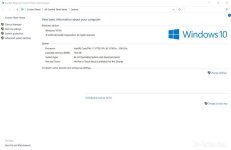
Go to screenshot WINDOW1 and select System Protection (on the left menu)
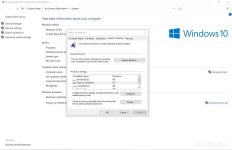
On screenshot WINDOW2 highlight your system drive (usually C) and select Configure
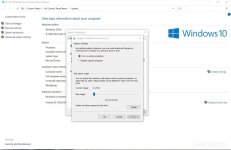
On screenshot WINDOW3 select turn on system protection and select OK
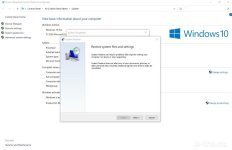
On screenshot WINDOW4 click Next.

If you want to restore system files select system restore on screenshot WINDOWS2.

Window1.jpg
Window2.jpg
Window3.jpg
Window4.jpg
 
BeeEmm said:
I have noticed that the screenshots appear in reverse order on here, so look at the file names, WINDOW1 etc.
If you click on place inline when you attach them, it should keep the running order :thumbsup:
 
No issues with 20H2 install on my Dell XPS, I use Firefox as main browser and occasionally Edge with Norton 360 with Secure VPN and everything running fine :thumbsup:

Tim.
 
Stevo1987 said:
ihadablackdog said:
Stevo1987 said:
In 99.9 % of cases it is user error.
I beg to differ.

Ok, that might play a part in it, but how can it be user error if everything works before the update and then following the update, doing things the same way gives different results?

And in our instance, it was intermittent and only affected those with that update. Not 100% conclusive as to the cause but considering they use login scripts, it couldn’t be user error.

The only user error was mine for not blocking it in WSUS....which I did soon after!
Oops, I forgot to do this.... :poke: :poke: :D

:D
 
TitanTim said:
No issues with 20H2 install on my Dell XPS, I use Firefox as main browser and occasionally Edge with Norton 360 with Secure VPN and everything running fine :thumbsup:

Tim.

Still seems to have intermittently fcuked up SMB1 shares.....probably done on purpose to make people move away from SMB1, which isn't a bad idea, just a bugger when you're the one thats got to sort it :rofl:
 
Finally sorted it.

Microsoft are aware of the problem and are going to fix it (they say!). Anyhow details are scant but it's caused by certain tasks running in the background which conflict with Windows 10 2004. They give a fix which involves running a script through Powershell to identify any such tasks, then it's a matter of disabling these tasks in Task Scheduler. In my case it was an HP task which relates to the HP Envy printer that I have. I don't know what it's purpose was but my passwords are now restored, AND my printer still works :D

If anyone gets a similar problem I can go into more detail.
 
Back
Top Bottom