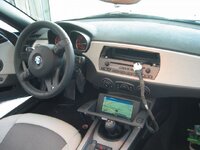
Sat Nav Retrofit Fitting Details

... the system is now tested and works as it should :)

z4-foto_1504603_15277657_17781698.jpg

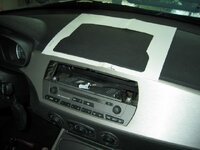
So just "one more hole to do" and we're ready to enjoy the Z4 on the road again

z4-foto_1504603_15277657_17781700.jpg

I hope that it's going to take me less than 20 months, a week or so would be more than great :D
 
Remember to stuff a towel on top of that radio when you make the hole.

srhutch is a bit slow .... that is why he was looking at a 3 series rep mobile to replace his Z :poke:
 
Glad to see you got it working! With regards to the cutting of the dash...it looks like you have the factory cut-out, so that may prove to be a bit easier. I did as srhutch had done, and I had made my template from cardboard. What I can say is make sure to focus on centering (side-to-side) the template based on the two tabs located on the underside of the dash that will ultimately be wear you screw the display on to. It doesn't appear that the cut-out has an indicator as to where the tabs are, so what you can do is insert your display into the cut-out, and mark the cut-out with the location so that you can ensure it gets aligned properly. Also, if in doubt, cut the whole slightly smaller than what you think you need, as you can always expand it.

Good luck and post some final pictures once you've got it installed.

Regards,
David
 
frcac

just make sure you dont cut out the tabs you need to leave on the back edge, your template doesnt look right and you wont be able to screw the monitor down at the back. Although as you know mine has been like this for 20 months :oops:

I will do it this year before the Vines Z Day though PVR, I promise.
 
srhutch said:
just make sure you dont cut out the tabs you need to leave on the back edge, your template doesnt look right and you wont be able to screw the monitor down at the back. Although as you know mine has been like this for 20 months :oops:

Don't worry - I am aware of this, dealer supplied me two templates - one for the cutout and the other for the tabs on the back edge to mount the body nuts for srews from the upper side.

Thanks for the tip ;)
 
Hi Guys,
I have a U.S. 2007 M Coupe and i now have all the parts needed to do the nav retrofit. The entire process seems pretty clear to me but it will be nervous time once i get to the point of cutting into the dash. :-)

My questions are:

1. Besides the air vent and the trim panels in the storage area what did you have to remove from the car to get access to everything?
I have a pdf instruction from BMW that states i need to remove the center console, the drivers seat and all the trim pieces behind the seat and the instrument cluster. Did you guys do all that?

Right now I don't see where the connectors in the car are that i need to plug the nav loom into. I know they behind the drivers seat somewhere.

2. Also, where did you guys actaully place the gps antenna at? I've read that it is either in the rear view mirror assembly or behind the instrument cluser on the dash.

Thanks
Jim
 
I didnt remove the seats, just remove all the screws from the side of the cetre console (3 each side one of which is under the knee pad) while you have the battery connected to move the seats.

Remove the storage bin/sub woofer panel for access to the loom break point, and remove the centre console storage section in the bulkhead and centre console on transmission tunnel, that should do you.
 
Having just done an install on a Z4M today, I can tell you that it is easier to undo the centre console in that then in a roadster.
 
Thanks Guys.

PVR: On the 07 MC:
1. Where is the GPS antenna?
2. Did you mount the Mk4 in the cargo area next to the stereo amp on a special bracket or actually inside that vertical compartment box that is between the seats on the rear wall?
3. Also, how did you remove the flip down door/cover for the storage box that is on the back wall between the seats????
4. The car's loom is on the drivers side (behind the seat), right???

I see the TIS states to push in a wire in a small hole on the side of the cover but I've tried that with no luck. I have already removed the two small screws on the covers hinges. I'm trying to get ot the two screws that are located below the door so i need to remove the door first.

I'm going to go search my TIS for removing those items mentioned above.

Seems like the most difficult part of all this is getting access to everything without breaking plastic screws and scratching anything. :-)

I also seem to have an old version of the TIS. Mine is an 05 version. I need to check fleabay for a newer version.

Take care,
Jim
 
Top cover lifts straight off, 2 big screws underneath holding the centre console doen. Remove phone cradle hinge to remove clip below and undo the screws.Remove two side screws and all is good to lift out (remember to lift up to take it out).
 
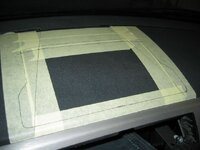
Finally got some time & peace to do it. Marked with the help of original cutting template with some diagonal references, just to check the position and symmetry. Since I got a feeling that the cutout on the template is a little too big, I opted out to make a slightly narrower cut - 6 mm according to my measurements. I was correct... I am not saying that the template supplied is oversized or not correct, I just felt comfortabler doing it this way.

z4-foto_1504603_15277657_17790795.jpg

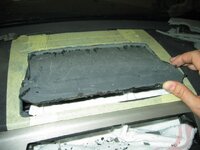
... it's a messy work, but someone has to do it...

z4-foto_1504603_15277657_17790796.jpg

Trial fit of the LCD monitor... successfull - now it's time just to finish off the edges

z4-foto_1504603_15277657_17790798.jpg

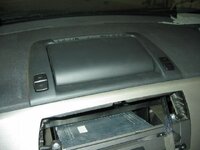
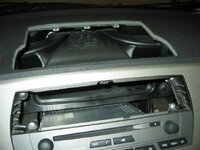
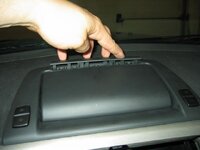
Final inspection before installing the monitor and center vents

z4-foto_1504603_15277657_17790799.jpg

... last piece of trim just clicks in the position after screwing the self-tappers

z4-foto_1504603_15277657_17790800.jpg

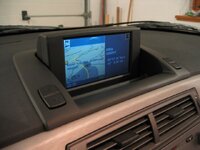
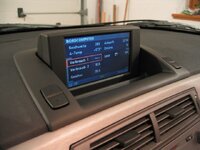
And... completed. Satisified :)

z4-foto_1504603_15277657_17790801.jpg

z4-foto_1504603_15277657_17790803.jpg

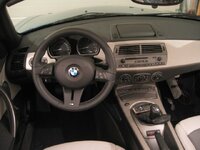
... interior does look "complete" now, I think that the navigation really adds to the final image of the car.

z4-foto_1504603_15277657_17790804.jpg

Well, it was worth it. The last part - installation of the monitor - was quite a stresfull job with a lot of "what ifs". But I'm glad I did it 8)

Thanks for looking and for input when needed :D Have a nice evening, Saso
 
Glad to see all went well, it not nice making that first cut in the dashboard is it.

Hopefully finish mine off in the next few weeks. :oops:
 
Welcome to the retro club :)

Srhutch - hopefully those last pictures will help you with completing your project .... :poke:
 
pvr said:
jamiez said:
Steve - so after ALL this time, yours still itsnt 100% completed! :)

He works in IT, what more do we need to say :P

I also have a Mergers and Aquisitions hat to wear :wink:

But no Jamie it's not 100%, PVR is the only person who has ever noticed, but I promise it will be complete for the Vines Z Day.

I just need to cut some slots so the little cover on the monitor can be put on.
 
pvr said:
Welcome to the retro club :)

Thanks. This was just the last one of all the retrofits I've done...

- hadlamp washing system
- heated seats
- cruise control
- Z4M steering wheel with multifunction
- illuminated dor sills
- rear park distance system
- CD changer cables and brackets (to install aftermarket mp3 changer emulator)
- an of course navigation.

... so that now my Zed is equipped in a way, that I feel comfortable in it :)

All of the retrofits were quite simple to do and don't require special knowledge (apart from coding the vehicle to activate headlamp washers) or tools, but as @Kryton said - you really have to be brave to cut up the dash for this monitor. You just have to take your time and be sure to doublecheck everything. But in the end - it was well worth it :thumbsup:

All I would like to "retrofit" now are power memory seats - since I will use my current leather trim and seat foams I just need the bases. So if any of you has a good idea on where and how to find them please do let me know.

Have a nice day, Saso
 
Back
Top Bottom