Sat Nav Retrofit Fitting Details

Hi all :)

Well, I have the same "problem" as dyerkes - everything is fitted, but the display and navigational computer obviously don't get any power. The loom is correct, bought from a dealer - 61 12 0 301 701, radio works, so does the CD and the illumination of the radionavigation unit. All of the components were previously tested in a X3 (identical navigation system) and are 100% in working order.

I thought about a fuse and in the fuse box there is no fuse in the position 49 (navigation and TV). Well, putting the fuse in wouldn't do any trick at all, since there is no terminals in the fuse box at mentioned position itself.

I know that the Mk4 navigation should be plug&play, but the retrofit manual is saying, that "system requires encoding". I'll try this tomorrow, hopefully it will do the trick.

@dyerkes - have you managed to resolve the problem? Any ideas from anyone are appreciated...

Thank you, Saso
 
No coding required, never. I have put two of these in and never had a problem with either (nor coding required).

- Does the MKIV unit spin up and is there a disk in there?
- There should be a red light on the unit that comes on as soon as you unlock the car, spins the disk for a bit etc.
 
I know that there should be no coding neccessary, but as far as it seems, this is my only option worth trying.

Mk4 does not power up, that is no red light in on, nothing. Absolutely dead.

Maybe it is that the car is not prewired for adding navigation, but this would be a bit odd, since the seats heating was plug & play (just switching the switch centre with the right buttons and installing seats with seat heating mats).

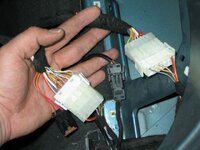
Here is the pic of the original retrofit wiring loom, that connects in between of the Z4s installation

z4-foto_1504603_15277657_17775630.jpg

... what worries me is that there is a lot less wires (the bottom ones connectors are original from the Z4, upper ones from retrofit loom) in cars own connectors...

Thank you, Saso
 
Dont think coding will sort out your problem as it's not required. Make sure you have earthed the loom properly otherwise the DVD drive will not work. I know this because when I was testing I had to run an earth to the battery to get it to work. When I installed I used a point on the bulkhead in the boot.
 
I don't actually remember the connectors like that. Next to the left side (top of the boot), my original connector was firmly stuck in place and I had to piggy back to it, i.e take one connector out and put the other on top.
 
I'll check the earth, and also one thing - maybe this is the cause for this "problem". Car does not have prewiring for the CD changer - and upon installin the cables for CD changer, from front there is a cable that goes into the big block connector behind the radio (and in which the only two pins of the navigational loom that need to be put in a connector at pin 5 an 11, to activate the voice guiding) and another one red and blue from the fuse box with its own fuse terminal, which powers the CD changer system (and I hope also navigation system). I'll get back with the results and pictures - but not today, it's a bit late now.

Thanks for help, Sašo
 
pvr said:
I don't actually remember the connectors like that. Next to the left side (top of the boot), my original connector was firmly stuck in place and I had to piggy back to it, i.e take one connector out and put the other on top.

It's a OEM connector, don't worry, I just removed it from its mount so that there's no need to "piggy back to it" :)

I'll keep you posted.

Have a nice evening, Sašo
 
Do you have blue tooth? My car did and I had two connectors there, had to remove one and plug the original one on top of the new one. The other satnav I did, did not have BT and so I only had to connect it there.
 
frcac said:
I'll check the earth, and also one thing - maybe this is the cause for this "problem". Car does not have prewiring for the CD changer - and upon installin the cables for CD changer, from front there is a cable that goes into the big block connector behind the radio (and in which the only two pins of the navigational loom that need to be put in a connector at pin 5 an 11, to activate the voice guiding) and another one red and blue from the fuse box with its own fuse terminal, which powers the CD changer system (and I hope also navigation system). I'll get back with the results and pictures - but not today, it's a bit late now.

Thanks for help, Sašo

thats sounds right, although these two wires wont stop the DVD from working if they are not attached.

If it was all tested before installation I would put money on it being the earth.
 
Sorry for not having responded to the thread sooner, but yes, my problem was resolved with getting the correct wiring harness. It sounds like you have no power to your MKIV unit, so I would agree with SRHUTCH that you might likely not have a good clean metal grounding point. The other thing that still concerns me is your statement about not having a fuse in slot #49. I also noticed in your photo that you still have the in-line fuse attached on the new wiring loom. Have you verified that the fuse is good in that?

Regards,
David
 
David not a problem - you're more than fast enough :)

I have to really take a look at the schemes (power lines) both for CD changer installation and navigation retrofit - and will hopefully discover the problem. Slot 49 in the fuse box has no terminals whatsoever, so I guess that the power has to come in to the loom from somewhere else.

As par the manual, the in-line fuse (fuse is OK) is supposed to be there if there is no red-green wire in the main connector. So I guess this should be OK. If mentioned wire exists, the fuse has to come off and the wires than need to be insulated. Today I am going to do the last part of the loom (both for navi and CD changer) through the boot, and while doing so I'll double check the earth terminal.

@dyerkes - can you please check (if this is possible) the BMW part number of the "correct" wiring loom? Just to be sure, according to bmwfans.info mine is correct.

Thank you, Saso
 
You appear to have the correct wiring harness, as mine was 61120301701. My question regarding your in-line fuse was more a question as to whether you have verified that the fuse is good. Obviously if it's not, than that may explain your lack of power to the NAV unit.

David
 
So the loom is the right one :) Thank you guys for confirmation... unfortunatelly today I didn't had any time at all to start working on a Z4, instead I had to replace one of the rear PDC sensors on my e39 touring. Time to rest now, tomorrow is a new day :wink: I'll keep you posted...

Have a nice evening, Sašo
 
Well, it really was the earth terminal - doing it again made a "miracle". Mk4 instantly got power and started spinning DVD, monitor had a few thoughts about operating properly with some glitches of movement, radio did not let itself to be turned on - but this just for a minute or so. Locking and unlocking the car gave it the correct boot up sequence, so that everything works now as it should :thumbsup:

... now I have to take a long coffee break, one thing still to do - to cut the hole in the dash :o

I'll get back with some pictures. Thanks again for the support and motivation :)

Have a nice day, Saso
 
Glad I was right about someting for once :D

With the dash cutting I really recommend a dremel with flexi drive cable or similar product and just take your time. You can always make the hole bigger but not smaller of course.
 
srhutch said:
You can always make the hole bigger but not smaller of course.

That worries me a bit - upon checking the size of original BMW template I can see, that there is not much margin for error - about a couple of milimeters on each side. I'll figure it out, no problem, but it sure is gonna take some time and nerves :roll:
 
I made my own template up using a piece of carboard (not corrogated) as I could cut it nice and tight around the monitor.

I couldnt tell you how much spare there is though I used the trial and error method after cutting the hole just shaving away a bit at a time to get it to fit. It is the worst and longest part of the entire job, just be patient and take your time.

PVR did his over a couple of nights with a pen knife the fool :poke:
 
Don't diss the swiss army knife :D

Remember to stuff the dash with a towel so all the gratings fall onto that rather then everywhere else ...
 
At least my screen was fixed the same week, rather then it rattling about for a year or so ... :poke:
 
Back
Top Bottom