Sat-nav delete how-to?

inkey$

Lifer
 Sevenoaks & Suffolk
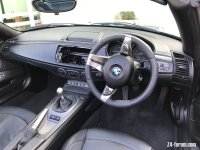
Has anyone ever written or seen a how-to for sat-nav delete? Am talking swapping over dashboards from one to another - not replacing the hole with an X3 storage bin.

I’ve searched the forum and can’t find anything on here. Reckon it could be useful for all those ageing sat nav equipped cars that are giving up the navigation ghost.

Curious to understand how difficult replacing the nav for non-nav dash is or isn’t.
 
Hi Inkey$

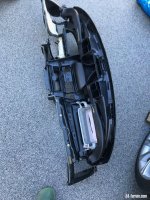
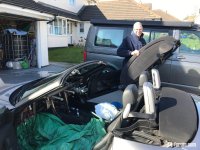
Well I did a dash swop on my E85 2004, last month. It's daunting, but in truth easier than I thought. Incidentally I'm not a mechanic, just an amateur who likes playing with their Z.

It took me 2.5 days start to finish and that's working really carefully and logically, storing screws etc in seperate jars for each component as I went along, taking photos. Please to say no fixings left at the end :lol:

A really detailed 'how to do' would be a huge post, but when I get a moment I'll at least post the order I worked in here with a bit more info. Always happy to help anyone with info on specifics. If you've ever swopped out dash and centre console trims you're part way there. Add in taking off the steering wheel for a retrim, something I know you've done recently and you're another step done:thumbsup: It all breaks down into removing seperate components and most of that information is here on the forum - that's how I did it.

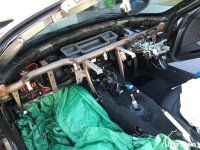
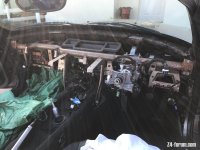
The last stage of actually pulling the dashboard out is really simple. Think it's only 13 screws/bolts holding it in :) A two person job at that stage so you don't damage anything, but really easy. Refitting is simply the reverse. Pleased to say I had no warning lights or any trim creaks afterwards and everything still worked :thumbsup: I also took the oportunity to remove that light surface rust on the dash support tube and lanoguard it.

A couple of photos ... and you can see the smile on my face, half way there :lol:
 

Attachments

  • IMG_6147.jpeg
    IMG_6147.jpeg
    285.4 KB · Views: 1,190
  • IMG_6149.jpeg
    IMG_6149.jpeg
    184.5 KB · Views: 1,188
  • IMG_6150.jpeg
    IMG_6150.jpeg
    211.9 KB · Views: 1,188
  • IMG_6152.jpeg
    IMG_6152.jpeg
    138.7 KB · Views: 1,189
Wow! Good effort there, Mojito. Looks quite involving but as you say, probably looks a lot scarier that it actually is.
 
What is the benefit as such? I am looking at putting in a CarPlay unit instead where the screen is so I need the hole anyway. Or even better if I can get an Android to fi inside a satnav monitor.
 
pvr said:
What is the benefit as such? I am looking at putting in a CarPlay unit instead where the screen is so I need the hole anyway. Or even better if I can get an Android to fi inside a satnav monitor.
You should contact this guy.

[youtube]M_-dhHsO5s4[/youtube]
 
pvr said:
What is the benefit as such? I am looking at putting in a CarPlay unit instead where the screen is so I need the hole anyway. Or even better if I can get an Android to fi inside a satnav monitor.
Man of your talent a piece of cake
20150322_135405.jpg
 

Attachments

  • 20150322_135647.jpg
    20150322_135647.jpg
    85.6 KB · Views: 1,057
Mark - yes, that is a good alternative and keeiping the original look and feel. Does it transfer the radio controls and board computer functions?

Must have a look where you documented that one
 
Steering wheel controls worked as normal , it just thinks phone is cd changer via BT, mine lost factory computer stuff , there's is a work around but it , I think I'd be more tempted to go the same route as Mac , I think that will still display all factory displays as well as the android stuff
 
What is this… funny as I was going to ask the same thing. What is that above that uses all the steering buttons. Sometimes I wish I didn’t have the stupid sat nav/pop up and minidisc thingy. It’s a right PITA

My screen broke this week, just wouldn’t stay open but worked. Fortunately I have an old x3 screen which is the same screen but different cowl/facia. 60 mins with some screwdrivers and I’d swapped the screen unit and motor over into the z4 plastics
 
Mojito said:
Well for anyone who REALLY wants to swop their entire dashboard out, here’s the order I removed/replaced things. I’m sure this is all second nature to those on the forum that dismantle cars and this is just how I did it - there might be a better way. Still it might help someone who is mad enough to take this on. Oh and why did I do it…. well it’s very difficult to cover an entire dashboard in Nappa Leather when it’s still in the car - see photo :)

Firstly and quite important if you have electric seats. BEFORE you disconnect the battery remove the central console side fixings as you need to be able to move the seats to reach them all. There are three each side, two under plastic covers and one under each knee pad. Removing the knee pads is probably the most difficult part of whole job. I also chocked my wheels and disconnected the roof pump as I did this outdoors and wanted to be able to close roof at night… or incase it rained :?

Disconnect Battery

Remove Rear Storage Compartment/Rear Console between seats. This involves removing lid on rear storage box, removing cover above storage box, removing panel for rear storage box, removing storage box upper section. You can then remove Rear Console Assembly.

Remove Handbrake Cover

Remove Trim around Gear lever, Switch unit/ashtray in front of gear lever. Then remove Center Console

Remove Sun Visors, central light, trim to front of roof liner & ‘A’ Pillar trims.

Remove Central Fresh Air Vents & Radio Head unit.

Remove Control Panel for Air Con.

Remove Steering Wheel Airbag and Steering Wheel.

Remove Lower & Upper Sections of Steering Column Trim.

Remove 'fixture' for Steering Column Stalk and then Stalks.

Remove Instrument Cluster

Remove Left & Right Fresh Air Vents

Remove Finisher around Light Switch & Light Switch

Remove Left & Right Door Entrance Cover Strips

Remove Trim above Pedals.

Remove Side Trim Panels in Footwell on both sides

Remove Trim below Glovebox.

Remove Glovebox.

Remove Passenger Airbag

….. and finally remove about 12 nuts/bolts holding the dashboard in place. Phew... al that's left to do is put it back :thumbsup:

I found most of the instructions on how to remove each section on the forum - thank you all who have shared in the past. Happy to share any specific info anyone might need.
 

Attachments

  • IMG_6264.jpeg
    IMG_6264.jpeg
    152.6 KB · Views: 908
Reading through that, it sounds a lot more straightforward than it maybe looks in your deconstructed pictures, Mojito :thumbsup:
 
inkey$ said:
Reading through that, it sounds a lot more straightforward than it maybe looks in your deconstructed pictures, Mojito :thumbsup:

Truly it was.. the photos of my Z in pieces still make me shudder :lol:
 
markplant said:
pvr said:
What is the benefit as such? I am looking at putting in a CarPlay unit instead where the screen is so I need the hole anyway. Or even better if I can get an Android to fi inside a satnav monitor.
Man of your talent a piece of cake
20150322_135405.jpg

hi Mark, can you share some details of how you achieved this? thanks
 
Car already had factory nav
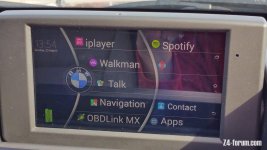
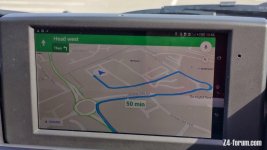
I used a Sony Xperia ultra phone
Split nav apart
Remove LCD screen but left the remaining circuit board as it controls the motorisation
Ran a usb power lead in with existing loom to power the phone
Added a BT adapter in place of the cd changer an paired the phone to that

I'll try an answer anything else as best I can
 
Hi Mark,
I'm also interested in what you achieved replacing your sat nav screen. Hats off to you - brilliant piece of work :thumbsup:
I just happen to have a spare working satnav screen, but one that has a couple of pixelated lines, so a perfect donor. Just wanted to ask a couple of questions:
What software are you using with the Xperia as it's a relatively old phone - came out in 2013 I think.
Are you using a bluetooth OBD sender for car info?
I know Xperia will turn on when powered through USB power lead, but how do you get Xperia to turn off - no battery perhaps :? This might be a stupid question :)
You help appreciated
 
Mojito said:
Hi Mark,
I'm also interested in what you achieved replacing your sat nav screen. Hats off to you - brilliant piece of work :thumbsup:
I just happen to have a spare working satnav screen, but one that has a couple of pixelated lines, so a perfect donor. Just wanted to ask a couple of questions:
What software are you using with the Xperia as it's a relatively old phone - came out in 2013 I think.
Are you using a bluetooth OBD sender for car info?
I know Xperia will turn on when powered through USB power lead, but how do you get Xperia to turn off - no battery perhaps :? This might be a stupid question :)
You help appreciated

Hi
It was just android with a skin
Yes BT for odb2
I drilled a small hole in the top edge of the nav surround to access the power button to switch off if not been used for some time.
 
Mojito said:
Hi Mark,
I'm also interested in what you achieved replacing your sat nav screen. Hats off to you - brilliant piece of work :thumbsup:
I just happen to have a spare working satnav screen, but one that has a couple of pixelated lines, so a perfect donor. Just wanted to ask a couple of questions:
What software are you using with the Xperia as it's a relatively old phone - came out in 2013 I think.
Are you using a bluetooth OBD sender for car info?
I know Xperia will turn on when powered through USB power lead, but how do you get Xperia to turn off - no battery perhaps :? This might be a stupid question :)
You help appreciated

Hi
It was just android with a skin
Yes BT for odb2
I drilled a small hole in the top edge of the nav surround to access the power button to switch off if not been used for some time.
 
markplant said:
Mojito said:
Hi Mark,
I'm also interested in what you achieved replacing your sat nav screen. Hats off to you - brilliant piece of work :thumbsup:
I just happen to have a spare working satnav screen, but one that has a couple of pixelated lines, so a perfect donor. Just wanted to ask a couple of questions:
What software are you using with the Xperia as it's a relatively old phone - came out in 2013 I think.
Are you using a bluetooth OBD sender for car info?
I know Xperia will turn on when powered through USB power lead, but how do you get Xperia to turn off - no battery perhaps :? This might be a stupid question :)
You help appreciated

Hi
It was just android with a skin
Yes BT for odb2
I drilled a small hole in the top edge of the nav surround to access the power button to switch off if not been used for some time.

Thanks Mark, that's really helpful. I've now found this thread: https://z4-forum.com/forum/viewtopic.php?t=56746
Really interesting and some great work in there.
 
Mojito said:
Thanks Mark, that's really helpful. I've now found this thread: https://z4-forum.com/forum/viewtopic.php?t=56746
Really interesting and some great work in there.
The perfect thread, but frustrating that little remains of the imagery to go along with those instructions. Feels like we need a proper how-to for this with embedded thread photos, other options for tablets, etc as I can imagine a few people wanting to take this on.
 
Back
Top Bottom