Professional Radio

dbri8lf

Member
Hi, New member, just changed from 2004 E85 2.5 manual to 2009 23i 2.5 manual.
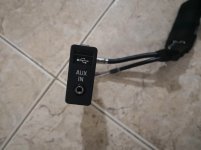
There is a USB and Aux socket in the armrest but I don't have any USB option coming up on the radio.
Aux is there but nothing works when plugged into it, I also have the BMW Ipod splitter cable and that doesn't work either.
Does the radio have to be programmed to use the socket?

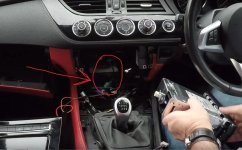
IMG-20190309-WA0003.jpg
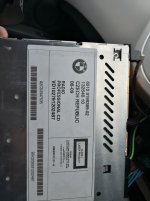
Radio Label.jpg
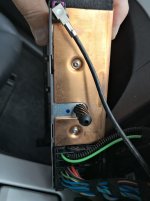
Radio Back.jpg[attachment=0]
Thanks in advance.
 
Hi bud, welcome to the forum, and a very nice looking Z you have :thumbsup:

Ok down to business, that head unit it not a USB one, so either someone has changed the head unit or put a USB socket in for some other reason.
Personally I'd go for the former (as the latter makes no sense!)
Assuming this is the case it should be easier to get it up and running as it'll already be coded for the correct head unit.
Take a look at this one and you'll see the white plug on the back, that's what you need.....
Oh damm cant post a link with my tablet, go to eBay and look up 153405077454

Do you have the grills on top of the steering wheel shroud? If you do the then you have bluetooth as well.

Do you have another cable in the space where the radio came out of, with a round ended plug on it?
 
dbri8lf said:
Thanks for the info. I will have a look in the car tomorrow to see if there is another wire lurking back there.
Now I'm on a PC and not a tablet I can do a little more for you :D

Attached is a photo showing the white USB socket at the back of the radio and the USB cable in the hole (green plug circled).
 

Attachments

  • USB1.jpg
    USB1.jpg
    74.4 KB · Views: 1,268
Hi, Finally had a bit of time to check out the car. Got the new head unit as per your message.
I can now play mp3 cds which is a start.
There weren't any cables hidden behind the radio.
Still have no aux or usb output even though they come up on the radio display now.
When you select usb it says 'insert' on the display.
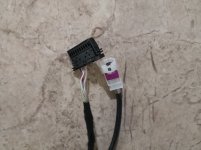
I disconnected the aux socket in the arm rest and the cable just connects into the car harness and appears to disappear into the boot.
IMG_20190328_201700.jpg
IMG_20190328_201710.jpg
IMG_20190328_201748.jpg
Not sure what is going on with the set up.
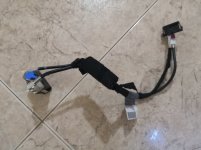
I am going to order the cables that you listed in your 'how to' sheet and plumb them in.
 
Yeah that looks like you have a MULF unit in the boot, if that is faulty then you could replace it but it needs coding to the car and that's an expensive piece of kit and software to do that (not possible with the software I have) so retrofitting the stuff in the How-To should sort it.
As a matter of interest where abouts are you in the country?
 
The usb cable has arrived, I have plugged it in, the Ipod is seen, can select tracks etc but there is no sound.
The aux cable supplied only has 3 wires, the original has 4, do the pin outs need altering?
Thanks.
 
This is the wiring diagram for the AUX that goes directly to the head unit, 3 wire;
https://www.newtis.info/tisv2/a/en/e89-z4-sdrive23i-roa/wiring-functional-info/body/audio-video-telephone-navigation-most-ring/aux-in-connection/2dYSNA0w

This is the wiring diagram for the combox (boot area) connection, 4 wire;
https://www.newtis.info/tisv2/a/en/e89-z4-sdrive23i-roa/wiring-functional-info/body/audio-video-telephone-navigation-most-ring/aux-in-connection/Eaif7EQl

So working from this you could alter the pin-outs to suit (pin 4 on the 4 wire is only a shield wire) :thumbsup:
 
dbri8lf said:
As I can't get the sound to work on my car for some reason, will the Android touchscreen system give me that?
There are ways and means :D
It'll be a little involved but I can write it all down for you, but basically you can wire the AUX directly to the back of the head unit......

Hang-on a moment, I've just thought of something..... Firstly make sure you have nothing in the USB socket. Plug your phone into the AUX socket and play some music (make sure the volume is up on the phone). On the radio press the "Audio" button, then go to "AUX" then on the screen you'll see "AUX-VOL", press the button below this and you have 5 dashes, turning the right knob make sure there is at least 1 dash fully showing (preferably 4 or 5 would be normal), then press the right knob to set this in. This is the AUX input volume, if it's all the way down you wont have any sound, check this it "may" be the problem, if not then we can revert to the plan above and basically rewire the AUX input.
 
LONG SHOT... Hi I have a 2009 E89 and it was very happy plugged into an iPhone 4s and then I bought an iPhone 5s, went to get a new cable from BMW to attach to the aux and they said I would have to get an aftermarket one that has another lead that fits into the 3.5 socket on the phone (got one from Amazon)... I could be talking mince here but have you got the right Y cable?
 
Hi Zed, I have the BMW ipod Y cable, the car sees the ipod, just can't get any sound. I have done the head unit and usb cable mod and at least I can now play mp3 cd's. It would be good if I could connect a usb stick with a lot more music on it. Very frustrating. Dave has been great with his ideas. I'm sure I'll get here in the end.
 
Just thinking here, if it now see's the USB port have you tried to just put a memory stick in? A memory stick doesn't use the AUX like the iPod cable does, it might work, worth a shot!
 
Doesn't see the memory stick, just says insert when you select USB. Is there a different BMW cable like the Y cable for ipod but for other usb items?
 
dbri8lf said:
Doesn't see the memory stick, just says insert when you select USB. Is there a different BMW cable like the Y cable for ipod but for other usb items?
Looks like you have a defo fault with the MULF then.
I should still be able to get the AUX working for you (under instruction) and maybe the USB but without using the MULF. I'll put something together for you and let you have it, bear with me and I'll sort that out :thumbsup:
 
I have not reconnected the small cable that originally went to the aux and usb socket (pictured in earlier post above) in the arm rest. I thought the cable I ordered online was to replace that one. Thanks for all your help Dave.
 
Back
Top Bottom