
You are using an out of date browser. It may not display this or other websites correctly.
You should upgrade or use an alternative browser.
You should upgrade or use an alternative browser.
Need recommendations for hand held obd2 scanner
- Thread starter Fyreball
- Start date
Anyone needing to work on roof when open knows the frustration of not being able to open boot.
Simple mod. Take a wire from boot to the cabin area.
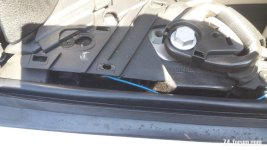
I threaded the wire under the plastic trim under the seat belt fixing area.
Some reasons pictures are in a odd order. Take a wire from the grey/green wire. I fitted a diode so as not to put any voltage back down the line just in case it caused problems.
Then threaded wire under trim, past the seat belt fixing and under the door rubber trim.
For now my wire is just lying free. ( my wire colour changes from blue to brown...
Simple mod. Take a wire from boot to the cabin area.
I threaded the wire under the plastic trim under the seat belt fixing area.
Some reasons pictures are in a odd order. Take a wire from the grey/green wire. I fitted a diode so as not to put any voltage back down the line just in case it caused problems.
Then threaded wire under trim, past the seat belt fixing and under the door rubber trim.
For now my wire is just lying free. ( my wire colour changes from blue to brown...
Did you try the following these instructions..Wouldn't be without my Foxwell in the car.
I look for boot open option, but can't find any.
Still i fitted a separate switch for that. Had to use that a few times.
Steps to Open Z4 Boot with Foxwell NT530:
- Connect the Scanner: Plug the Foxwell NT530 into the OBDII port and select the BMW-specific software.
- Identify Vehicle: Allow the tool to perform a smart scan or manually select your Z4 model to establish communication.
- Access Modules: Navigate to the Body or Body Control section.
- Select Junction Box/JBE: Locate the Junction Box Electronics (JBE) module.
- Activation/Active Test: Choose Actuations or Activation to send commands to the car.
- Trunk Release: Select the "Trunk Release" or "Tailgate Lock" option to trigger the release mechanism.
A wire from the boot? What wire? And then a grey and green wire in the cabin? and now it’s lying free? Where is the switch or what switch? Would need more and clear detailsgreen/grey wireAnyone needing to work on roof when open knows the frustration of not being able to open boot.
Simple mod. Take a wire from boot to the cabin area.
I threaded the wire under the plastic trim under the seat belt fixing area.
Some reasons pictures are in a odd order. Take a wire from the grey/green wire. I fitted a diode so as not to put any voltage back down the line just in case it caused problems.
Then threaded wire under trim, past the seat belt fixing and under the door rubber trim.
For now my wire is just lying free. ( my wire colour changes from blue to brown...
Last edited:
This could be very useful, going to print this out and keep it with my scanner in glove box, although foxwell says none of their scanners open the boot?Did you try the following these instructions..
Steps to Open Z4 Boot with Foxwell NT530:
- Connect the Scanner: Plug the Foxwell NT530 into the OBDII port and select the BMW-specific software.
- Identify Vehicle: Allow the tool to perform a smart scan or manually select your Z4 model to establish communication.
- Access Modules: Navigate to the Body or Body Control section.
- Select Junction Box/JBE: Locate the Junction Box Electronics (JBE) module.
- Activation/Active Test: Choose Actuations or Activation to send commands to the car.
- Trunk Release: Select the "Trunk Release" or "Tailgate Lock" option to trigger the release mechanism.