
You are using an out of date browser. It may not display this or other websites correctly.
You should upgrade or use an alternative browser.
You should upgrade or use an alternative browser.
Nav Volume help
- Thread starter RobJJZ4
- Start date


If you press the right hand knob when sat nav is in working mode, a window pops up and you can untick the instruction box to mute the voice. Unless newer ones are different.
bladeowner said:If you press the right hand knob when sat nav is in working mode, a window pops up and you can untick the instruction box to mute the voice. Unless newer ones are different.
Thanks, I will try on the why home and see

Ooh I need to do that. Quite often put it on for long journeys but I know the first half of the route!
RobJJZ4 said:bladeowner said:If you press the right hand knob when sat nav is in working mode, a window pops up and you can untick the instruction box to mute the voice. Unless newer ones are different.
Thanks, I will try on the why home and see
Nope that didn't work....
Was the sat nav in directing mode? Newer one's must operate differently then 
RobJJZ4 said:RobJJZ4 said:bladeowner said:If you press the right hand knob when sat nav is in working mode, a window pops up and you can untick the instruction box to mute the voice. Unless newer ones are different.
Thanks, I will try on the why home and see
Nope that didn't work....
it should work, unless you have this
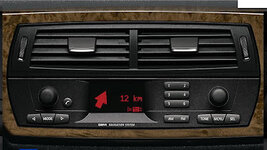
RobJJZ4 said:Press Knob, select Information or Instruction (Depending on version), press and HOLD knob, and it turns it off
That's what I said........ or meant

bladeowner said:RobJJZ4 said:Press Knob, select Information or Instruction (Depending on version), press and HOLD knob, and it turns it off
That's what I said........ or meant
:wink:

Z4 Coupe said:This doesn't work for me?
When I press instruction it just repeats the last instruction. What am I doing wrong?
That's what I did at first, you have to press and HOLD. You will then see the symbol change
Z4 Coupe said:Yes it was me being thick.
It switches back on again when I get back in the car but that is much better than nothing. Whoever designed this radio must have been mad!
Anyone know how to switch off GALA? (The thing that changes the volume depending on how fast you're driving)
My volume is off to hear the engine or on full??? Must be the way I drive
 :roll:
It is stupid - but it becomes habit after a while, like a twitch you just do without noticing
As for turning off the speed dependent volume, no idea. It's never really bothered me... I think it can be set to be less/more sensitive. Srhutch knows Secrets such as these...
As for turning off the speed dependent volume, no idea. It's never really bothered me... I think it can be set to be less/more sensitive. Srhutch knows Secrets such as these...
RobJJZ4 said:My volume is off to hear the engine or on full??? Must be the way I drive
I would say most of my journeys are stuck in traffic going to and from work or motorway miles as this is my daily drive. The times that I drive for pleasure I don't tend to have the sat nav or the radio on either.
This year I'm going the make sure my boring/pleasure ratio goes the other way a bit more