E89 Stereo Options

awt said:
I think we agree after all. :) The combox is a far better solution to all of this, but it again requires CIC, which is quite outdated now. Also it's a bit more hassle to retrofit CIC with DAB+, than just the normal radio player. 10+ years ago the combox had a great built in web radio app, but that's long gone now.
It's a big job to retrofit CIC, I know as I've done it. Took me a full day, but most of that was swapping the headunit cage over (without removing the dashboard!). My system is now full spec with DAB+, Combox, and the Top HiFi. It's really nice and sounds great, but has been a lot of work to get it this way, a lot of FUN work might I add :thumbsup: And it's about to get the OEM camera system fitted to it (not an MMI box, although I do have that anyway), and to the best of my knowledge it'll be the only E89 Z4 to have this (video to come).
I did consider upgrading the the standard radio with one that had DAB, but never got around to it as I fitted the Android Touchscreen instead, which I loved.
 
I've retrofitted CIC on two of my earlier cars, first one was back in 2011, when noone knew what CIC was. :) I also retrofitted OEM navi in my old e46.

The first car I retrofitted CIC in was an e61, which never came with combox or DAB+ from factory. I later mounted a CIC from an e70 X5 with DAB+ in this one, as well as combox. Quite a hassle, as you need to use the internals from the e70 CIC inside the case from the e6x CIC. Then flash the CIC with e61 software, and then do some magic tricks to get it all working, as the e6x software doesn't support combox. I did the same in my e81 1-series, but that was quite a bit easier, as these came with combox from factory.
 
Just to clarify DAB+ vs DAB..when or if they fit dab+ to E89s?

If they did..can you swap a dab+ module across AND does it then need coding ..or is it a whole CIC head unit swap out ? :tumbleweed:
 
BMW switched from DAB to DAB+ in 2011 model year (cars produced from september 2010 and onwards), so all cars produced as 2011 models should have DAB+ (I'm sure there's some exceptions). Models that never was produced as 2011 models, like the e60 5-series only had DAB.

You need to swap the whole unit. I've dismantled both DAB and DAB+ units, and it's not like there's a small chip that says "DAB" or anything simple like that. It's all implemented in the main circuit board.

Also, since the CIC units are using FSC codes for the navigation and combox part, it's a bit more work than a straight swap to get them to work properly.
 
awt said:
....
Also, since the CIC units are using FSC codes for the navigation and combox part, it's a bit more work than a straight swap to get them to work properly.
You're not kidding, I had to learn how to input FSC's in mine, and finding the correct process, that actually worked, was fun too. I will be making a video on this using the method I found, that does work! :thumbsup: :D
 
Thanks everyone for your input - I'll be sourcing a Y cable next, and possibly a Tune2air also - haven't decided on that 100% yet!
 
awt said:
BMW switched from DAB to DAB+ in 2011 model year (cars produced from september 2010 and onwards), so all cars produced as 2011 models should have DAB+ (I'm sure there's some exceptions). Models that never was produced as 2011 models, like the e60 5-series only had DAB.

You need to swap the whole unit. I've dismantled both DAB and DAB+ units, and it's not like there's a small chip that says "DAB" or anything simple like that. It's all implemented in the main circuit board.

Also, since the CIC units are using FSC codes for the navigation and combox part, it's a bit more work than a straight swap to get them to work properly.

Thank you so if the cic headunit has a production date post September 2020 it should be dab+?
 
awt said:
*2010

Yes, it should (however, I'm not taking any responsibility. :P )

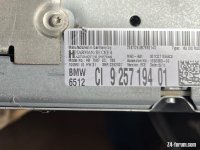
Interesting the car production date according to VIN decoder is 20th May 2011 and date stamp on CIC unit is week 16 of 11 ..so I'll see!
 

Attachments

  • IMG_0963.jpeg
    IMG_0963.jpeg
    128.7 KB · Views: 600
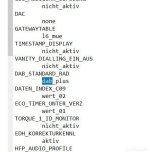
If you can do a .trc file download of the CIC unit then look for this, if it says "dab_plus" then you're good to go
 

Attachments

  • DAB_CIC.jpg
    DAB_CIC.jpg
    28.4 KB · Views: 642
awt said:
It should be fine, as long as it actually has DAB connections. :)

There were no aerial or other external changes to support DAB+?
 
Update on the iPhone working from the USB...

McBoxer said:
.....
2) The USB is working - is as much as I can charge my phone - but it gives me a message that my phone cable is unsupported. and won't connect It's a standard iphone charging cable connected to an iphone (14 I think). I guess it could be a cable issue, but are there any nuances I need to be aware of / tricks I need to do? Or could it be something to do with coding?

OK, so I've got some iPhone cables, that are supposed to have the chips in them to work.
I used one of these to see if I could get my wifes iPad showing up, no, didn't charge or show up on the screen. PLugged into the 12v outlet adaptor and it charges. So I tried a second one, still the same. Now I've got an old iPhone 5S, so went to that, it was flat so had to charge it.
Once with some charge in it I did the same, still wouldn't charge or show up on the screen. Now to reiterate, these cables are Lightening to USB, not Y cables.
Now I'd charged the iPhone 5s in the hose using a genuine cable, so just to check I fetched this and low-n-behold it worked perfectly! It showed up as a USB device (as it's iPhone name) and I could play from the phone or the steering wheel controls.
So it should still work on later phones, alas, unless someone at work has a later iPhone I can't check this for certain, but I do have an iPad which is a year old and upto date with the latest software so I'll see how it goes :thumbsup:
 
awt said:
No, they’re identical regarding that.

The 2015 CIC unit in my 2011 has DAB+ just found the D1 ensemble and voila lots of DAB+ stations
 
AnubisZed said:
Update on the iPhone working from the USB...

McBoxer said:
.....
2) The USB is working - is as much as I can charge my phone - but it gives me a message that my phone cable is unsupported. and won't connect It's a standard iphone charging cable connected to an iphone (14 I think). I guess it could be a cable issue, but are there any nuances I need to be aware of / tricks I need to do? Or could it be something to do with coding?

OK, so I've got some iPhone cables, that are supposed to have the chips in them to work.
I used one of these to see if I could get my wifes iPad showing up, no, didn't charge or show up on the screen. PLugged into the 12v outlet adaptor and it charges. So I tried a second one, still the same. Now I've got an old iPhone 5S, so went to that, it was flat so had to charge it.
Once with some charge in it I did the same, still wouldn't charge or show up on the screen. Now to reiterate, these cables are Lightening to USB, not Y cables.
Now I'd charged the iPhone 5s in the hose using a genuine cable, so just to check I fetched this and low-n-behold it worked perfectly! It showed up as a USB device (as it's iPhone name) and I could play from the phone or the steering wheel controls.
So it should still work on later phones, alas, unless someone at work has a later iPhone I can't check this for certain, but I do have an iPad which is a year old and upto date with the latest software so I'll see how it goes :thumbsup:

Old iPhone SE the original works perfectly in the aux/USB socket in the armrest FWIW
 
So just to update this for the iPhone/USB question...

The latest IOS software does work with the OE USB port, just using a standard USB to Lightening cable. Track information (title/singer/album etc) all shows, as does album art, skip forward/back and Now/Next all show and work.
Of course this is using iDrive with a Combox, so as the later standard professional radio has the built in combox then that should all work the same (excluding album art, obviously), ie; no need for a Y cable.
 
AnubisZed said:
So just to update this for the iPhone/USB question...

The latest IOS software does work with the OE USB port, just using a standard USB to Lightening cable. Track information (title/singer/album etc) all shows, as does album art, skip forward/back and Now/Next all show and work.
Of course this is using iDrive with a Combox, so as the later standard professional radio has the built in combox then that should all work the same (excluding album art, obviously), ie; no need for a Y cable.

I'm using an iPhone 14 running iOS 18.4.1 and when I connect using a standard USB to Lightning cable I get the aforementioned error about using the wrong cable (it does recognise that an iPod is there, but gives the error and I can't go any further). However, I don't have iDrive so won't have the iDrive combox set up you mention and I'm not sure how early or late my replacement radio is.

I've now got hold of a fake Tune2air bluetooth receiver that connects to the USB and the aux socket (so mimics a Y cable I presume) and can now listen to music from my phone, but interestingly I have to select 'Aux' and not 'USB' to do this.
 
It should pop up as «iPod» in the screen to work properly, but you need at least one song in the iTunes part of your phone for it to be recognizable.
 
Fitted the remaining items of my interior swap today, which included the steering column shroud with phone mic. I was expecting (or maybe hoping) to find a spare socket to plug the mic in, but I couldn't see anything, so I still dont have full use of my newly retro fitted head unit.

Does anyone know if the mic socket IS hidden away somewhere behind the dash, or is there another harness I need to source to connect it back to the head unit?
 
Back
Top Bottom