Hi All,
Ive been looking for a solution like this for a while. I have toyed with the idea of replacing the original screen with a new one with all the newer tech but the downside is you loose the original functionality.
The ideal would be to have both as it keeps the car looking OEM.
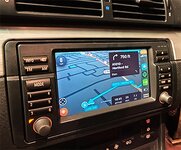
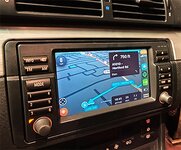
Anyway ive been following a company called carphonics for a while and they do conversions for the early 2000s BMW nav systems. There are quite of a lot of examples of 3/X5/7 Series and apparently this is available on the Z too.
If you dont want to read my waffle there is loads of info linked below
https://carphonics.co.uk/shop/upgrades/apple-carplay-android-auto-original-system-conversion/
So I decided to get in touch. Essentially if you have the TV functionality already installed all that would need modifying is the microphone but this can be done to work with the OEM look on the steering wheel. If you dont have TV functionality this can be retrofitted. They can also add a touchscreen layer into the display but for the Z this isnt really going to work. Looks like you can add all sorts of other functionality like a fire stick etc
It is £360 if you have the TV functionality and £390 if you dont. Installation is £80
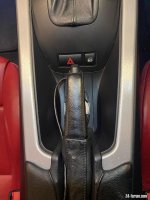
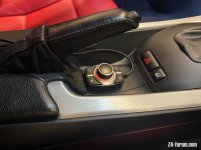
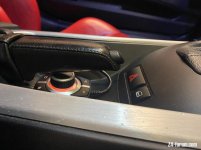
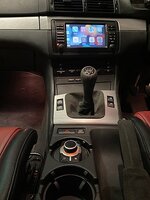
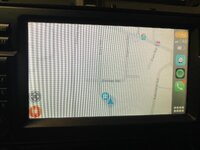
There are a couple of stipulations, you need an idrive controller for this to work and my concern in the Z is where it could be located to be useable and ergonomic, there is no centre mounted cup holders for example. He did mention that there is a smaller one but it would be an additional cost. The other thing is the resolution and quality of the display, as the Z is a bit of distance away it actually should work ok the drawbacks of the screen are obvious but it is what it is. Unlike the 3/5/7 series where it’s much closer to you.
[youtube]M2AjSgjrSviEYY_2[/youtube]
The vid runs through different installs and what can be done to the OEM headhunt. There is also the ability to add a reverse camera etc.
Few more details from the page:
Phone Call / Microphone
For phone calls, you can use our universal microphones which we provide in the package, or you can use your existing OEM microphone. We would need to modify the microphone to make it work with the Apple CarPlay /Android Auto. You can purchase a modified one from us, or send your microphone to be modified. You will also need to purchase the Bluetooth ULF adapter, which connects to your existing hands free unit. For older cars, like early e39, the cable is slightly different, so please contact us, so we can make you a custom connector.
Features include:
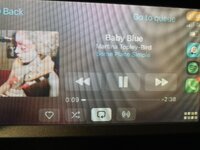
– Wireless Apple Car Play
– Wireless Android Auto (CarPlay for Android)
– Wireless Phone Screen Mirrorring
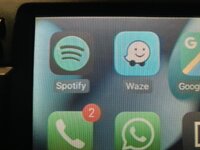
– Spotify Music
– Waze Navigation
– Google Maps Navigation
– Apple Maps Navigation
– TomTom Amigo Navigation
– TuneIn Radio
– Speed Camera Alerts
– Siri / Google Assistant voice command control
– Voice activated operation (Dialling contacts)
– Send and receive messages through voice actions using WhatsApp, iMessage, SMS, Messenger
– USB Media Input
– Compatible With All Existing Hardware, Parking Sensors etc
– Full Screen Carplay
– Any Many Other Apps Available
Anyway I thought I would post for discussion and see what peoples opinions are. Obviously this isnt a cheap option but I think it is a really good compromise between ripping the OEM unit out and loosing the original functionality to adding a huge amount of ability to the original.
They are based in Enfield London. If there is enough interest I would be happy to see if there is some sort of group buy option etc
Ive been looking for a solution like this for a while. I have toyed with the idea of replacing the original screen with a new one with all the newer tech but the downside is you loose the original functionality.
The ideal would be to have both as it keeps the car looking OEM.
Anyway ive been following a company called carphonics for a while and they do conversions for the early 2000s BMW nav systems. There are quite of a lot of examples of 3/X5/7 Series and apparently this is available on the Z too.
If you dont want to read my waffle there is loads of info linked below
https://carphonics.co.uk/shop/upgrades/apple-carplay-android-auto-original-system-conversion/
So I decided to get in touch. Essentially if you have the TV functionality already installed all that would need modifying is the microphone but this can be done to work with the OEM look on the steering wheel. If you dont have TV functionality this can be retrofitted. They can also add a touchscreen layer into the display but for the Z this isnt really going to work. Looks like you can add all sorts of other functionality like a fire stick etc
It is £360 if you have the TV functionality and £390 if you dont. Installation is £80
There are a couple of stipulations, you need an idrive controller for this to work and my concern in the Z is where it could be located to be useable and ergonomic, there is no centre mounted cup holders for example. He did mention that there is a smaller one but it would be an additional cost. The other thing is the resolution and quality of the display, as the Z is a bit of distance away it actually should work ok the drawbacks of the screen are obvious but it is what it is. Unlike the 3/5/7 series where it’s much closer to you.
[youtube]M2AjSgjrSviEYY_2[/youtube]
The vid runs through different installs and what can be done to the OEM headhunt. There is also the ability to add a reverse camera etc.
Few more details from the page:
Phone Call / Microphone
For phone calls, you can use our universal microphones which we provide in the package, or you can use your existing OEM microphone. We would need to modify the microphone to make it work with the Apple CarPlay /Android Auto. You can purchase a modified one from us, or send your microphone to be modified. You will also need to purchase the Bluetooth ULF adapter, which connects to your existing hands free unit. For older cars, like early e39, the cable is slightly different, so please contact us, so we can make you a custom connector.
Features include:
– Wireless Apple Car Play
– Wireless Android Auto (CarPlay for Android)
– Wireless Phone Screen Mirrorring
– Spotify Music
– Waze Navigation
– Google Maps Navigation
– Apple Maps Navigation
– TomTom Amigo Navigation
– TuneIn Radio
– Speed Camera Alerts
– Siri / Google Assistant voice command control
– Voice activated operation (Dialling contacts)
– Send and receive messages through voice actions using WhatsApp, iMessage, SMS, Messenger
– USB Media Input
– Compatible With All Existing Hardware, Parking Sensors etc
– Full Screen Carplay
– Any Many Other Apps Available
Anyway I thought I would post for discussion and see what peoples opinions are. Obviously this isnt a cheap option but I think it is a really good compromise between ripping the OEM unit out and loosing the original functionality to adding a huge amount of ability to the original.
They are based in Enfield London. If there is enough interest I would be happy to see if there is some sort of group buy option etc

 Scottish Borders