When I first bought my Z4 (E86) it was in transport mode and I had to take it to a friendly specialist who deactivated for me. For those unaware, transport mode is where certain things do not work in order to preserve the battery before being sold when new. Unfortunately the E85/86 cars can go into transport mode when the battery goes flat. When this happens the rear window demister doesn't work and the blower fan only operates at a very slow speed.
Well with the current lockdown my car hasn't been used recently and I found the battery flat a few days ago. I jump started it a few days ago but found the car to be in the dreaded transport mode.
I have spent hours over the last 2 days trying to disable it and thought I would post my findings as they may be useful to others.
Now I have previously used BMW scanner 1.4.0 and found it easy to install and use but for the life of me I couldn't get it to work on my laptop. I have the most up to date version of Windows 10 on my laptop (build 2004) so thought I would try installing an older version to see if that was the issue. It was! So if anyone is having trouble with installing BMW scanner 1.4.0 please note it 100% does not work with windows 10 2004 build. It was actually the drivers that don't work not the program itself.
So a fresh install of windows 10 (1909 build) did the trick.
I installed BMW scanner 1.4.0 then installed the drivers following the instructions found here
https://www.bimmerfest.com/threads/release-bmw-scanner-1-4-drivers-for-windows-10-dummy-friendly-installation-guide.1397475/
The link the drivers in the above link doesn't work so get the windows 10 64bit drivers from here
https://www.ftdichip.com/Drivers/D2XX.htm
You will also need the correct cable and these are available from ebay for under £15.
So I now the software installed and connected to and talking to the car but I couldn't find how to disable Transport Mode and endless google searching didn't return any results either. Everything read online said you need INPA and DIS to disable transport mode.
I finally found how to do it using scanner 1.4.0.
Go into the A/C - heater and automatic conditioner control - press "reprogramming"
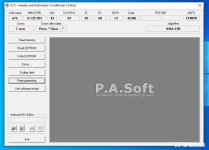
Press "Set unit mode"
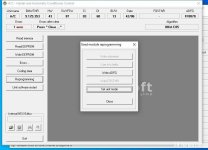
Press "Normal (default) mode
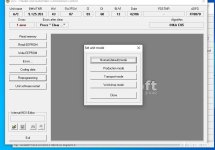
Thats it, the blower kicked into full speed and everything was sorted.
This took me hours to figure out so thought I would post here to save anyone the hassle I went through.
Well with the current lockdown my car hasn't been used recently and I found the battery flat a few days ago. I jump started it a few days ago but found the car to be in the dreaded transport mode.
I have spent hours over the last 2 days trying to disable it and thought I would post my findings as they may be useful to others.
Now I have previously used BMW scanner 1.4.0 and found it easy to install and use but for the life of me I couldn't get it to work on my laptop. I have the most up to date version of Windows 10 on my laptop (build 2004) so thought I would try installing an older version to see if that was the issue. It was! So if anyone is having trouble with installing BMW scanner 1.4.0 please note it 100% does not work with windows 10 2004 build. It was actually the drivers that don't work not the program itself.
So a fresh install of windows 10 (1909 build) did the trick.
I installed BMW scanner 1.4.0 then installed the drivers following the instructions found here
https://www.bimmerfest.com/threads/release-bmw-scanner-1-4-drivers-for-windows-10-dummy-friendly-installation-guide.1397475/
The link the drivers in the above link doesn't work so get the windows 10 64bit drivers from here
https://www.ftdichip.com/Drivers/D2XX.htm
You will also need the correct cable and these are available from ebay for under £15.
So I now the software installed and connected to and talking to the car but I couldn't find how to disable Transport Mode and endless google searching didn't return any results either. Everything read online said you need INPA and DIS to disable transport mode.
I finally found how to do it using scanner 1.4.0.
Go into the A/C - heater and automatic conditioner control - press "reprogramming"
Press "Set unit mode"
Press "Normal (default) mode
Thats it, the blower kicked into full speed and everything was sorted.
This took me hours to figure out so thought I would post here to save anyone the hassle I went through.


 Coventry