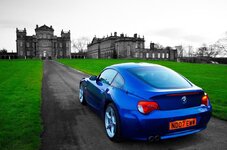
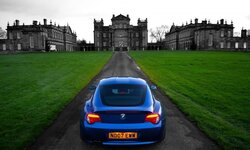
Z4 Coupe shots - Photoshop effort

A320_phill

Member
 Whitley Bay, Tyne and Wear
Thought I would share a few pics of my Z4 coupe as a few others have!

Been attempting amateur photography for a few years with an entry level DSLR and just trying to learn photoshop now that my girlfriend uses it for work. Any comments welcome as I find the art of processing them very difficult and I am keen to learn more, especially with there being some clearly talented photographers on the forum!

Took these this evening after a wash and Dodo Juice wax, and edited in Photoshop CS6 with an attempt at selective colour for the first time.

I've added the first one as an entry into this months photo comp as I quite like it.
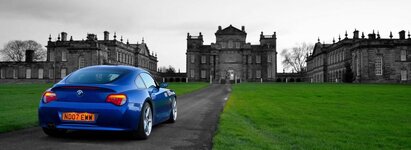
z4deleval2_zps045b52f2.jpg

z4deleval3_zpsbc955a45.jpg

z4deleval1_zps50302fb3.jpg
 
Its at Delaval Hall in Northumberland. About a mile or so up the coast from Whitley Bay, and about a 5 minute drive from my house :thumbsup:

The car and grass are the areas of selected colour. It didn't look right to me with just the car highlighted, but I see where you are coming from. If you could see the original there was a lot of colour from the sky, road and buildings.
 
Should have checked your Location :oops:

You'll have to get along to our NE runs next season - that's a nice looking Coupe.

Considering buying a DSLR camera myself for just such kind of shot - still not certain if I'll do that but I would like similar results to your photos.

:driving: :thumbsup:
 
paulgs1000 said:
Should have checked your Location :oops:

You'll have to get along to our NE runs next season - that's a nice looking Coupe.

Considering buying a DSLR camera myself for just such kind of shot - still not certain if I'll do that but I would like similar results to your photos.

:driving: :thumbsup:

Yeah I would definitely like to get involved in some meets :thumbsup:

I would say just go for it if you can with regards to the camera. I am by no means an expert, but have found a few good beginner books very helpful and also youtube for tutorials etc. Very satisfying if you end up with a shot you had sort of visualised in your head, or if that thing you wanted to try in photoshop actually works out!
 
Nice! Car looks lovely. You've done a great job of detailing it!
The photo and Photoshop work are good too, but the buildings don't look that obviously black and white if you know what I mean.

Try cutting and layering the bits that you want to keep in colour and using the different modes for b/w in Photoshop! That way you can experiment more for more/less surreal a black and white effect.
 
Hi thanks for the feedback.
I feel another photoshop youtube tutorial coming on :lol:

When you say different modes of b&w, do you mean with the various colour filters and infra red etc? Cheers
 
lux said:
srhutch said:
Where is the selective colouring?


Errr do you think that could be the green and blue bits!? :poke:

Grey building and grey sky = normal day up north.

Selective colouring is normally more selective than what has been done here so that the colours do stand out against a mainly b&w picture.

cars-selective_00275941.jpg
 
As I say, feedback appreciated, good or bad as I have a lot to learn. :thumbsup:

Thats a cool pic. Good composition and really suits the selective colouring.
 
Don't take it the wrong way OP, but as said on a grey day that picture would look the same.

Have youe tried making it all black & white except the tail lights?
 
A320_phill said:
Hi thanks for the feedback.
I feel another photoshop youtube tutorial coming on :lol:

When you say different modes of b&w, do you mean with the various colour filters and infra red etc? Cheers

Basically you can set the strengths of different origin colours.
See my steps in the photos below:

Original Colour image
colour_zpsf9ee8666.jpg


Basic De-Saturated Black/White. As you can see, certain colours have become lost or lacking in detail
bw1_zps69ec7110.jpg


Using PS's Black & White feature, I have set Reds and Yellows to darker grey and Greens set to lighter
bw2_zps626b476b.jpg


Then once you're happy that your greys are lighter/darker for the colours you want to be differentiated
Layer your original colour image over your BW layer and cut out the bits you want to lose the colour for
bw3_zps4e0ef7fe.jpg


Once you've done this, You can brighten up your colours if you wish to make it a little more surreal
bw4_zps9072812f.jpg


Hope this helps! :)
P.S. Sorry for taking up a shed load of room.
 
Back
Top Bottom