
 norwich
Hi all, thought I would post a quick guide for those with the auto box that keeps giving the orange gearbox light for the selector locations sensor.
my 2.5 2003 auto has always had this light intermittently and turning off and on, along with moving the sector would make the light disappear for a few days.
I found a video on YouTube showing how to change the switch/sensor for an X5, however the Z4 was much easier and I managed to do in about an hour!
tools needed:
ramps or a way to raise the front of the car to get under ( I used drive on Ramps on the drive)
10mm socket
10mm spanner
13mm spanner
13mm socket
large flat head screwdriver
1.
Put the car safely on the ramps and put handbrake on and in park
2.
under the passenger side (UK) roughly in line with the jack pad at the front you will see a round connector and behind that on the side of the gearbox is the selector switch or neutral safety switch which will look like the below - the cable comes out the top when fitted to the gearbox
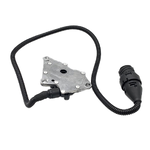
3.
untwist the connector and pull apart - the end connected to the switch is fixed in a bracket that is bolted to the gearbox DO NOT REMOVE FROM BRACKET AS YOU WILL BREAK CLIPS. instead there is a 13 mm bolt that holds the bracket - undo this and let the cable hang. its much easier to remove from the bracket when not under the car (as I found out!)
4.
using the 13mm socket and spanner undo the nut on the shaft that goes through sensor and remove the metal plate that attaches to the cable from the shaft - you might need to gently prize with the screw driver to get it off - don't remove from the selector cable/rod!
5. undo the 2 bolts either side of the switch holding it to the gear box. the one closest to the rear I could use the socket the whole way, the one at the front I needed to use a spanner as when fully out there was not enough room to remove the socket (doh!)
6.
using the screwdriver, slowly leaver the switch off the shaft, do a small amount one side , then the other. the shaft is splined so try not to twist otherwise it will rotate and make things more difficult later.
7.
the black connector slide backwards out the bracket - there are 2 tabs at the back. of the socket that need to be gently! lifted and it will slide out leaving the collar in the metal bracket - do the reverse to fit the new one.
8.
Hold both new and old switches together and rotate the splined collar inside the switch so they both match, there will be one side with a flat spot - these both need to match up
9.
very gently put the new switch on the splined shaft. you may need to rotate it gently to get it too slide on. (no grease needed) if it won't go, the collar needs rotating until it does. don't just force it as you will round the splines (as I did)
10.
the cable goes round the bolts behind the switch - make sure you route the cable before pushing the switch all the way on.
11.
put the gear selector back on the shaft and tighten all 3 bolts back up.
12.
attach the cable bracket and connect the connectors
13.
you should now be able to cycle through the PNRD without the gearbox light!
If the shaft moved whilst fitting the switch you may need a friend to move the leaver whilst under the car to get it rotate into the right position to slide back on the shaft.
hope this helps those of you with the issue!
my 2.5 2003 auto has always had this light intermittently and turning off and on, along with moving the sector would make the light disappear for a few days.
I found a video on YouTube showing how to change the switch/sensor for an X5, however the Z4 was much easier and I managed to do in about an hour!
tools needed:
ramps or a way to raise the front of the car to get under ( I used drive on Ramps on the drive)
10mm socket
10mm spanner
13mm spanner
13mm socket
large flat head screwdriver
1.
Put the car safely on the ramps and put handbrake on and in park
2.
under the passenger side (UK) roughly in line with the jack pad at the front you will see a round connector and behind that on the side of the gearbox is the selector switch or neutral safety switch which will look like the below - the cable comes out the top when fitted to the gearbox
3.
untwist the connector and pull apart - the end connected to the switch is fixed in a bracket that is bolted to the gearbox DO NOT REMOVE FROM BRACKET AS YOU WILL BREAK CLIPS. instead there is a 13 mm bolt that holds the bracket - undo this and let the cable hang. its much easier to remove from the bracket when not under the car (as I found out!)
4.
using the 13mm socket and spanner undo the nut on the shaft that goes through sensor and remove the metal plate that attaches to the cable from the shaft - you might need to gently prize with the screw driver to get it off - don't remove from the selector cable/rod!
5. undo the 2 bolts either side of the switch holding it to the gear box. the one closest to the rear I could use the socket the whole way, the one at the front I needed to use a spanner as when fully out there was not enough room to remove the socket (doh!)
6.
using the screwdriver, slowly leaver the switch off the shaft, do a small amount one side , then the other. the shaft is splined so try not to twist otherwise it will rotate and make things more difficult later.
7.
the black connector slide backwards out the bracket - there are 2 tabs at the back. of the socket that need to be gently! lifted and it will slide out leaving the collar in the metal bracket - do the reverse to fit the new one.
8.
Hold both new and old switches together and rotate the splined collar inside the switch so they both match, there will be one side with a flat spot - these both need to match up
9.
very gently put the new switch on the splined shaft. you may need to rotate it gently to get it too slide on. (no grease needed) if it won't go, the collar needs rotating until it does. don't just force it as you will round the splines (as I did)
10.
the cable goes round the bolts behind the switch - make sure you route the cable before pushing the switch all the way on.
11.
put the gear selector back on the shaft and tighten all 3 bolts back up.
12.
attach the cable bracket and connect the connectors
13.
you should now be able to cycle through the PNRD without the gearbox light!
If the shaft moved whilst fitting the switch you may need a friend to move the leaver whilst under the car to get it rotate into the right position to slide back on the shaft.
hope this helps those of you with the issue!