Z4 and Dension - Compatibility unknown

I've now had some time to play with the Dension GW300 and it looks like there is a problem. I can only see the current track, or artist, or playlist, or album. So if I have a list of many songs, I can only see one - I can't scroll or search through and select a different one. Once in a particular 'mode' (e.g. artist, album, all, etc) I can press the 'next' button on the steering wheel, and get the next song etc, but I just can't see more than one on the screen. A bit frustrating, but that's the gamble you take when you can't find anyone else to say they definitely have this working 'correctly' on their Z4. I've opened a case with Dension to see if there's anything they can suggest.
Failing that I might just throw all songs into a few folders and then use the 'random' function to play all the songs within. Perhaps create the folders as genres etc.
 
have you checked if you are running the latest Firmware?

when i got my gateway500, and was having issues, i did live chats in the mornings with there support - somewhat helped but still left me frustrated. lol
 
Checking the .bin file it looks like the firmware is newer than what's on the website. I'm a bit scared to try to 'update' it in case it makes it worse (and how would I go back if the same firmware's not on the website?).
I'm waiting to hear back from Dension, hopefully they might have a suggestion, but I think I've tried all the options.
 
Okay, final update (I think) on this.
After some exchange of info with Dension's tech support, who I have to admit have been very helpful and great with responses/suggestions etc, and an upgrade to the latest firmware, I have concluded:
The GW300 'works' with the Z4, but only so far as having one line of text goes. So, despite having the 16:9 satnav screen, the car is not capable of displaying lists (e.g., lists of songs, or artists, albums, etc) when using the Gateway300.
Because of this, I changed the display option to '2' (it was set to '4') so that all text is displayed at the top of the screen, in one line of text. I have pretty much all of the GW300 functionality, but only as if I had the head unit with no satnav screen (i.e. the head unit with the single line LCD). This will be good enough to play and search the contents of the USB stick connected to the GW300. And it's still miles ahead of the functionality of the OEM system, while retaining the navigation, radio and computer displays on the satnav screen.
Next step is to do the mod as described by PerryGunn so that I can access the USB stick from the AUX panel. This will make it accessible, but still discreet.
 
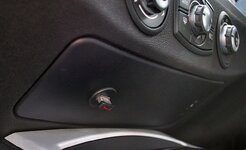
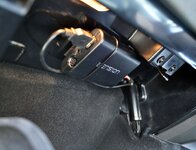
Follow up post to show the 'extra' bits I've added as per perrygunn's suggestion.
I ran a USB extension cable from the GW300 to the 'Aux' panel under the aircon controls, and connected a low profile memory stick to make it easy to change the music source if I want to.
22590241815_011be0639d_b.jpg
21969041883_e48d9d4832_b.jpg
 
Back
Top Bottom