Hi Guys I'm a noob to the forum and to owning a zed so here goes…
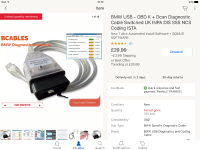
So recently bought a 57 plate E85 2.0ltr M sport the car is great but I think i have the dreaded transport mode issue as mentioned in a few other places on here. i’m 99% sure its in transport mode as I had to replace the battery due to low voltage and when i bought the car the guy had to boost it. so on further research I started reading about ODB, INPA, DIS, etc… Being a software developer and not too shy with tech I decided to try and remove, delete or switch off this transport mode myself. In my naivety I ordered this cable of amazon…
https://www.amazon.co.uk/gp/product/B01DGZCJA4/ref=oh_aui_detailpage_o00_s00?ie=UTF8&psc=1
Now after god knows how many attempts at installing the software and getting everything set up I'm beginning to think i might have ordered the wrong cable!
The confusion for me is coming from a change in cables by BMW in 2007. So my car is a 57 plate and i think it’s production is 03/2007 but not 100% sure on that. on cable-shack.co.uk line is for cars built car between 07/2000 and 02/2007 and DCAN is for cars built between 07/2000 and 2014 (E series models) the Zed being an E85 does that mean its an E series model? :? and will the K+DCAN cable i have bought work with my car? :?
Any info would be greatly appreciated - i’ve spent weeks trying to figure this out and remove the transport mode but to no-avail… :x :x :x
So recently bought a 57 plate E85 2.0ltr M sport the car is great but I think i have the dreaded transport mode issue as mentioned in a few other places on here. i’m 99% sure its in transport mode as I had to replace the battery due to low voltage and when i bought the car the guy had to boost it. so on further research I started reading about ODB, INPA, DIS, etc… Being a software developer and not too shy with tech I decided to try and remove, delete or switch off this transport mode myself. In my naivety I ordered this cable of amazon…
https://www.amazon.co.uk/gp/product/B01DGZCJA4/ref=oh_aui_detailpage_o00_s00?ie=UTF8&psc=1
Now after god knows how many attempts at installing the software and getting everything set up I'm beginning to think i might have ordered the wrong cable!
The confusion for me is coming from a change in cables by BMW in 2007. So my car is a 57 plate and i think it’s production is 03/2007 but not 100% sure on that. on cable-shack.co.uk line is for cars built car between 07/2000 and 02/2007 and DCAN is for cars built between 07/2000 and 2014 (E series models) the Zed being an E85 does that mean its an E series model? :? and will the K+DCAN cable i have bought work with my car? :?
Any info would be greatly appreciated - i’ve spent weeks trying to figure this out and remove the transport mode but to no-avail… :x :x :x