Ultramega's 35i mod & maintenance log

ultramega

Member
 Scotland
As the title suggests, I'll be recording every fix and change that happens during my ownership. My ownership began early January, and the starting point was a 2010 35i DCT with 76k miles and the following mods already in place:
  • Koni Special Active Dampers
    Quaife ATB rear differential
    VRSF downpipes
    Mishimoto intercooler
    Masata chargepipe
    Burger DC intake
    MHD Stage 2+

What has happened so far:

I took the seats out so I could clean the carpets
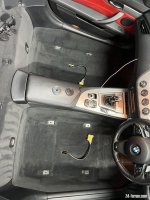
IMG_1430.jpg

It definitely needed doing, as you can see!
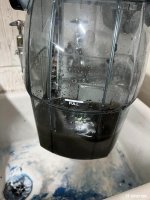
IMG_1432.jpg

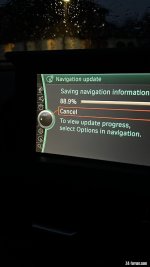
I updated the still 2010 maps
705694CB-B87E-469A-BD3E-74E5D842CEBB.jpg

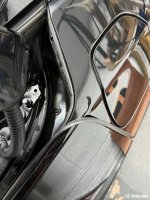
I replaced this outer seal on the boot
IMG_1538.jpg

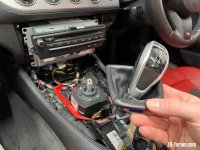
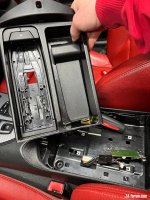
I ripped this stupid thing out. It was quite reluctant to leave the vehicle!
IMG_1555.jpg

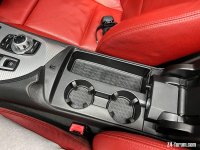
I replaced the above with this. I used to manage fine having a car without a cup holder, but not now. It doesn't make me a bad person.
IMG_1557.jpg

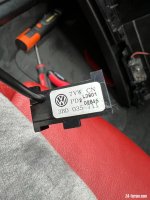
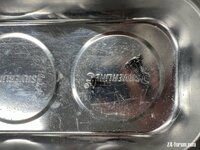
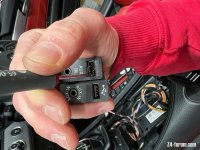
While I had the centre console apart I replaced the USB/AUX input. No idea what befell the old one, but I am sure you can see why it wasn't working.
IMG_1556.jpg

Other things that have happened:
I have put a set of Michelin PS4's on the back. They don't match the Goodyears that are still on the front, but I've never had an issue mixing front and rear, and the front will get PS4's when required.
I re-flashed the map from stage 2+ down to stage 1. I don't mind admitting the claimed 420bhp was a bit terrifying, especially at this time of year. Of course, it wasn't helped by the nearly bald Goodyears it had on the back until I replaced them!

Things happening imminently:
The car is in a nearby garage today for a thorough checking over. Not one I have used before, but they are a Merc/BMW specialist and they have a fantastic reputation (https://goo.gl/maps/DoxJgyPHEQN7t1PTA)
I know it needs new rear discs & pads, and I suspect something is worn in the front suspension. I'm also ready for them finding any signs of leaks, but hopefully nothing too dramatic for my wallet.

Things happening in the near future:
Fitting an Android screen - this weekend. Will also include removing the existing CarPlay piggyback system, hopefully easy to find!
Fitting LCI side indicators - probably this weekend, depending how well the above goes.
Replacing door top seals - I'll have to establish to what extent the door needs taking apart before tackling this.

Thing happening as soon as possible:
Audio upgrade - realistically I think I'm going to get someone to do this for me. I have three young kids, so there's a limit to the time I can put into doing things myself. The car has base audio, so it needs new speakers, an amp, a DSP and doors taking apart for sound deadening. How much I can spend on that lot will be determined on how many issues the garage find today!
 
I have thought about taking the seats out to clean the carpets thoroughly as there isn't any space under the seats to be able vacuum properly but I am worried the seats will be too heavy and I might end up scratching some trim or the sill trying to get them in or out, or maybe I am just weak :rofl:

Luckily the base audio is pretty simple to upgrade, here's a thread on what I did to mine. You may find it helpful:

https://z4-forum.com/forum/viewtopic.php?f=23&t=126024
 
Some impressive work done already!

Good luck working through your list. :thumbsup:
 
ultramega said:
I don't mind admitting the claimed 420bhp was a bit terrifying, especially at this time of year. Of course, it wasn't helped by the nearly bald Goodyears it had on the back until I replaced them!
Mmm ...
 
ultramega said:
......
I ripped this stupid thing out. It was quite reluctant to leave the vehicle!
IMG_1555.jpg

I replaced the above with this. I used to manage fine having a car without a cup holder, but not now. It doesn't make me a bad person.
IMG_1557.jpg
Hmmm, that'll be because there is a process for getting it out!! :wink:


ultramega said:
......
Things happening in the near future:
Fitting an Android screen - this weekend. Will also include removing the existing CarPlay piggyback system, hopefully easy to find!
....
The existing will probably be either above the glovebox or behind the air-con controls, either way you need to remove those anyway to fit the new Android screen.

If you haven't already seen it my video on installing the Android screen.... https://www.youtube.com/watch?v=VC9VFJBDFQM&t=472s

And incase you've not completely destroyed the phone charger completely you could always re-install part of it where the blank tray is and install the OE wireless base so you can keep your phone charged while you are driving. Information is on the second post down page 2 of this thread... https://z4-forum.com/forum/viewtopic.php?t=132196&start=15

New link for OE wireless charger.... https://www.ebay.co.uk/itm/304343524271?hash=item46dc49a3af:g:KCIAAOSw93dfEDwP
 
Silverstar said:
I have thought about taking the seats out to clean the carpets thoroughly as there isn't any space under the seats to be able vacuum properly but I am worried the seats will be too heavy and I might end up scratching some trim or the sill trying to get them in or out, or maybe I am just weak :rofl:

Luckily the base audio is pretty simple to upgrade, here's a thread on what I did to mine. You may find it helpful:

https://z4-forum.com/forum/viewtopic.php?f=23&t=126024
Thanks Silverstar, that is useful.
 
AnubisZed said:
Hmmm, that'll be because there is a process for getting it out!! :wink:

The existing will probably be either above the glovebox or behind the air-con controls, either way you need to remove those anyway to fit the new Android screen.

If you haven't already seen it my video on installing the Android screen.... https://www.youtube.com/watch?v=VC9VFJBDFQM&t=472s

And incase you've not completely destroyed the phone charger completely you could always re-install part of it where the blank tray is and install the OE wireless base so you can keep your phone charged while you are driving. Information is on the second post down page 2 of this thread... https://z4-forum.com/forum/viewtopic.php?t=132196&start=15

New link for OE wireless charger.... https://www.ebay.co.uk/itm/304343524271?hash=item46dc49a3af:g:KCIAAOSw93dfEDwP

All good info Dave, thanks.

Yes, not sure where I will find the existing unit, but I had figured I would need to remove everything that you said.

Unfortunately my removal "process" for the phone cradle was destructive. Oops.
 
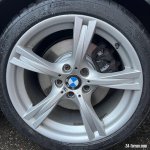
Car came back from the garage. Has a new OSF ball joint which has cured the clunk experienced over bumps. Also has new rear discs & pads, which don't feel any different but look way better.
IMG_1600.jpg

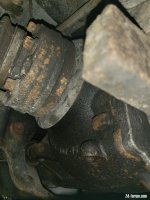
Got a bit of a weep on one of the drive shaft seals, so it will be going back in to get that done.
20220202_124051_resized.jpg

Overall though, a good health report, and nothing I didn't expect for a 12 year old car with 76k miles on it. Oh, and from their test drive they commented that it was "a bit lively"
 
Nice wee write up.
Good luck and have fun working through the list.
Enough time to get it done before the better weather cones back :driving: :thumbsup:
 
craig3.2 said:
Nice wee write up.
Good luck and have fun working through the list.
Enough time to get it done before the better weather cones back :driving: :thumbsup:
Thanks Craig. Android screen fitting yesterday was fun from start to finish.
 
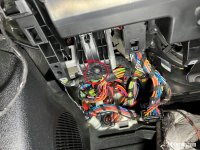
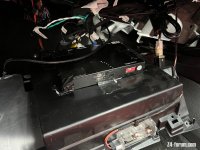
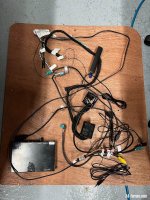
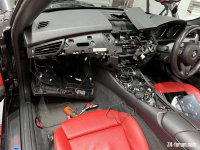
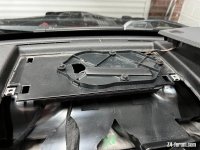
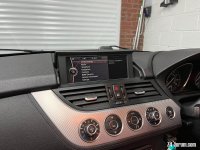
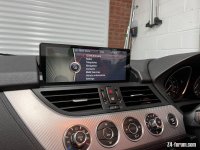
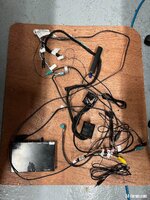
Android screen fitting happened yesterday, and the putting back together was completed this afternoon. Took longer than I expected, but that was mostly down to removing the existing MMI box.
The whole process was made easier by Dave's SUPERB videos.
Anyway, this is what went down...
IMG_1606.jpg

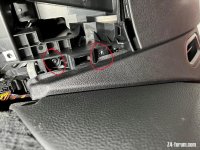
Eventually managed to remove the glovebox. It had a couple of extra screws I didn't spot at first, over and above the "optional" one Dave mentions.
IMG_1612.jpgIMG_1613.jpg
IMG_1614.jpg
IMG_1617.jpg
IMG_1616.jpg
IMG_1623.jpg
IMG_1624.jpg

Sticky-ish points:
Removing the a-pillar trim to route the mic cable:
I managed to prise it off eventually, having removed the sun visor, but not wanting to remove the continuation of the trim along the top of the windscreen. I eventually managed to get it clipped into place, but at no point could I see where the actual clips were! And the mic still works, so none of the tesa tape I used has fouled on the trim.
Rear view mirror:
This was easy enough to remove, but I should have looked it up first. Had to google getting it back on. It a hold-at-60°-and-then-rotate movement. When I later went for a test drive the mirror mount now has some springy play in it, so I'll need to keep an eye. Clipping the cover back on was pretty difficult too.
Fitting all the cables in:
Took eleventy three in-out-adjust movements of the head unit and cables to get it to go back in far enough. Just had to keep reaching back and moving cables/connectors about.

IMG_1605.jpg
IMG_1632.jpg
I'm very happy with the results. Ignoring the additional functions, the screen quality alone over OEM is a vast improvement. There are a few settings I'll need to get in touch with their support about, but everything is working as it should. I'm calling this a win.
 
Screen looks great now its all back in place. :thumbsup: Hopefully worth all that effort. I know the first ones had some issues e.g. only km/hr in the setup. Be interested to hear if theres any other gripes but probably a bit early days for you yet. Certainly the idrive is very dated now.. but not yet sure i want to take the leap!
 
ultramega said:

Go on then I'll ask, what are you doing with the MMI box you've pulled out? :D

Great job by the way, nicely done. Any screws left over after you've put it all back together? :rofl:
If you want to know anything give me a shout as I may be able to answer quicker (and in better English) then the sellers :lol:
 
AnubisZed said:
Go on then I'll ask, what are you doing with the MMI box you've pulled out? :D
I suppose I should sell it really. You've got first refusal - make me an offer if you want it. Oh, I got a manual for it too - I can send that through to you for a look first if you want. May have a solution to the phone call audio issues I had.

AnubisZed said:
Great job by the way, nicely done. Any screws left over after you've put it all back together? :rofl:
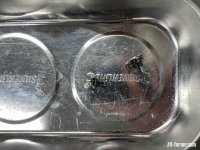
Only two. :dizzy:
IMG_1637.jpg

AnubisZed said:
If you want to know anything give me a shout as I may be able to answer quicker (and in better English) then the sellers :lol:
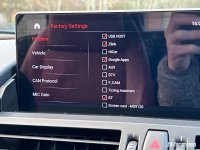
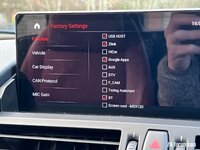
I'm really looking for an explanation as to what all the advanced settings do. Wouldn't want to totally cock things up. But I think the menus I have are maybe different from yours?
IMG_1631.jpg
Other issue I have (but haven't properly looked into yet is connecting my phone to it via bluetooth. I paid for wired carplay (it uses the Zlink5 app), but whenever I try to connect to the android system through bluetooth the Zlink5 app opens up trying to do wireless carplay... but not managing. I don't want wireless carplay (don't ask why), so need a way round it. Like I say, not had a play about yet. They are most likely on Chinese NY downtime right now, so I haven't been in touch with them yet.
 
Looks really good - I've thought about doing the same, but I just know I'd end the day with a sh!t load of wires that I've got no idea what to do with and be contemplating a massive bill to get someone else to clean up my mess :rofl:
 
ultramega said:
AnubisZed said:
Go on then I'll ask, what are you doing with the MMI box you've pulled out? :D
I suppose I should sell it really. You've got first refusal - make me an offer if you want it. Oh, I got a manual for it too - I can send that through to you for a look first if you want. May have a solution to the phone call audio issues I had.

I'll PM you.
As for the phone issue, I know the remedy for that, not to use that crappy microphone that's included and T-off the OE microphone with (what should have been) the supplied T loom, but it looks like whoever fitted it didn't realise this so didn't use it (or it was never supplied in the first place) and fitted that supplied microphone instead.

ultramega said:
AnubisZed said:
Great job by the way, nicely done. Any screws left over after you've put it all back together? :rofl:
Only two. :dizzy:
file.jpg

That's 3!! :wink:

ultramega said:
AnubisZed said:
If you want to know anything give me a shout as I may be able to answer quicker (and in better English) then the sellers :lol:
I'm really looking for an explanation as to what all the advanced settings do. Wouldn't want to totally cock things up. But I think the menus I have are maybe different from yours?
file.jpg

Yeah mine was the original Android 8.1, looks like yours is running Android 10 (or maybe 11).
Not 100% sure, but I'd leave those as they are (*). "F_CAM" I'd say is for the front DVR camera.

ultramega said:
Other issue I have (but haven't properly looked into yet is connecting my phone to it via bluetooth. I paid for wired carplay (it uses the Zlink5 app), but whenever I try to connect to the android system through bluetooth the Zlink5 app opens up trying to do wireless carplay... but not managing. I don't want wireless carplay (don't ask why), so need a way round it. Like I say, not had a play about yet. They are most likely on Chinese NY downtime right now, so I haven't been in touch with them yet.

OK, so looking at your Settings screen above, (*)where it says "Zlink", un tick this and it'll dissable CarPlay, so you'll be able to use the on-board Bluetooth. Presumably the idea here is that if you're going to use CarPlay then you wouldn't need a separate Bluetooth connection as it would be included once CarPlay is up and running.
 
AnubisZed said:
That's 3!!
3ish...

AnubisZed said:
OK, so looking at your Settings screen above, (*)where it says "Zlink", un tick this and it'll dissable CarPlay, so you'll be able to use the on-board Bluetooth. Presumably the idea here is that if you're going to use CarPlay then you wouldn't need a separate Bluetooth connection as it would be included once CarPlay is up and running.
Tried that, made no difference, Carplay still worked too. Next step is to have my phone forget it has ever been connected for carplay, then connect by Bluetooth, then try carplay.
 
Back
Top Bottom