
Okay, so the last couple of days ive spent messing around swapping my Racepak IQ3s to a newer version of the same dash , but with a logger option. (notice how now Racepak is owned/distributed by Holley) and don't bother joining their forums for after sale service or advice.. its non existent. you might ask yourself WHY would you buy one of these dash's? well it comes down to only one thing. The price.. and the configurability. Pretty much half price of what you would pay for the same thing from Aim. Anyways, it IS a really nice unit,, just that the support is s**t and your pretty much left to figure stuff out on your own. If youve got a stand alone ECU, its much much easier.
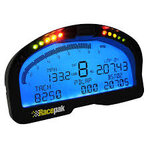
This isnt just for the IQ3s, but for the whole range of digital dashes from Racepak, using their Racepak Data-Link program. Currently version 5.something or rather.
Right, so pretty much the same dash, just with a logger option, you'd think that would be a copy and paste solution , in and out in a few minutes.. yeah right.. its never that easy..
It could be that easy, but ive decided to make it harder for myself as you can select a multitude of ECU;s that are compatible with this dash, but at this stage i don't have one yet, that leaves me with a twisted pair known as the Canbus, which i am sure that if your still here reading, no doubt you've head about the Canbus.
Anyhow, the Racepak is compatible with the Canbus Protocol, but its just a fucker to set up, and even though i did it a few years ago, i couldn't for the life of me remember how i did it.
So heres the Tut..
If your buying the digital dash brand new, skip to the next section.
If your buying used, then youll need to reset your dash, otherwise youll populate with a heap of channels that no doubt youve got no use for and is increasingly confusing.
Right, so long hold button#2 untill the red light blinks twice and then button one to enter SETUP 1.
Scroll to reset to default and make it so, then scroll down to ECU types and select USER DEFINED. (the second bit you can also do in the software, but easier just to do it while your here.
Right, connect the dash up to the canbus, and make sure the USB cable is in the back of the dash and then connect that sucker to the laptop. Start the Data-Link 2 proggy and then (new or reset dash right? ) and then goto open config under the file menu, and select the "IQ3S" or whatever other Dash youve got from them.
click "I know its not the default config, but go on and use it for this time anyways" then click on the read button, and youll get a populated channel list that is supported out of the box by the IQ3S
(now if youve bought used and havent reset the dash, youll get a list of whatever the previous user had defined) took me a while to figure out how to delete all that sheit.
If you didnt set up the ecu type in the dash settings itself, then we go now to the dash control panel and we will set it up now. So right click the first channel (it will be names whatever your dash is) and it will bring you to this menu.
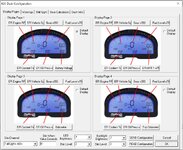
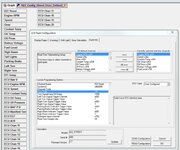
Click on the Dash info tab at the top, and then youll land here
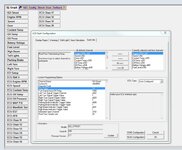
select ECU type from the list on the left and user configured type ECU from the box on the right.
remember to send the configuration to the dash.
Next, go to Edit->Read VNet Config (new channels), you will get a single channel titled EFI Setup
ok.. so now because you've gone and setup the ECU type in the settings on the actual dash, or because you've done it now in the software part, either way, you'll have a Setup EFI button at the bottom of the list of channels.
so this is where we can add a list of canbus channels
I choose 12, because why not, you might choose 10 or 30, doesnt really matter, just depends on how much stuff you wanna display.
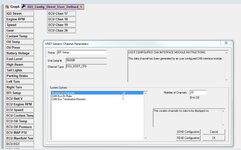
Right click on the Setup Efi channel button, set the number of channels to 12 (or less if you don't need 12), the CAN Bus Bit Rate to 500k and the CAN Bus Termination Resistor to On.
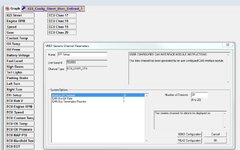
I choose 20 in that screen, but later changed it to 12. No biggie.
Send that configuration again to the dash and then go to edit: and read the v-net channels again, and WHOLA.. You now have 12, or how many channels you set to define as you like!..
Cheers, the rest is pretty easy to figure out.
This isnt just for the IQ3s, but for the whole range of digital dashes from Racepak, using their Racepak Data-Link program. Currently version 5.something or rather.
Right, so pretty much the same dash, just with a logger option, you'd think that would be a copy and paste solution , in and out in a few minutes.. yeah right.. its never that easy..
It could be that easy, but ive decided to make it harder for myself as you can select a multitude of ECU;s that are compatible with this dash, but at this stage i don't have one yet, that leaves me with a twisted pair known as the Canbus, which i am sure that if your still here reading, no doubt you've head about the Canbus.
Anyhow, the Racepak is compatible with the Canbus Protocol, but its just a fucker to set up, and even though i did it a few years ago, i couldn't for the life of me remember how i did it.
So heres the Tut..
If your buying the digital dash brand new, skip to the next section.
If your buying used, then youll need to reset your dash, otherwise youll populate with a heap of channels that no doubt youve got no use for and is increasingly confusing.
Right, so long hold button#2 untill the red light blinks twice and then button one to enter SETUP 1.
Scroll to reset to default and make it so, then scroll down to ECU types and select USER DEFINED. (the second bit you can also do in the software, but easier just to do it while your here.
Right, connect the dash up to the canbus, and make sure the USB cable is in the back of the dash and then connect that sucker to the laptop. Start the Data-Link 2 proggy and then (new or reset dash right? ) and then goto open config under the file menu, and select the "IQ3S" or whatever other Dash youve got from them.
click "I know its not the default config, but go on and use it for this time anyways" then click on the read button, and youll get a populated channel list that is supported out of the box by the IQ3S
(now if youve bought used and havent reset the dash, youll get a list of whatever the previous user had defined) took me a while to figure out how to delete all that sheit.
If you didnt set up the ecu type in the dash settings itself, then we go now to the dash control panel and we will set it up now. So right click the first channel (it will be names whatever your dash is) and it will bring you to this menu.
Click on the Dash info tab at the top, and then youll land here
select ECU type from the list on the left and user configured type ECU from the box on the right.
remember to send the configuration to the dash.
Next, go to Edit->Read VNet Config (new channels), you will get a single channel titled EFI Setup
ok.. so now because you've gone and setup the ECU type in the settings on the actual dash, or because you've done it now in the software part, either way, you'll have a Setup EFI button at the bottom of the list of channels.
so this is where we can add a list of canbus channels
I choose 12, because why not, you might choose 10 or 30, doesnt really matter, just depends on how much stuff you wanna display.
Right click on the Setup Efi channel button, set the number of channels to 12 (or less if you don't need 12), the CAN Bus Bit Rate to 500k and the CAN Bus Termination Resistor to On.
I choose 20 in that screen, but later changed it to 12. No biggie.
Send that configuration again to the dash and then go to edit: and read the v-net channels again, and WHOLA.. You now have 12, or how many channels you set to define as you like!..
Cheers, the rest is pretty easy to figure out.
Attachments
Last edited: