
Hi all
Following a long 3 week wait my Sound Generator Kit for the z4 2.5si has finally arrived. I ordered it from Pelican Parts in the U.S.A. via Germany then posted back to the U.S.A. and finally to Australia.
First impressions –It looks a very tidy unit and appears exactly the same as what’s on the Z4 3.0si, Best of all it was very easy to fit. All that was required a flat faced and torx screwdriver. Total fitting time was about 30 minutes including the photo session.
Didn’t buy it locally as B.M.W. wanted about AU$680.00 or approx US$500. I bought in from the U.S.A. for $200 plus postage. I’m happy with that.
I’ve ripped together a few photo’s of the exercise so hope you enjoy. Sounds much better to drive and good $$$ value.
OLD RUBBER BOOT VERSUS NEW GENERATOR KIT
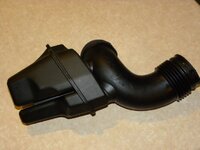
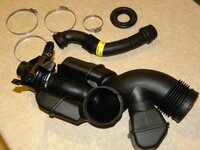
1. Looking into the engine bay.
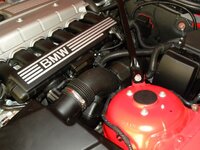
2. Loosen both jubilee clips (from air box and throttle body) then give the old rubber boot a firm roll with the wrists and it will come loose. Remove the unit from car and keep in a safe place. You may want it again.
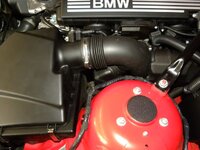
3. Following the removal of the old boot.
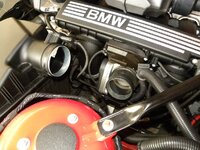
4.Loosen off right side shock tower support then slide it to the far right. The new sound Generator is a much larger unit and requires the extra room for placement.
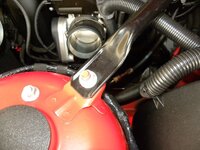
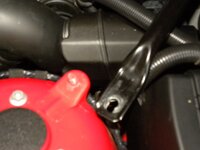
5. Slide into position the main body of the Sound Generator then tighten firmly (you don’t want air leakage) the two jubilee clips you removed minutes earlier on. Swing the rear tower brace to the right to allow fitting of the sound generator tube to firewall.
IMG]http://i907.photobucket
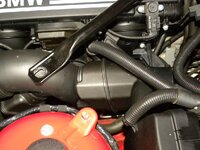
6. firewall plug and sound generator tube
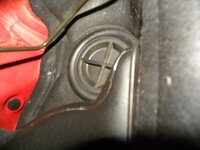
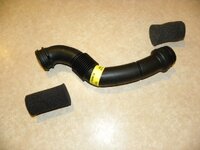
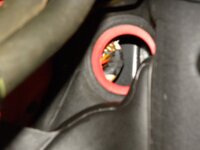
7. Place the rubber grommet secure on to the end of the S/G tube then push firmly into the firewall. Push the other end firmly into the S/G main body.
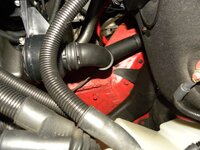
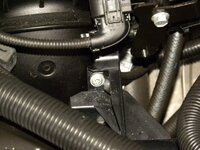
8. Now place the torx screw into the main S/G housing ( there is only one hole – see photo ) and screw to engine body.
IMG]http://i907.photobucket.com/albums/ac278/wildbill2010/DSCN2012-1.jpg[/IMG]
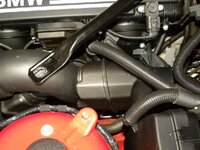
9. Now slide the tower brace back to its original position and tighten it back up.
IMG]http://i907.photobucket.com/albums/ac278/wildbill2010/DSCN1998.jpg[/IMG]
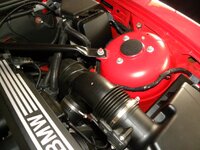
10. Re-check your work and if done correctly it’s music to your ears – enjoy.
IMG]http://i907.photobucket.com/albums/ac278/wildbill2010/DSCN1929.jpg[/IMG
Following a long 3 week wait my Sound Generator Kit for the z4 2.5si has finally arrived. I ordered it from Pelican Parts in the U.S.A. via Germany then posted back to the U.S.A. and finally to Australia.
First impressions –It looks a very tidy unit and appears exactly the same as what’s on the Z4 3.0si, Best of all it was very easy to fit. All that was required a flat faced and torx screwdriver. Total fitting time was about 30 minutes including the photo session.
Didn’t buy it locally as B.M.W. wanted about AU$680.00 or approx US$500. I bought in from the U.S.A. for $200 plus postage. I’m happy with that.
I’ve ripped together a few photo’s of the exercise so hope you enjoy. Sounds much better to drive and good $$$ value.
OLD RUBBER BOOT VERSUS NEW GENERATOR KIT
1. Looking into the engine bay.
2. Loosen both jubilee clips (from air box and throttle body) then give the old rubber boot a firm roll with the wrists and it will come loose. Remove the unit from car and keep in a safe place. You may want it again.
3. Following the removal of the old boot.
4.Loosen off right side shock tower support then slide it to the far right. The new sound Generator is a much larger unit and requires the extra room for placement.
5. Slide into position the main body of the Sound Generator then tighten firmly (you don’t want air leakage) the two jubilee clips you removed minutes earlier on. Swing the rear tower brace to the right to allow fitting of the sound generator tube to firewall.
IMG]http://i907.photobucket
6. firewall plug and sound generator tube
7. Place the rubber grommet secure on to the end of the S/G tube then push firmly into the firewall. Push the other end firmly into the S/G main body.
8. Now place the torx screw into the main S/G housing ( there is only one hole – see photo ) and screw to engine body.
IMG]http://i907.photobucket.com/albums/ac278/wildbill2010/DSCN2012-1.jpg[/IMG]
9. Now slide the tower brace back to its original position and tighten it back up.
IMG]http://i907.photobucket.com/albums/ac278/wildbill2010/DSCN1998.jpg[/IMG]
10. Re-check your work and if done correctly it’s music to your ears – enjoy.
IMG]http://i907.photobucket.com/albums/ac278/wildbill2010/DSCN1929.jpg[/IMG
 You could have edited your original post to fix the links.
 wouldnt it have been cheaper to buy an induction kit to get more noise?

