Satnav boot problems... Not at all

boyee

Member
 Bristol
So I believe I have been very stupid this evening.

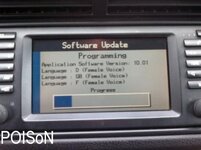
Tried to install the latest v32 version to my 2003 satnav system, booted up fine but misread the instructions online - turned the ignition off then inserted the cd, then turned it on. Not only that as an automatic reaction whilst I waited I closed the door!

It won't boot at all now, plays music etc but the screen is blank. Now I am pretty pissed off with myself and worried I have made an expensive mistake. There anyone in the know that could point me in the right direction?
 
I think its entirely fixable. I'm too new to know lots of the background info on these cars but I definitely read a post from someone who'd done similar and fixed it. I think reinstalling the old DVD sorted it. Someone will be along shortly to point you in the right direction I'm sure.
 
That's quite reassuring Chris. I'm pretty new also, having a computer in the car for me is space age! I'm still used to carburettors.

I will have a look in the meantime, though few rums down my gullet may not help!
 
Is it possible to try the firmware whilst driving? It's a 30min work journey.

If not, it was left more than 5 mins and nothing. Or am I being impatient?
 
i wouldnt do a firmware whilst driving, you want the data to get to the source as clean as possible , car movement could cause read errors.

bmw say not to have engine running and battery to be good, tbh it takes 5 mins roughly.

but interrupting power supply isnt good.

when u put the v32 disc into map drive did it come up with a grey screen and a loading some thing like this

618766a41055a4aace7ca1f4a99dcf77.jpg

and then you lost power?
 
I had some problems with my sat nav.
I fixed it by removing the fuse (when key not in ignition). Left fuse out for a few hours. Then put it back, then turned on ignition and turned sat nav on again and it came back to life. I think the software had got into an endless loop. The satnav doesn't fully turn off when key is removed. You can hear the dvd spinning up 1st thing when you unlock the car and get in, even without putting key in ignition.
Removing fuse really turns it off.
Fuse box is behind glove box, all easy to do in 30 seconds and shown in your owners manual.

Hope this helps, can't see how it could do any harm.

Good luck!
 
Have you tried disconnecting the battery for 15 mins and then trying to reinstall? If not, that's the first thing to try.

If that doesn't work the chances are that the update actually started writing the new data blocks and, if the firmware loader got as far as starting to update the firmware to the new version, you may not be able to recover using your new disc.

The installed firmware version for the mk IV is identified by two bytes in the initial data blocks that contain the major/minor version numbers, the BMW firmware loader checks the current version and will only proceed with an update if there is a difference in version numbers. This means that you can't reinstall the same version. When I produced versions of the firmware with custom loader screens I would always use a version number fairly remote from the BMW standard sequence to allow people to return to stock using any OEM version

The way to get around this is to reinstall a known good earlier version of the firmware, if this works you can then try installing your new copy again
 
First thing. Cheers for the replies guys.

Biojo, it never got as far as the screen you show. Just cd-rom installed prompt screen. It then went blank for good 5 mins and that was when I got out and closed the door.

I will try the battery first, if not then the fuse. After that I need to find an early version of the firmware? Hopefully, it's a case of remove battery or fuse.

Will report back over the weekend.
 
boyee said:
First thing. Cheers for the replies guys.

Biojo, it never got as far as the screen you show. Just cd-rom installed prompt screen. It then went blank for good 5 mins and that was when I got out and closed the door.

I will try the battery first, if not then the fuse. After that I need to find an early version of the firmware? Hopefully, it's a case of remove battery or fuse.

Will report back over the weekend.
If you can't find an early version, I can do you a copy the original v32 but change the internal firmware version # - it'd still be v32 but identify itself as something else
 
Two things, have you managed to eject the CD as that can be a PITA.

Also you need to record the CD on the slowest sped possible. 1X is best but 4X should be ok. Any faster and you will probably have issues.
 
Perrygunn. If I can find a roll back I'll send you a pm.

The drive is working thus far, luckily. I will look at getting another iso burn software as I can't see an option for Windows.

Looking at the car this afternoon. Thanks for the info guys, slight panic stations last night!
 
Ok happy chappies. First step made to rework.

Disconnected the car for 15 minutes.
Turned to ignition 1 with original map dvd - no boot.
Inserted new firmware cd-rom, spinning rom, but no life on monitor.

So from this, I am assuming the next step is a stable older (than v32?) firmware disc installation?

Or a pull of the fuse?
 
when u say disconnected the car for 15mins if you mean battery id presume theres no point trying the fuse

if it hasnt booted and you have disconnected the battery, you might have bricked the unit, duno if thats the screen part or drive.

you can try a disc with earlier version but i dont see how this would help it boot and load a new image
 
From what's been said above it won't reinstall a firmware if it has the same version number. So I reckon try a different firmware. Think it's very unlikely its bricked.
 
Good news!

The computer is back, working and all back to normal. Looking to install v32 next.

Thanks for the help guys - i hope this thread will come in handy for another plonker in the future :thumbsup:
 
Great news. :thumbsup: Nothing worse than that feeling when you think you've ballsed something up beyond repair, glad its fixed.
 
Back
Top Bottom