

 Finland
I have had this dedicated, but annoyingly slow and cramped-screen Windows laptop for running ISTA and related sw in my garage. With too much vacation time at hands, I was wondering what it would take to install the software on an old iMac at disposal? Not too much, it turns out.
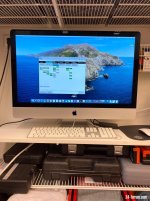
- One vintage, late 2013 27” iMac with 8gb memory, OS X fresh install, then updated to latest possible, Catalina. Expect to use some 200 gb of disk space.
- VMWare fusion 12 player, free from https://customerconnect.vmware.com/web/vmware/evalcenter?p=fusion-player-personal
- Windows 10, non-activated copy, free download from MS. Might buy a cheap legit license for $20, but for now, don’t see any drawbacks from using the non-activated one.
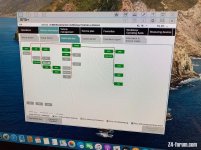
- ISTA setup files, several sources on the web, on ebay with the cables etc., EDIABAS set to com9, latency 1ms. Have not found a way to increase the resolution used, but it’s kind of cute to have it in smallish window.
It’s runnig way faster than on the laptop and most importantly, there’s more screen estate for notes, browsing etc. Wakes up in a couple of seconds, like macs do. Only drawback I can tnink of, it has a white keyboard - have to keep things clean like in a lab
- One vintage, late 2013 27” iMac with 8gb memory, OS X fresh install, then updated to latest possible, Catalina. Expect to use some 200 gb of disk space.
- VMWare fusion 12 player, free from https://customerconnect.vmware.com/web/vmware/evalcenter?p=fusion-player-personal
- Windows 10, non-activated copy, free download from MS. Might buy a cheap legit license for $20, but for now, don’t see any drawbacks from using the non-activated one.
- ISTA setup files, several sources on the web, on ebay with the cables etc., EDIABAS set to com9, latency 1ms. Have not found a way to increase the resolution used, but it’s kind of cute to have it in smallish window.
It’s runnig way faster than on the laptop and most importantly, there’s more screen estate for notes, browsing etc. Wakes up in a couple of seconds, like macs do. Only drawback I can tnink of, it has a white keyboard - have to keep things clean like in a lab

 Gothenburg


 Liverpool
