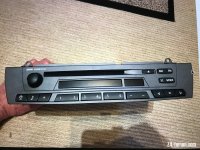
Please help me get the right Business CD headunit

Z4Mariner

Member
 Minnesota
I'm looking to purchase a Business CD Headunit (HU) to replace the Sat Nav Controller in my Coupe. Mojito recently documented a Sat Nav update using a Garmin 66 GPS to modernize his Zed. I am getting ready to do something similar, and I received the Garmin from my wife as a Christmas gift. I know using a Business CD HU will give up my DSP, but that's okay. I want the new HU so I can see radio stations, set the clock, and view BC outputs in the absence of the Sat Nav display.

Maybe I'm over-analyzing - but I'm stuck on which Business CD HU's will work. I find many listed for sale, but I have yet to find a single HU with any of the part numbers that RealOEM lists for E85's or E86's. What is interesting is that many of the units for sale have BMW part number labels that differ only by 1 in the last digit. RealOEM says the same parts were installed on X3's (E83's). The number on one used part that claims it's from a Z4 has P/N 65126976888-03 rather than 65126976889 in my RealOEM list. Does any of this matter ?

Here's my part number list from RealOEM, in order of most recent (replacing retrospectively):

65129205279
65129189963
65129150590
65129136884
65129130168
65126976889
65124155850
65126943438
65129124632
65126939659
65126932429
65126935626
65126915880

I would appreciate any advice from those who have gone down this road.
 
Hi Z4Mariner,

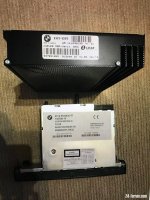
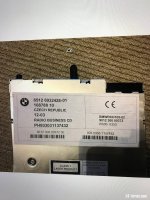
Not sure if it will help clarify, but photos below show part number on my Business CD Head Unit and my matching DSP amp. These parts are the original install in my 2004 E85 and are currently used in conjunction with my Garmin 66 conversion. Matching head units to DSP amps can be a bit of a minefield and there are others here that have a much better understanding on this subject than me - hopefully someone will come along who can advise. My DSP amp has a co-axial connection for CD changer (now bluetooth connection through DSP adapter) I suspect your 2006 E86 will not be a coaxial DSP amp.

I came at my Sat Nav upgrade from a slightly different angle, as my E85 didn't originally have Sat Nav. I did an OEM Sat Nav retrofit with a second hand Sat Nav head unit and screen and then decided to upgrade with the Garmin 66. I simply switched back to my original head unit for the rado tuning display. Having said that, I often listen to radio through the bluetooth connection from my phone using Alexa, rather than through the head unit tuner.

If you need any help on the actually display conversion just message me. Really pleased with how the Garmin conversion panned out. Works beautifully and has that OEM look.

Cheers
Mojito
 

Attachments

  • IMG_7641.JPG
    IMG_7641.JPG
    190.8 KB · Views: 599
  • IMG_7642.JPG
    IMG_7642.JPG
    231.7 KB · Views: 599
  • IMG_7643.JPG
    IMG_7643.JPG
    223.4 KB · Views: 599
I have the 10 speaker setup in my pre-facelift Zed but not the satnav screen setup, the spec level just below that setup. I wanted a black bezel on the radio so bought a facelift radio from eBay, which was sold as being from a Zed.

I didn't check any numbers and everything worked.

Maybe I got lucky? Sorry I can't be anymore help.
 
Thanks to both of you for your feedback !

I've purchased a Business CD from a UK breaker which has "almost" a matching RealOEM P/N and a manufacture date nearly that of my car - but from an X3. It should work - the breaker has tested function and specified that it has Aux Input, which was added between 2006 and 2007 for E86's (and E85's ?) in US trim.

Mojito, thanks for the offer to "hold my hand" via PM once I get to the actual connections. I'm a "lab guy", but not an electronics whiz.

Question: How did you cut down height of the enclosure box ? I searched for thinner project boxes, but ended up ordering a clone of yours.
 
Z4Mariner said:
Question: How did you cut down height of the enclosure box ? I searched for thinner project boxes, but ended up ordering a clone of yours.

I used a Dremel with a cutting disc - I think Dremel 426 Cut-Off Wheel. Marked cutting line round box and clamped a straight edged piece of scrap metal to box to create a cutting guide. Worked fairly well, cleaned edge up with wet & dry on a flat surface. Not perfect, but pretty good.
I'm not an electronics wizz either, but this project only really involves lengthening the wires to board and I like soldering :)
 
Thanks for the detail. I have my Garmin, I have removed both head unit and display module for the Sat Nav, and I have it apart. I think I haven't damaged anything - yet. I can tell that my unit has been apart before, maybe for the better, since it has functioned as well the technology of the day allowed.

Am I correct that you kept the day/night photo sensor in the display module shell, but left it unattached in case of a reversion to OE ??

I would like to re-finish my display module before I reinstall. The "soft" finish has a couple of nicks that irritate me. If anyone reading this can direct me to pertinent posts, I would appreciate it. Else I will review how members have refurbished their steering wheel trim pieces and post separately on that question.

Other questions: 1) did you add any micro-SD card memory ? 2) which bluetooth module have you installed ? 3) How have you set up the screen opening ? Always on power-up ? Did you do any coding to change when the screen pops up ? 4) have you acted upon the back-up camera option ? I frequently find my car parked among trucks and Suv's, and the wide angle camera "eyeball" at the very rear of the car would reduce my chances of being hit while backing from between the "giants".

I appreciate the work you went through and your willingness to share. Thanks !
 
Hi,
Sounds like you are making good progress and have got the Screen apart - well done. When you reassemble a good idea to lubricate the plastic parts the screen swivels on. Can't really call them bearings :lol:

Z4Mariner said:
Am I correct that you kept the day/night photo sensor in the display module shell, but left it unattached in case of a reversion to OE ??
Yes I kept in place.

Z4Mariner said:
Other questions: 1) did you add any micro-SD card memory ? 2) which bluetooth module have you installed ? 3) How have you set up the screen opening ? Always on power-up ? Did you do any coding to change when the screen pops up ? 4) have you acted upon the back-up camera option ? I frequently find my car parked among trucks and Suv's, and the wide angle camera "eyeball" at the very rear of the car would reduce my chances of being hit while backing from between the "giants".

1) no, didn't add memory card
2) Bluemusic version with microphone and DSP adapter. Sent from Germany, ordered on Ebay. See my last post on the conversion thread:
https://z4-forum.com/forum/viewtopic.php?t=142096
3) Screen opening always on power-up. No coding needed - that was default action before I swopped screen.
4) Yes I fitted the wide angle reversing camera. Excellent piece of kit, works really well and you can install it really discretly - you can barely see it. I have posted a section towards the end of my install thread, link above.

Z4Mariner said:
I would like to re-finish my display module before I reinstall. The "soft" finish has a couple of nicks that irritate me. If anyone reading this can direct me to pertinent posts, I would appreciate it. Else I will review how members have refurbished their steering wheel trim pieces and post separately on that question.
Sorry can't help on re-finishing the 'soft finish', but sure you will find something on the forum.

When you get everything up and running, it's worth having a good look at the section in the Garmin manual on setting where the different audio outputs can connect. Very comprehensive options, mixers and volumes for sound levels. I normally have all audio outputs connecting through bluetooth, but recently tried changing the Nav instructions to play through the Garmin integral speaker. Even though the Garmin is mounted in the Screen case it is still loud enough to be heard clearly. As you know I normally listen to radio streamed through my phone, which means that radio volume is muted when there are Sat Nav instuctions. If you listen to radio directly from the car head unit tuner, you won't hear Nav instructions, unless you set it this way, because the head unit isn't set to output the bluetooth source, it's set to tuner. Hope this makes sense, bit difficult to explain! The joy of setting all audio outputs from the garmin to play through bluetooth is that it gives you a fully integrated system with everything muting for Sat Nav instructions. I also have it set so that my WhatsApp messages automatically pop up on the screen - handy!

Hope all this helps

Mojito
 
Back
Top Bottom