
Hello,
Finally.... after many attempts I have paried my phone again.
I think last time I had my Z4 serviced they may have upgraded something...
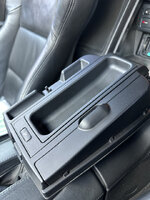
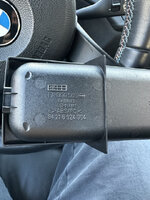
The pairing process that worked for me - Z4 Sat Nav with fold down compartment, "Shouting button" and pop up display
1. Ignition key out
2. Open compartment and press and hold "Shouting button" for 3 seconds
3. Keep holding the button and turn ignition key two clicks
4. Just as the pop up display starts to pop up - release the button
5. I heard two beeps - but the display did not changed to say bluetooth pairing
6. I had to go to my phone and try and discover the device
7. Then I inputted the pin and it worked.
Hope this helps others!
Adrian
Finally.... after many attempts I have paried my phone again.
I think last time I had my Z4 serviced they may have upgraded something...
The pairing process that worked for me - Z4 Sat Nav with fold down compartment, "Shouting button" and pop up display
1. Ignition key out
2. Open compartment and press and hold "Shouting button" for 3 seconds
3. Keep holding the button and turn ignition key two clicks
4. Just as the pop up display starts to pop up - release the button
5. I heard two beeps - but the display did not changed to say bluetooth pairing
6. I had to go to my phone and try and discover the device
7. Then I inputted the pin and it worked.
Hope this helps others!
Adrian

 Finland