Mr12V MMI

Aussie-John said:
Hi All,

So I have just installed Mr12V MMI but I can't the Z4 to see it. When I go to CD, it just says - NO DISK.

I have a coder and BimmerCode, but I don't know what I need to change.

Any help would be great.

Cheers
J


Read this and follow through..

https://z4-forum.com/forum/viewtopic.php?p=2062385&hilit=%2AMMI#p2062385
 
UDPATE

Sooooo... Stupid me. I accidentally put the Optic plug in the wrong Quad Connector - LOL! So that is sorted.

The system is installed, and working - ALTHOUGH - Not working as it should exactly.

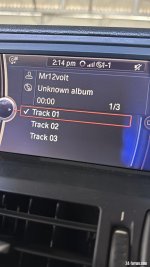
When I go to CD, I get Mr12v Listed, and 3 tracks. I actually have to select Track 2 in order to get the thing to work. See attached - Strange.

LASTLY - Making a phone call is impossible. The Audio from the Mic is awful. I have done the Echo Correction etc, but no good. If I am sitting still it is fine, if I drive nobody can understand me. They say it sounds like someone rustling a packet of crisps! LOL!

As directed by Mr12v I plugged my new Mic into the unit - not the splitter.

Anyone experience this?
 

Attachments

  • 6E32013D-500B-428D-95E5-35F9C82B004F.jpeg
    6E32013D-500B-428D-95E5-35F9C82B004F.jpeg
    88.4 KB · Views: 1,734
On the Mk 3 version I’ve used the car mic via the plug in cable all works fine..you do get multiple instances on the CD player screen..
 
Chippie said:
The screen is normal and the mic is under the steering column top cover.

The pig tail connector for the factory mic is usually under the trim near the light switch (RHD)
 
So not under the Wheel Column cover? Any imagery or guidance on this? I don't want to go chasing my tail for it. I hope it is better than what I have now, as it is unusable. Not sure why it is so bad, plugged directly into the MMI. :(
 
Mine was under the upper steering cowl piece. It was a pig to get to as it has a tiny plug and not much access for sausage fingers
 
Yeah right! Ok... I will have a look tomorrow and see what I can find. Disappointed, as I thought the external Mic would be better than the OEM - but for some reason no. :( Now a PITA to try the OEM. Basically have to rip it all out agan. :(
 
OK, sorry a bit late to this today...

So location and how to fit the microphone lead. This link should be keyed to the correct place in the video (otherwise you need to jump to 20:39)..
https://www.youtube.com/watch?v=jY-pSPUz0IU&t=1239s

For the OEM microphone connection, ONLY connect it to the "OEM Mic" flying lead on the new loom, NOT the socket on the back of the box. :thumbsup:
 
Thanks Dave.

Do you have any idea why a new external Mic would sounds so bad. It is so bad nobody can understand me at all when I drive. :(
 
UPDATE - So today I decided to go back and revert to the OEM Mic, and it is better - not the best - but better. I have no idea what the external mic was such a problem - but it was. Maybe it was the Mic itself, who knows.

Anyways - Seems OK now, so I will run it and see.

Install was pretty easy, and I have mine tucked up above the passenger foot well (Left side). Sits in there nicely.

Hopefully all is well now. :)
 
Back
Top Bottom