Misguided Sat Nav!

seech

Member
 Manchester
I have had a search for this but only came up with a 5 yr old post.

Yesterday, on the way home from Nottingham to Manchester, my in-built factory nav decided to tell me I was driving through fields and rivers. Today, my nav tells me I am in Matlock. But I know I am not because I am sat at work.

I have seen a few solutions, ranging from:

- leave it a couple of days
- edit the setup menu to allow perspective view (never knew the car had this, but I have switched it on now)
- disconnect the battery for a few minutes
- disc in and out
- new antenna
- new sat nav

Has anyone had any experience with this?

Thanks
 
I have the same problem on my 2005 Z, business sat Nav. I tried 1-4 to no avail. Settings said Im getting at least 3 feeds from the heavens so not the aerial.

Mine wouldnt ever switch off either so I pulled the fuse.

I've just switched it off completely as Im not buying a new one. The nav on my phone does just fine. Would be interested if there are other solutions.

Watching with interest. :(
 
Inevitably I use my iPhone anyway as I can put full postcodes in and it's obviously more up-to-date.

Would hate for it to be knackered - dread to think what BMW would charge for a new unit!

Will keep you posted.
 
seech said:
Inevitably I use my iPhone anyway as I can put full postcodes in and it's obviously more up-to-date.

Would hate for it to be knackered - dread to think what BMW would charge for a new unit!

Will keep you posted.

I think you may find that the screen itself has been discontinued http://realoem.com/bmw/showparts.do?model=BT92&mospid=49344&btnr=65_1240&hg=65&fg=45&hl=11
 
I've heard of variations of this and all seem to have self cured over a few days, cured after disconnecting the battery or driving in a figure 8 in a car park.

Mine did it once for a day and displayed me driving about half a mile off track through fields. Self cured.

One check is to see if you have a good GPS signal showing.


Sent from my iPhone using Tapatalk
 
If a battery disconnect doesnt work I would go for the next cheapest option which is a £10 antenna from ebay before doing anything else.

If only 3 feeds are being recevied it could still be the antenna so I wouldn't rule it out.
 
Thanks guys.

Pressing 'menu' for 8 seconds in the set up screen brought up the service menu which said their was 8 satellites in view. However, the little symbol in the top right just shows half a globe - I have no idea what it has shown before!

I like the figure 8 idea.

I will wait a few days before doing the battery/antenna.
 
Sounds like you have a good GPS signal then.

The figure 8 I recall from somewhere forces the system to re-orientate itself.

You may or may not be aware that the Z4 uses inputs from GPS at start up then from that point takes information from the ABS sensors to calculate speed and changes of direction along with GPS inputs.

From the technical documentation:
Diagnosis of the navigation systems comprises the following features:
• Read identification
• Diagnosis enquiry, e.g. gyro value, wheel speed, eject button

That gives another clue to a possible fault being the ABS sensor (rear left ) or ABS module, but first I'd do the figure 8 then a new GPS aerial, before getting worried :)
 
Mac,

Yes, I have ejected the disc and put it back in. Presume this is all you meant?

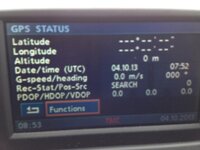
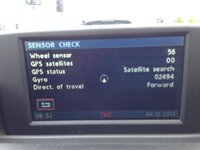
I have tried to link a couple of pics below (fingers crossed) of the set up screen. I am now thinking maybe there is no GPS signal and it is gauging the movement of the car purely on wheel speed?

In the second pic, the wheel speed moved up with the car, but the first pic didn't seem to want to show my location (even though a location is shown on the normal screen).

IMG_1708_zpsfae9a84f.jpg

IMG_1706_zps257cb4b3.jpg
 
I have had this, in my case it was the start of the sensor failing. Invariably it came back, then would fail - and using older nav discs didn't help as the sat nav would get very confused when I was "driving over fields".

I tried all the solutions mentioned including driving in figure of 8, reboot, reset (by disconnecting the battery for a few minutes), latest Sat nav discs (official versions) and even had BMW look at it (as the car was under warranty at the time) - they replaced a wire they claimed was at fault. All worked to a degree for a while, but I ended up spending £20 on eBay to get a new sensor. It's worked faultlessly since.
 
Nope, the GPS sensor, in mine it was positioned above the cabin lights, in the top console.

Made a post about it on the Alpina forum here
 
Hi

I've managed to pick up the same problem. Tried 1-4 and also replaced the antenna. Had no luck in getting the sat Nav to work, but using the hidden menu produced the same results. I guess a new head unit might be an idea, but it's very costly for an outdated sat Nav. Strangely keen to get it working (strange OCD!). Any more ideas?

P.
 
seech said:
Thanks guys.

Pressing 'menu' for 8 seconds in the set up screen brought up the service menu which said their was 8 satellites in view. However, the little symbol in the top right just shows half a globe - I have no idea what it has shown before!

I like the figure 8 idea.

I will wait a few days before doing the battery/antenna.

I had a problem a while ago with Nav not working even though hidden menu showed 8 sat locked, it didn't mean they were...

You mention in the main screen in the top far right you only st see the half a globe symbol. If the GPS antenna was working you would see dots around that globe (they represent how many satellites you are locked to) and if you are locked to enough, beneath the globe, you will see the words GPS or GPS Fix (cant remember which from memory sitting at my desk)... Only if you have got the dots and the words at the bottom can you confirm the antenna is working and you are locked on. If not a new antenna is about £10 from eBay.

The driving around in a fig 8 is not necessary. If you have satellite fixes and GPS symbol below the globe but are still not positioned accurately on map when driving, it means that the "Almanac" needs re-initializing. The Alamanac basically keeps your satellite position locked by using directional sensors so if you was to lose GPS reception for a bit or were in a long tunnel, the GPS location on map would remain accurate as it would be determine by the travel of the wheels / speed.

If the hidden menu shows Almanac as "No" rather than "Yes" and antenna is working, you just need to park up for about 15 mins with navigation on and clear sky above for it to reload onto system.

So if I was you, I would check to see if there is dots around the half globe sign as first point of call and if no dots at all, check antenna. As it sits in just behind your interior lights (just above the interior mirror), it can become faulty after a very hard jolt as mine did.
 
Update:

I meant to update this last week... But the nat righted itself after the magic 4 days.

FYI, I definitely wasn't getting dots around the globe in the map mentioned above by 123 Billy. I only realised that because I saw the dots once it worked.

My wife took the car out that week... I hope there was no 'jolt' when she drove it!!

I did look at antennae, but I would also probably have to get someone to give me a hand (when it does eventually go) as the mirror set up looked like something I would break if I removed...

Thanks to all that contributed.
 
Back
Top Bottom