Have just installed a mfsw and wondering how to properly use it. Of course the volume up and down is pretty self explanatory but I'm not sure what the other buttons are meant for. I thought the arrows were to change radio station but they don't seem to do so.

You are using an out of date browser. It may not display this or other websites correctly.
You should upgrade or use an alternative browser.
You should upgrade or use an alternative browser.
MFSW control purposes
- Thread starter skmattwell
- Start date

 south yorkshire
That’s what they are for- maybe check all the plugs are seated home correctly?
Never mind, they have miraculously started working? 
Still not sure what the phone related ones are for
Still not sure what the phone related ones are for
If you have the Bluetooth module it will activate the phone. Given you had no MFSW I’d say you don’t have it. You can check by looking in the boot for a lump where the module sits under the carpetskmattwell said:Never mind, they have miraculously started working?
Still not sure what the phone related ones are for

paddy wright said:If you have the Bluetooth module it will activate the phone. Given you had no MFSW I’d say you don’t have it. You can check by looking in the boot for a lump where the module sits under the carpetskmattwell said:Never mind, they have miraculously started working?
Still not sure what the phone related ones are for
Any idea where to look for the lump?
Pretty sure mine doesn’t have the module - but thought I’d double check!
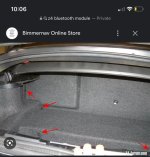
It’s at the back left of the book like this pic
paddy wright said:If you have the Bluetooth module it will activate the phone. Given you had no MFSW I’d say you don’t have it. You can check by looking in the boot for a lump where the module sits under the carpetskmattwell said:Never mind, they have miraculously started working?
Still not sure what the phone related ones are for
Turns out I do have the Bluetooth module, had to go searching for the pass key but once connected I had a great time admiring the 20 year old interface
Much like the sat nav it's almost like they've gone out of their way to make it as unintuitive as possiblepaddy wright said:829DE98D-5AC6-4C87-A385-57C3C78438DE.jpeg
It’s at the back left of the book like this pic
Thanks, this confirms- I don’t have it!
kis said:Really? I’ve always found the system easy to use? Although I rarely use the nav to actually navigate these days. Generally only go a handful of locations in the Zed, so know where to go!
Receiving a call is very straightforward, making one is a nightmare. Scrolling through your entire address book is painful :lol:
As painful as being able to input 4 digits of the postcode on the sat nav and then having to put in the road name... why
