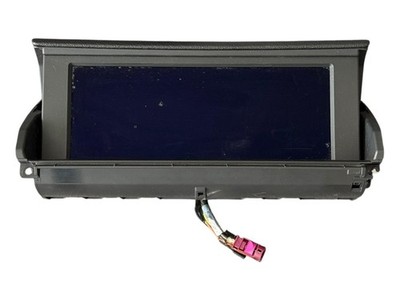
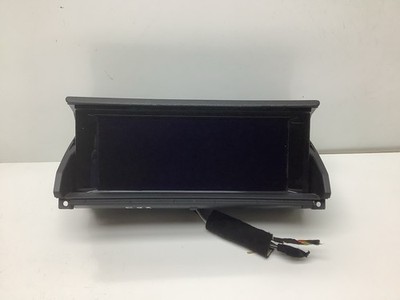
IDrive screen fault

flybobbie

Elite
 Stourbridge
So stripped out dash to silicone grease all clips and fix some broken screw attach points to reduce rattles, which it has done..
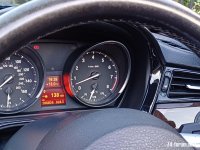
Also stuck on some glossy trim around air vents main reason was to hide cracks in the plastic instrument binnacle..
cv2.jpg
cv.jpg
Fit on binnacle not great, but i tell you something you won't un-see.
The strip along the bottom of binnacle is tapered, the stick on trim tapered wrong way.... :?
So refitted iDrive screen mechanism, but no longer flips :x
If i leave it open and come back later it closes to 45 degrees.
Sometimes opens to 30 degrees on start up..
Screen displays info. when up, also on off using programmed button.
Tried holding volume button 30 seconds, no difference.
I think manually opening screen has confused the mechanism.
I wonder if there should be set position on installation to set initial position.
 
Hello flybobbie. Today my iDrive screen decided to not close. I closed it manually and then it wouldn't open. I manually open and closed it a couple of times and could see the function of the actual screen were still displaying when 'open' and turning off when 'closed'. Tried the reboot with the volume switch, no difference. Turned car off walked away, snuck back and turned car on and screen opened, but wouldn't close. A few hours later.... went back to car and now it opens and closes. What the...! I see a previous post of yours in 2023 suggested spraying silicon spray on the gears on the right side of the screen. I can see those gears. Just wondering how you got on with your screen and if the spray is an option. Thanks
 
I spayed the gears years ago to stop the rattling.
My cars screen still plays up, will open, but stays open on shutdown. At some point it closes but not fully.
Seems to wait for me to turn my back and sneak down.
Looks like mine needs some kind of reset to learn the closed position.
 
  • Like
Reactions: YDB
I use my phone on a mount behind the screen for long journeys, and plug it in for charging. I have twice turned the car off when the cable is in the way of the screen and it, quite reasonably, refuses to close.

After a couple of gentle manual openings and closings, it behaves again.
 
  • Like
Reactions: YDB
So stripped out dash to silicone grease all clips and fix some broken screw attach points to reduce rattles, which it has done..
Also stuck on some glossy trim around air vents main reason was to hide cracks in the plastic instrument binnacle..
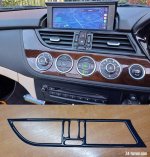
View attachment 183883 survival race
View attachment 183882
Fit on binnacle not great, but i tell you something you won't un-see.
The strip along the bottom of binnacle is tapered, the stick on trim tapered wrong way.... :?
So refitted iDrive screen mechanism, but no longer flips :x
If i leave it open and come back later it closes to 45 degrees.
Sometimes opens to 30 degrees on start up..
Screen displays info. when up, also on off using programmed button.
Tried holding volume button 30 seconds, no difference.
I think manually opening screen has confused the mechanism.
I wonder if there should be set position on installation to set initial position.
Try a system reset by holding the volume button for about 30 seconds and check the gears on the side of the screen for dirt or lack of lubrication. Thank you!
 
Last edited:
Tried, makes no difference. Obd scanner says fault.
I appreciate this is a year old post, but is it still doing it?
Assuming it still is then by now it's had plenty of time to have a long shutdown period. But have you tried disconnecting the battery for about 15 minutes?
A couple of other things I'd suggest are to delete any fault codes and try to default code the CID (screen) unit. Other than that, and if those dont help then I'd say it's probably time to replace the screen.
 
Tried all sorts, still opens if closed, but random when it decides to close.
Programmed button to close but just goes blank on that button.
 
To me that sounds like a control circuit issue with the screen motherboard. For it to turn off the screen tells me it's receiving the canbus signal, and it's obviously receiving 12v, so that means the 4 pin connector is working.
 
So with it being smooth movement means nothing is trapped, so I'd still be looking at the replacement screen, unfortunately.
Here's one (with intact cables that haven't been cut!!)...
 
Or this one and perform a bit of dismantling and swap the cables over...
 
I'm more likely to hack it a find a way to wire in my own raise and lower.
Like today it never retracted home, stuck up.
Just random if it closes.
Be nice to have wiring diagram for it. I wonder if the mmi box is causing it?
 
This on facebook post, so gives me a few areas to look at.
 

Attachments

  • 492481552_10161038079867097_1746542303629084809_n.jpg
    492481552_10161038079867097_1746542303629084809_n.jpg
    546.7 KB · Views: 3
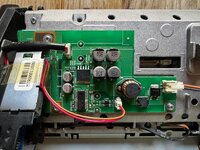
Looking at circuit board i wonder if the pair of wires drives motor and the triple wires goes to a potentiometer to detect screen position.
I wonder spraying some lube to quiet the gears as contaminated the pot.
 
From Google;
BMW iDrive systems, particularly in older models with motorized screens (such as the E89 Z4 or 1 Series), detect whether the screen is open or closed using a combination of physical limit switches and current monitoring (hall effect sensors) within the motorized screen assembly.
  • Motor Torque/Current Sensors: The screen mechanism senses increased resistance or a spike in electric current when the screen reaches its fully opened or fully closed position, triggering the motor to stop.
  • Limit Switches: Physical sensors or switches on the hinge mechanism detect the physical position of the screen.
  • iDrive Settings Logic: The system stores the state (open/closed) based on user settings in the iDrive menu (e.g., set to open on engine start or incoming call).
 
Back
Top Bottom