Hi all, does anyone know if there is a way to see the route that the iDrive has plotted before you start the journey?

You are using an out of date browser. It may not display this or other websites correctly.
You should upgrade or use an alternative browser.
You should upgrade or use an alternative browser.
iDrive - Satnav
- Thread starter Silverstar
- Start date
That's is the question how do you see the road by road detail of the route. I can't find anything in the menus to give this option, you can zoom in and out of the map but that just gives you an overview. I found a YouTube video for the newer NBT iDrive and in that there is an option for route details in the navigation section which allows you to alter the route a little if needed but it doesn't seem to be there in the CIC.
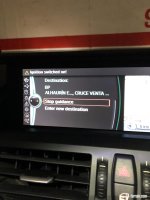
If I go into the top option (navigation / route) it only gives me two options 1) stop guidance or 2) enter new destination:
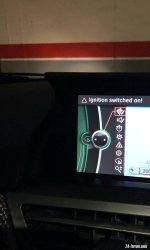
Thanks Ronk, what is the temperature there? I am still in my short sleeves polo top 
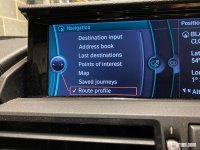
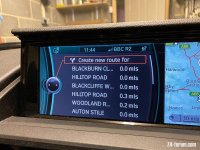
Thanks Ronk. So after entering the destination I press the NAV button on the iDrive controller?
Ok perfect I will try it out in a few minutes. 
I just tried it out and it works Strange that BMW have kind of hidden this option away on the CIC.
Strange that BMW have kind of hidden this option away on the CIC.I had this issue when coming from London to Spain it routed me via Paris which led me to being stuck in traffic for 3 hours when Ideally I could have changed the routing to go via Rouen (I think that is what it's called) to avoid Paris.

Dave 2 dogs
Senior member
Hi
Sorry to jump on this thread
Was using the sat nav
Yesterday for the first time since I got the car
( usually just use my phone )
I got the voice information on , but , how do you get the volume up on the voice? Not very good with gadgets, sorry
Sorry to jump on this thread
Was using the sat nav
Yesterday for the first time since I got the car
( usually just use my phone )
I got the voice information on , but , how do you get the volume up on the voice? Not very good with gadgets, sorry
Dave 2 dogs said:Hi
Sorry to jump on this thread
Was using the sat nav
Yesterday for the first time since I got the car
( usually just use my phone )
I got the voice information on , but , how do you get the volume up on the voice? Not very good with gadgets, sorry
When the sat nav is 'speaking' turn the volume knob for the radio up.