Help with bluetooth install

Ryaowe

Member
I'm trying to install an OEM bluetooth kit on my 2003 Z4 3.0i. Searching the forum, I found two sets of instructions:

http://www.bimmernav.com/BMW_Z4_Bluetooth_Installation_Instructions.html

and

http://www.z4-forum.com/forum/viewtopic.php?f=31&t=31240

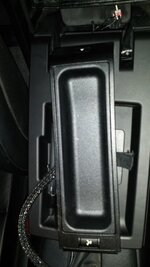
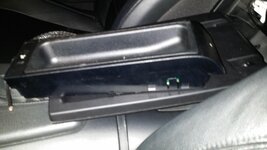
Both have been extremely helpful, but I'm stuck at the point where I need to connect the pairing button to the 18-pin connector. The pairing button that came with the kit is part of a large tray, which doesn't really seem to fit anywhere on the console. I'm ok to just keep it in the center storage compartment, or even in the trunk (I should only have to pair my phone once, right?).

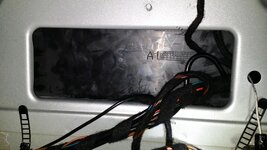
My problem is that I can't seem to find a way to route the 18 inch connector to either place. I can see the connector when I remove the passenger side speaker grill, but I can't find a way to access to it from the trunk or the storage compartment. The bimmernav instructions say you can access it through the "electronics access hole" in the trunk, but my car doesn't seem to have this hole. There is a cutout in the metal partition, but it is nearly completely blocked by black plastic:
OY0125G.jpg

Compared to the image on the bimmernav instructions:

BMW_Z4_bluetooth_18.jpg


I also can't find any access to the connector from the storage compartment, without drilling a hole big enough for it to fit through.

Has anyone else done figured out how to do this? I apologize if I'm missing something obvious. Thanks for any help!
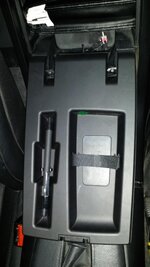
 
You can see it when you remove the passenger side speaker cover. It rests on a mount to the right of the speaker mount plate closest to the storage bin door hinge. I actually removed the entire center plastic cover and, unnecessarily, both plastic covers behind the seats to get at all this.

The center plastic doesn't HAVE to come off, but it's EASIER to reach that interface.

I didn't twist and unlock the snap-in adapter socket from its mounting plate - it's a HUGE pain to lock it back on. So look closely with a light and spot the numbers, find the "1" and connect jumper wires onto the pins 1 and 2.

I bought a Bluetooth antenna, but found one on the right side of the console already installed and wired up... just grab the cream colored plug in the trunk and plug into your TCU.

Underneath the 18-pin snap in adapter mount and socket I found the blue connector and harness that go to the assist module.

My pairing button isn't working since I'm battling figuring out how BMW assist is keeping mine from working. I may also need to learn more about DIS, I've been able to use it to diagnose and activate/deactivate TCU and bluetooth functions, but I don't understand them or the correct settings.

Also maybe I need to program the Business Radio to recognize the Bluetooth??

Good luck, I'm still figuring mine out...
 
I ended up following steps 5-29 from http://www.unofficialbmw.com/images/6042EN.pdf to remove the center console and remove the storage box. After all of that, it turns out that both the car connector and the pairing button connector are male. So in the end I just soldered a button to pins 1&2 of the 18-pin connector. That seems to work for now.
 
Ryaowe said:
After all of that, it turns out that both the car connector and the pairing button connector are male.
What are you using for the pairing button?

I eventually bought the eject box for mine and it is a very nice, neat, proper looking solution.
 
I'm using a little push button from my stash of electronics parts. It's kind of a hack, but it works for now. The eject box didn't seem to fit anywhere in my console... maybe they changed something after 2003? Since the button is used for more than just pairing, I'd like to eventually move it up to the ashtray so it doesn't require the center storage compartment to be open. And maybe try to find something that looks a little more official while I'm at it.

Did your eject box fit into the door of the storage compartment like the diagrams show?
 
I strongly doubt they would have changed the eject box after 2003. Mine fit exactly as the diagrams show, so I don't know why yours doesn't? Can you show some photos?

There's no need to have access to the button for anything other than pairing. Everything else is done through the steering wheel controls.
 
That's the problem: I don't have any steering wheel controls. I've found that I can use the button to answer incoming calls and such, though.

Here's a photo of the door to my center console, where the diagrams show the eject box should go:

rta1MVj.jpg

Here's the eject box:

Eo2AGtK.jpg

And a side view:

4KVbZ7U.jpg
 
You need a different storage door. There's a phone prep version and a no phone version like the one you have. Sounds like you figured out something for the pairing button, but for the sake of more information, my car has no button, it tries to pair every time one turns on the ignition. YMMV

To pair, I go through the phone's menus to the search menu. Then turn on the ignition and invoke the phone's search. The phone finds the car and asks for pass key. After entering the key, some phones ask if they should automatically pair every time, and others just do it. I do have a MFSW, so the rest works normally.
 
I didn't realise that phone prep meant a different internal face on the storage door! That's certainly the problem. Looks like you're going to need part (5) from here (note that you'll need to know what your interior plastics colour is).
 
Back
Top Bottom