
You are using an out of date browser. It may not display this or other websites correctly.
You should upgrade or use an alternative browser.
You should upgrade or use an alternative browser.
Headsup Intravee II Ebay
- Thread starter Redzedfour
- Start date
markeg said:On a scale of 1 - 10, pretty much a 2, if that (for frustration levels with trim removal). Easy connections at the back, and simple to store away next to the bluetooth module (also added some rubber matting to prevent any squeeks/rattles), most frustrating bit is removing the boot trim (I broke a couple of trim clips, so am ebaying replacementsStuart Truman said:Easy to fit?). Fed the wire through the centre to the ash tray (which I have temporarily removed whilst I work out a better mounting clip for my iPhone 4s) which involved moving the passenger seat forwards and backwards a few times (electric seats being a definite pain in this instance) to get the wiring under the trim. Connected up the phone, switched power on and all worked first time!
I hope it's that easy! I just bought Daffy's kit that he was selling

If you could post any pics of how you mounted yours I'd be grateful

will do Stuart but am in Moscow at the moment - will do at the weekend ?Stuart Truman said:markeg said:On a scale of 1 - 10, pretty much a 2, if that (for frustration levels with trim removal). Easy connections at the back, and simple to store away next to the bluetooth module (also added some rubber matting to prevent any squeeks/rattles), most frustrating bit is removing the boot trim (I broke a couple of trim clips, so am ebaying replacementsStuart Truman said:Easy to fit?
I hope it's that easy! I just bought Daffy's kit that he was selling
If you could post any pics of how you mounted yours I'd be grateful
Sent from my iPhone using Tapatalk
That'd be marvellous. Enjoy Russia and the incredibly expensive, well everything really!
Here you go Stuart, hope it helps.
Firstly fold the roof recess upwards (so the roof can’t be taken down). This frees up the space so the carpet trim can be moved. Remove the hardboard battery cover, then fold the remaining floor carpet back towards the rear of the boot. I didn’t bother removing these clips as I didn’t want to damage them (and they are very fragile)
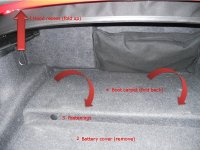
So now the boot looks like this:
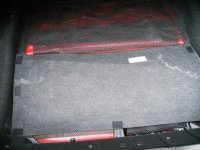
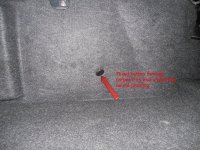
Next I threaded the emergency centre console release button on the rear bulkhead back through the carpet and the underlying soundproofing.
I now removed all four retaining clips, two on the left and two on the right, from the sides of the rear bulkhead carpeting
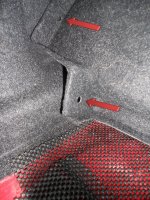
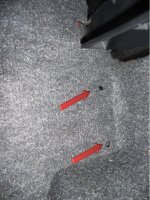
Be very careful with these as they are fragile and easily break. Mine snapped, and I looked at sourcing replacements from eBay. I couldn’t find any and ended up buying some from Sopers. They only cost a couple of quid for four: item numbers are for spacer bush (51478189959) and blind plug (51718137323) which both come in packs of four.
Now gently tweak the carpet from behind the plastic trim – its only folded behind there so should come out fairly easy
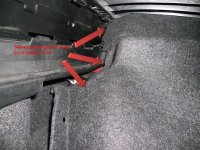
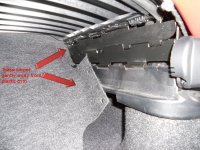
The rear carpet and soundproofing should now be easily pulled upwards to gain access to the leads and bulkhead
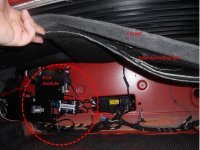
I held the soundproofing and carpet up by use of rubber-faced clips
I mounted the Intravee and KCA module onto the rear bulkhead by using the thick number plate pads from Halfords – stick well and ensure that the modules don’t rattle against the metalwork. Side view and close up of the leads:
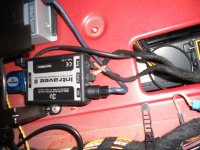
The USB lead is attached to the Intravee and fed through the side so I don’t have to remove the carpeting again to provide updates
I’ll post the threading through to the main cabin and my (somewhat Heath Robinson) mounting affair for holding the iPhone later this weekend.
Firstly fold the roof recess upwards (so the roof can’t be taken down). This frees up the space so the carpet trim can be moved. Remove the hardboard battery cover, then fold the remaining floor carpet back towards the rear of the boot. I didn’t bother removing these clips as I didn’t want to damage them (and they are very fragile)
So now the boot looks like this:
Next I threaded the emergency centre console release button on the rear bulkhead back through the carpet and the underlying soundproofing.
I now removed all four retaining clips, two on the left and two on the right, from the sides of the rear bulkhead carpeting
Be very careful with these as they are fragile and easily break. Mine snapped, and I looked at sourcing replacements from eBay. I couldn’t find any and ended up buying some from Sopers. They only cost a couple of quid for four: item numbers are for spacer bush (51478189959) and blind plug (51718137323) which both come in packs of four.
Now gently tweak the carpet from behind the plastic trim – its only folded behind there so should come out fairly easy
The rear carpet and soundproofing should now be easily pulled upwards to gain access to the leads and bulkhead
I held the soundproofing and carpet up by use of rubber-faced clips
I mounted the Intravee and KCA module onto the rear bulkhead by using the thick number plate pads from Halfords – stick well and ensure that the modules don’t rattle against the metalwork. Side view and close up of the leads:
The USB lead is attached to the Intravee and fed through the side so I don’t have to remove the carpeting again to provide updates
I’ll post the threading through to the main cabin and my (somewhat Heath Robinson) mounting affair for holding the iPhone later this weekend.
Cheers!
I was hoping it would arrive this weekend but it hasn't Never mind, it's pissing down so I'll stay in here and research why I still can't get INPA working on my PC.
I was hoping it would arrive this weekend but it hasn't
Never mind, it's pissing down so I'll stay in here and research why I still can't get INPA working on my PC. Well I got it fitted but couldn't mount the Alpine unit where you've got yours as I have a chunky amount of electronics fitted. I've put the Intravee to the left of the hole where you can get access to the CD Changer. All dead easy, one of the 4 screw clips was missing but the other 3 unscrewed without drama. I've put the Alpine unit inside the boot tucked away in the little alcove between rear suspension and bulkhead. It's velcro'd to the carpet. All works flawlessly on 6.01 firmware, I'll try the new version for the extras menu next weekend.
The biggest PITA was actually the small cable on the back of the changer. Not sure if there is supposed to be a release clip, but if there is it is broken off. I had to use a pair of pliers and gentle pressure to remove it.
Now my issue is that I have a 160GB iPod classic with about 10000+ songs on it. The Intravee seems to have problems with a large flat folder structure. It gets to about halfway through my album list and simple rotates back to A albums. I have a similar problem with the Ford iPod kit so I guess I need to rethink how I load the iPod
The pics were damned useful, thanks!
The biggest PITA was actually the small cable on the back of the changer. Not sure if there is supposed to be a release clip, but if there is it is broken off. I had to use a pair of pliers and gentle pressure to remove it.
Now my issue is that I have a 160GB iPod classic with about 10000+ songs on it. The Intravee seems to have problems with a large flat folder structure. It gets to about halfway through my album list and simple rotates back to A albums. I have a similar problem with the Ford iPod kit so I guess I need to rethink how I load the iPod
The pics were damned useful, thanks!
No problems, glad you got it fitted Let me know if you need a clip, think i have a couple spare somewhere now...
BTW - I had the same problem with the cd changer cable, doesn't fully clip in so have added some rubber cable cover to keep it secure. Must be heavy-handed original Alpina owners
Let me know if you need a clip, think i have a couple spare somewhere now...BTW - I had the same problem with the cd changer cable, doesn't fully clip in so have added some rubber cable cover to keep it secure. Must be heavy-handed original Alpina owners