HDR Photo's in Photoshop

For a first effort, I think they're all pretty good attempts. Certainly much better than anything I've ever managed.

I'm looking at signing up for a digital photography course - probably planning on doing one just aimed at taking photos and doing basic post-processing. Will leave the more advanced PS stuff for another day!
 
I didn’t mean offence, I was being honest, 'horrible and nasty' were my exact thoughts - no sugar coating from me, that is how I am.

They are way overdone, the background looks like a cartoon etc. Keep attempting by all means, but I personally think they need a lot of improvement.

Also I’m not really a HDR fan, as (very well) explained in this thread processing is a thing that needs to be treated with respect and skill, it can ruin an image or it can make an image.
 
shabba said:
I didn’t mean offence, I was being honest, 'horrible and nasty' were my exact thoughts - no sugar coating from me, that is how I am.

They are way overdone, the background looks like a cartoon etc. Keep attempting by all means, but I personally think they need a lot of improvement.

Just a question.

What did your first HDR pics look like? :wink:

No sugar coating is one thing, constructive criticism is good, but there is a large line between:

"Nice 1st effort. Keep practising and you will get there. It can be a time consuming job getting HDR right, but you just need to keep working at it. In my opinion the background may be a bit "cartoon like", a bit over done on the colours."

and the way you criticised!


I hope your not a teacher! :P
 
I must admit, I`d love to get into photography, but work commitments and other family stuff just don`t allow the time at the moment, but one of these days........

As for Photoshop, I`ve been doing it for about 10 years now, but only at a strictly amateur level (would love to do it for a living...), and I get a lot of enjoyment out of it.

The biggest kicks, though, come from doing photo corrections, or repairs, for family and friends, who have had a photo lying there for years, in a bad state of repair, and thought all was lost with it...........and then along comes the mighty Photoshop, TA-DA..........and brings it back to an acceptable level again. Cool as........... 8)
 
Been messing with the HDR format as it's something I've never tried.

Just using the technique as a tone mapping can make the photo "pop" but tried the HDR look.
These are made from 3 re-exposed RAW files on the Mac rather than bracketed pictures taken by the camera, using +2 and -2 exposures (right click and click "view image" to see full size).

This looks like a scene from a computer game!! 6 Series GT3 race car I took at Silverstone.

5146140659_703edce3f0_oLarge.jpg


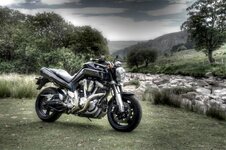
My Yamaha MT-01 taken at the Elan Valley. Going to mess with this one sky wise.

5133347904_c357fe0613_oLarge.jpg


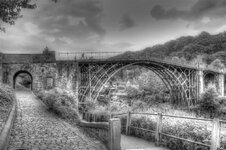
B/W pic of the bridge at Iron Bridge.

5131004915_121fce334c_oLarge.jpg

Still early days. Quite interesting but it can take some work!
 
shabba said:
I didn’t mean offence, I was being honest, 'horrible and nasty' were my exact thoughts - no sugar coating from me, that is how I am.

They are way overdone, the background looks like a cartoon etc. Keep attempting by all means, but I personally think they need a lot of improvement.

Also I’m not really a HDR fan, as (very well) explained in this thread processing is a thing that needs to be treated with respect and skill, it can ruin an image or it can make an image.

Yeah, but my equivalent of your "no sugar coating" argument would be to say you sounded like a cock.. but that wouldn't be a nice thing to say, so I won't ;)

Back on subject, the HDR issue does seem to bring out emotions in people far more than they should. It is an attempt at art, some people like it, some people don't... to shoot it down like someone just ran over your dog is far too harsh.

I tend to agree with those who say HDR should be used to overcome the exposure limitations of the camera, in a similar way an ND-Grad filter is often used, especially on seascapes, but when I started using HDR I went for the extremes too, it is the way you learn and the way you develop the skills.

The pictures in the OP don't do it for me per-se, but you can see where there is potential and room for development. The aim, I presume, is to produce a good HDR shot... those who think there is no such thing as a "good" HDR shot should just not comment on this thread.

Discuss, comment, and constructively criticise, but please (everyone) maintain a level of politeness and respect.
 
They are not HDR pics, they are LDR.

Tone mapping from HDR to LDR is the art here.

What HDR allows you to do is capture what YOU thought a scene looked like with your own eyes, like a wonderful sunset which might, through a lens, look too dark, or too bright, but perfect to your eye.

Capturing HDR allows you to make it look like YOU saw it, or get the perfect balance of exposures that a camera can't normally get.


I think everything on here is fairly badly tone mapped. None of them look natural.

The Z4 in the dark in the car park is the best one... if the rear lights had a bit more work that would be pretty damn good. I bet that is how it looked to the photographer, but any single exposure wouldn't have achieved what they were seeing. That is where HDR is useful! It's got the photographer the shot they wanted, but it still just looks natural. You probably wouldn't get that shot without HDR capturing techniques and tone mapping. If you have to ask if it was tone mapped from a HDR, then it's a tone mapping job done well imo :D


Many people seem to use tone mapping badly to get that 'HDR' effect as it's called. That is cool, but it's no different to using other random photoshop filters to get an interesting effect. If it's done simply for the effects sake then it's hard to appreciate.

All imo :D

Dave
 
I agree, the "issue" is tone mapping, not HDR, although the problem is the industry seems to have embraced tone mapping and called it HDR, the effect being people are calling tone mapping HDR by no fault of their own.

I agree on the car park pic too, that is something I would love to achieve, and something I enjoy looking at :)
 
The HDR effect is trying to get an "arty" version of a picture, not to make it look more "real" as some seem to be confusing here! For instance, the effect on mine wasn't to tone map an original picture to make it look sharper as an original, but to make them look more of a painting. Many photo-shop filters do a form of tone mapping but they don't really hold up well when printed.

Many people seem to confuse skill to preference when using photo-shop! :P Some who say they are skilled in using it I sometimes find their work worse than mine. It's not, but to me mine looks better. All personal taste. :wink: For instance, that pic of the Z4 in the car park on here looks fantastic, but it still looks like it's from a computer game to me. Not real at all. But that is the sort of level I am aiming for with HDR. Tone mapping a pic is another art entirely!

You can do so much with digital photos these days that it's like painting a picture. Some will like it and some won't. There are so many people like me sat at home with Photoshop tinkering away that the personal preference to what is right and wrong is huge! The pics here on my first attempts took a total of around an hour on 3 photos and that's nothing! To get it right takes a lot more tinkering! We all need to watch we don't become "5 minuet experts"! :P

I say leave all these Photoshop courses that are cropping up all over the place and just buy the software and a decent camera and experiment!

Some good examples of HDR (the surreal form, not the realistic!!) can be seen on here:

http://www.flickr.com/photos/stuckincustoms/sets/72157603505606537/

Some tutorials here to have a practice with:

http://www.stuckincustoms.com/hdr-tutorial/
 
By the way, Photoshop Elements 9 has a good picture style copy feature! You load a photo you like the look of, tone map and effect wise, and one of your own photos and it maps yours the same as the photo you liked the look of! Has it's limitations, but actually works quite well! :thumbsup:
 
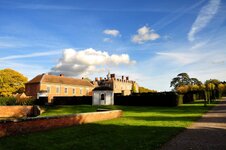
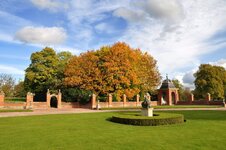
Sky yes to bring out the clouds, the rest and the colours no! It was taken late autumn afternoon with a polarizing filter on and the sun at this time of year gives a very orange glow that also makes the grass look a strange green. Can be great for detail at this time of year because there isn't any haze!
I was surprised how saturated and HDR looking these pics were when looking at them on the computer! One of the very few times I almost toned the colours down on a pic from the camera!
 
HDR isn't a look, it just means high dynamic range.

Most digital cameras capture more than 8bit per channel, most are about 12bpc iirc (my D70s is and it's fairly old now, newer ones may be even more)

The issue is our computer digital displays stop at about 6-10bits of colour display, depending on model, so it's how we rationalise the wider range we can capture, even with a digital camera, onto our display range of ~ 255 levels of colour intensity per channel.

That is tone mapping.

Tone mapping has ALWAYS been around, gamma correction is a type of tone mapping.


Load a RAW in 12bit per channel from the camera, and it's tone-mapped on the SLR's little display, then it's tone mapped in photoshop, and by the gfx software for monitor gamma correction.


Film was 'tone mapped' when you developed the photos. You could get some fairly funky looking effects with it!


I'm all for using more stops of exposure to get an image that you can see with your eye, but the camera limited to maybe 4-6 stops can't, but to just use the effect on raw images, and tone-map something to look a bit funky for no other reason than you can, seems a bit pants to me.


Lets put it this way, Ansel Adams didn't need "HDR" to take good pictures... and half the pictures I see that are HDR, even good ones, didn't NEED to be HDR'd... chances are while they were taking their bracketed shots, they had a perfectly nice exposure in there already anyway :D


Dave
 
Back
Top Bottom