Google Local search disappeared!

Now I'm getting sad(er)....

Looking at the icons on the left of your picture, the 4th one down is the POI icon right? Look at the 3rd one down. In yours, it looks like an alarm clock or stop watch.

In mine, the 3rd one down looks line a road with a star in the top right. Wonder if this is significant?
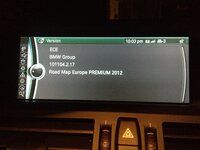
 
Essentially when I do your steps, navigation, poi, I get the screen a-z/category/google local search, where the last option is 'google local search' when i click this the screen goes to 'starting BMW online' and then the screen I posted above.
 
kevinmarkwhite said:
Now I'm getting sad(er)....

Looking at the icons on the left of your picture, the 4th one down is the POI icon right? Look at the 3rd one down. In yours, it looks like an alarm clock or stop watch.

In mine, the 3rd one down looks line a road with a star in the top right. Wonder if this is significant?

Scrap that....the OP's 3rd icon is the same as mine.
 
Maniac said:
Essentially when I do your steps, navigation, poi, I get the screen a-z/category/google local search, where the last option is 'google local search' when i click this the screen goes to 'starting BMW online' and then the screen I posted above.

Interesting. Mine doesn't do the "starting BMW online" bit. This is the difference then, yours are going into BMW online (which is why you get the same screens as when really going via connected drive).

Wonder why this is.
 
Maniac said:
Essentially when I do your steps, navigation, poi, I get the screen a-z/category/google local search, where the last option is 'google local search' when i click this the screen goes to 'starting BMW online' and then the screen I posted above.

Same as me , Kevin you look to have an older nav version than me , Maniac said his had been updated , wonder if its the same as mine
 
Yeah, my nav version is older than yours. Maps are "Road Map Europe PREMIUM 2013".

Maniac...versions please!
 
So the plot thickens:

Maniac
Nav Version: 101104.2.17
Map Version: Premium 2012

kevinmarkwhite
Nav Version: 101114.2.16
Map Version: Premium 2013

supersebbo
Nav Version: 101114.2.16
Map Version: Premium 2013

So Kevin and I now have exact same version of nav, map and combox software yet we still get a different Google Search options - and Maniac has a slightly different version, but the same Google Search as me. Maniac - have you had the fix for the traffic on wrong side of road issue? I'm thinking maybe thats the .17 bit at the end, I haven't had this yet.

Otherwise I'm flummoxed - we've got two systems with identical versions and yet two different behaviours for searching from the Navigation POI menu. I want what Kevin has, it seems to work more reliably than what I have (in terms of actually being able to navigate to Google POIs), but how on earth do I approach BMW about this?!
 
haha, you want what I have.....

How about my billions of debt? :D

So it doesn't seem to be the software version, or year of car (i.e. not changed on LCI etc).

Is there a setting that has changed?

Did you ask the dealer already? I would ask the service department, and say you know of at least 1 other car that is the same, and at least 1 other car that works how it used to. Basically, the Google Local Search option should work differently depending upon which menu you access it from (i.e. going via Nav, it knows you're gonna want to navigate to the place).

I doubt the dealer will know, but they can escalate it higher. Mention the forum, but my dealer normally slates forums, although in this instance you have photographic proof!
 
Just found this:

http://www.bimmerfest.com/forums/showthread.php?t=653323

Could it be something to do with the BMW Assist service? Perhaps phone them? 0800 561 0555.
 
Well, it's been a long long time but I'm happy to report that BMW Group have confirmed this is a problem with the software on some head units and are issuing a software fix next month. I don't know if it will be over-the-air or a dealer job, I will let you know when I know. Letter from BMW:

I write with reference to your email dated August 29, 2013. I would like to thank you for your patience whilst I have investigated your concerns.

I can advise that our internal Product Department have responded to your concerns with the Local Google Search facility. They have advised that BMW Group have investigated this matter and they have identified an error with the address format for the head unit in your vehicle. They have stated that an update will be released at the end of November which will rectify this error.

Once again, I am sorry that you have had cause to contact us. Should you have any further queries please do not hesitate to contact BMW Customer Service.

Yours sincerely
BMW UK
My-Ha Hoang
Senior Customer Service Executive
 
That's interesting to know... I wonder if that will qualify as a free update. Last I hear its about £120 to have BMW update software over the entire car...
 
just checked my map version premium 2013-2
nav ver 101123.2.14 car 3.0 litre m sport 2012 Oct
and mine works like Kevin's... for info purposes
I didn't try this before I did my map update via 2 x usb
drives in september
 
Back
Top Bottom