Google Local search disappeared!

supersebbo said:
Maniac said:
So I've looked at this for you and I get the same results as you. So I checked for more local golf courses and indeed some were presented without addresses but some were and navigation could be set. So this is a case I believe of incomplete information or a search result glitch.

Interesting... thanks for the help Maniac. I have tried about 5 different POIs and none worked so I assumed it was a system-wide problem, when it appears I may have just been unlucky. However Google definitely knows the address information for this POI, so something is not getting processed correctly. I will pass the information onto BMW and hopefully it will help them solve it for everyone.

https://maps.google.co.uk/maps?q=Brickhampton+Court+Golf+Complex,+Churchdown&hl=en&ll=51.89598,-2.18821&spn=0.006594,0.012413&sll=53.800651,-4.064941&sspn=12.948388,25.422363&oq=brickham&t=h&z=17&iwloc=A

Just for my sanity - can you give me the name of a POI that definitely does work, so I can double check in my car?

I typed town - Egham, search - gym, and it let me select and routed the first match.
 
just uploading better pictures, but not bmw online - go into nav and select POI
 
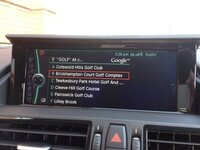
This is what mine USED to look like!! I didn't have the small map thumbnail, but the address would always appear with the flag next to it like in Kevin's photos, for this very same POI.

I bet its a version issue, I'm not sure whether it would be the version of the sat-nav, online services, connected drive, etc... there are so many little bits that can get updated.

It seems like BMW applied an update which added extra features, like the little thumbnail map, but at the same time broke something with the address details for some POIs.
 
supersebbo said:
This is what mine USED to look like!! I didn't have the small map thumbnail, but the address would always appear with the flag next to it like in Kevin's photos, for this very same POI.

I bet its a version issue, I'm not sure whether it would be the version of the sat-nav, online services, connected drive, etc... there are so many little bits that can get updated.

It seems like BMW applied an update which added extra features, like the little thumbnail map, but at the same time broke something with the address details for some POIs.

I think before you launch any nuclear missiles or start a war ;) that you should write up a step by step to get the results you see. If kevinmarkwhite can do the same then you can compare.
 
supersebbo said:
This is what mine USED to look like!! I didn't have the small map thumbnail, but the address would always appear with the flag next to it like in Kevin's photos, for this very same POI.

I bet its a version issue, I'm not sure whether it would be the version of the sat-nav, online services, connected drive, etc... there are so many little bits that can get updated.

It seems like BMW applied an update which added extra features, like the little thumbnail map, but at the same time broke something with the address details for some POIs.

Have you tired another POI, try the one I got a match for above and see if it works? I didn't get a flag, I just selected the location from the list and then 'start guidance'
 
So, from the Main Menu, go into Navigation:


Then select POI from the left:


Then Google Local Search:


Then go into Keyword and enter the phrase. Ignore the top line where it says a postcode - that's from a previous entry. As your typing the phrase (didn't get photos), suggestions appear on the right. Select the one that's closest:


And you get the choices:


Select the right one:


Click on Accept Destination:


And finally Start Guidance:


Sorry some pictures are crap, sun shining into car. Not sure if I've duplicated a step, the that's the general jist of it!
 
Ok, there are clearly some version differences here, compare these side-by-side:

Search Results screen:
Mine/Maniac's:
1ea27bd4-9e53-4039-bc6d-60ede0ad08bf_zpse8dd285d.jpg

Kevinmarkwhite's
1_zps1dc0684e.jpg


POI information screen:
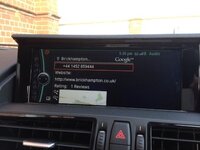
Mine/Maniac's:
GLS2_zpsa1c24cae.jpg

Kevinmarkwhite's:
3_zpsfe8e9577.jpeg


Notice in both instances on Kevin's the page title is actually in the title bar, where as in mine/maniacs is is separate with the white Google logo. Then also at the bottom of the POI information screen on Kevin's there is the Powered By Google text.

Now I am certain mine used to look like Kevin's, and it only 'broke' after I applied an update to the 'Bluetooth Compatibility' software (http://www.bmw.com/com/en/owners/navigation/bluetooth/bluetooth_software_update_vin.jsp) which by rights shouldn't be related, but it could be. What version information do you have under Main Menu->Settings->Software Update->Current Version?

Mine is:
Multimedia: MX-003.005.004
Telephone: TX-003.005.006
 
Can't answer at the moment...I'm cooking up some undercooked bangers on the BBQ!
 
Not checked the version on mine but it was updated recently. My google local search screen has much more on it than Kevin's. send button, google logo, recent searches list etc
 
I have tried the following

go to google maps search for my sisters house , when it found it under the more option pick send then pick bmw enter my connected drive user name , it reported sent to car sucessfully and sure enough by the timee i walked from office to car there was a route message waiting for me

then from sat nav went to poi then google search picked cinemas then local multiplex upcame details which had the nav (flag) icon clicked there, downloaded to car

so all seems to be working

my nav version is 101123.2.14
 
Transmat said:
For some reason I can't even look my version up under the settings menu

The area supersebbo mentions is the combox software version. Prior to 2010/11 the e89 didn't have combox. And if you don't know what combox is, google it.
 
Supersebbo: I think you are trying to do it via the Connected Drive, BMW Online, Online Search option, as you have the little spinning globe in the top left of the screen.

When I try it that way, I don't get the option to navigate to it either.

The way I am doing it is via the Navigation menu from the front screen.

My version was different:

Multimedia: MX-003.005.004
Telephone: TX-003.005.005

(Telephone out of date) But as I'm a version junky, I've updated it now to the same (Multimedia: MX-003.005.004,Telephone: TX-003.005.006) but it still works the same.

My Nav version is 101114.2.16

So can you confirm you are doing it via the Navigation option, and not the Connected Drive option?
 
Maniac said:
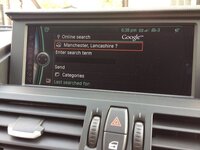
I went via both BMW Online and Navigation and both routes take me here;

9618406208_d434b215f3_c.jpg

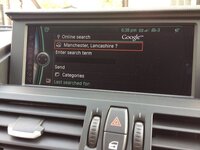
Thats the screen I get when I go via connected drive, but not navigation.......

So it seems, for some reason, that the google local search feature in your Nav section has been replaced with the same one from the connected drive version.

Can you take pictures of each step, like I did on page 2, showing going from the main screen, into nav, then into POI from the left and show what options come up then. I can see from your picture (and re-looking at the OPs originals) that you are both in the nav screen.

Will see what mine is like tomorrow once its been off overnight with the update applied.....perhaps it only takes effect after a full reboot.

Mine is a 2012 Sep build car.
 
Back
Top Bottom