A bit more information than you asked for but it's worth spelling it out in detail as others may find it useful....
You can only 'update' with a firmware version that's different to the one that's already installed so, if you need to install a modified version of the latest firmware that hasn't had its internal version number changed, you first need to install an old firmware version i.e. downgrade first, then repeat the process with the modified disc to upgrade
To find the current version go into the settings menu and you will see SW x-y/zz In the upper right hand corner and it should say something like SW 4-1/00
SW x-y/zz breaks down as
x should be 4 indicating that it's a MKIV nav
y should be 1 indicating that it's the full colour 'high' nav system
zz is your current firmware version
00 = v31 or v32 (latest official versions, released in 2008, BMW didn't update the number between releases)
91 = v29.1 or v30 (BMW didn't update the number between releases)
80 = v28
71 = v27.1
70 = v27
plus you'll find others that tend to be 0(something), these are usually a v32 firmware that has been modified - when I create custom ISOs I tend to modify the internal version number of the firmware to 1002 (10.02) so it displays under settings as SW 4-1/02, yours is showing as SW 4-1/03 which, to me indicates that it's a modified v32 with an internal version number of 1003
To upgrade Nav firmware: (I normally keep the drivers door open for this but I'm not sure if that's strictly necessary)
- Key in ignition position 1
- Wait until nav system has booted up
- Eject maps DVD
- Insert firmware CD
- After a bit of whirring and clunking from the DVD drive a message appears (briefly) regarding the software update
- Screen goes blank
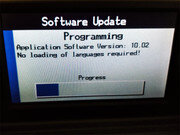
- Software Update screen appears with a progress bar (this is the only time you see the full internal version number)
- Once complete, it's followed by
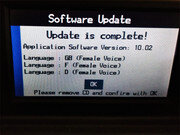
- Click [OK] using right hand knob
- CD is ejected automatically, nav system reboots


 By the seaside...