
You are using an out of date browser. It may not display this or other websites correctly.
You should upgrade or use an alternative browser.
You should upgrade or use an alternative browser.
Finding blue tooth module on z4 2003
- Thread starter Dicko
- Start date
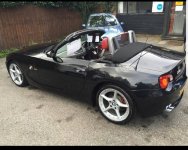
not many cars were specced with bluetooth ..you sure you have it?
In the coupe the module is behind the rear wall boot liner. I could just about get my hand in with my phone, take several pictures and eventually I managed to take one of the module enabling me to see the code. If the roadster is the same then this is where you'll find it.
A
Anonymous
Guest
Dicko said:I am trying to find the code to pair my phone to my car can some one tell me where the module is because I don't have the owner's manuals the car is a 2003 3L convertible I only just got her and so far I love her just a lot to learn about her lol thanks
Do you mean the code your car asks for when pairing with your phone? If so its either 0000 or 1234 .
GuidoK said:You can also read it with INPA
Really? Picture of menu in INPA please.
sad_old_man said:Dicko said:I am trying to find the code to pair my phone to my car can some one tell me where the module is because I don't have the owner's manuals the car is a 2003 3L convertible I only just got her and so far I love her just a lot to learn about her lol thanks
Do you mean the code your car asks for when pairing with your phone? If so its either 0000 or 1234 .
Not on an E86/6. It’s hard coded into the BT module.
The module sits in the boot against the bulkhead/firewall to the passenger compartment. You’ll need to remove some of the carpet trim to get to it.
ph001 said:GuidoK said:You can also read it with INPA
Really? Picture of menu in INPA please.
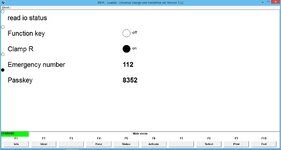
In INPA
In ISTA-D
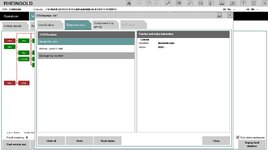

I dont know if you can initiate real pairing.
You can activate all seperate functions for diagnostic purpose (including pairing mode) but I dont know if you can actuatlly pair a phone then.
Maybe I can test it, although my phone doesnt work with my ULF (2004 ulf doesnt work with android 3 and plus because of the way the bluetooth stack is integrated, but I think it works with iphones). I can pair my phone though, it just disconnects after a few minutes.
You can activate all seperate functions for diagnostic purpose (including pairing mode) but I dont know if you can actuatlly pair a phone then.
Maybe I can test it, although my phone doesnt work with my ULF (2004 ulf doesnt work with android 3 and plus because of the way the bluetooth stack is integrated, but I think it works with iphones). I can pair my phone though, it just disconnects after a few minutes.
Ok, thanks. It was this post https://z4-forum.com/forum/viewtopic.php?f=3&t=102155 that led my to thinking that it might be possible. I couldn't even find the right menu to get to it in INPA, maybe |I have an older version software. It said it couldn't find the ECU when I tried to go into telephone menu.
Maybe you dont have the right data files in INPA. I dont think my INPA install is complete too but I hardly use it because I use ISTA-D. For that you need to have a specific version of the BMW standard tools/ediabas and the INPA version included in that is the one I use if I have to.ph001 said:I couldn't even find the right menu to get to it in INPA, maybe |I have an older version software. It said it couldn't find the ECU when I tried to go into telephone menu.
But I had no problem connecting with the ULF. And I tested the bluetooth activation, and indeed you can connect to that when activated with your phone.
Select the telephone module in communications:
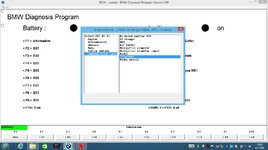
Select activate (F6)
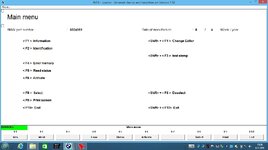
In the next menu select BT SEARCH (F5) and the car goes into BT pairing mode:
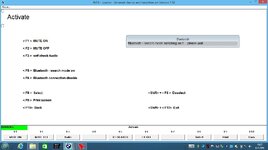
The only think I couldnt find is a way to remove all previous BT connections via INPA.
But as you're in BT pairing mode now you can hold the BT button on the center console for 10 seconds to remove the previous connections (after 10 sec. you hear 3 beeps as confirmation that the stored connections are deleted)
Thanks so much for taking the time to do that - you are a real credit to the forum. I'm fairly sure when I selected 'telephone' option last time it came back with a 'can't find ECU' error. Strange as most other things like live data / diagnostics work fine. I will check software version tonight and have another go. 
OK, so this is the problem I have when I try to select Telephone from the menu in INPA...
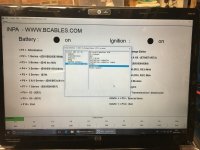
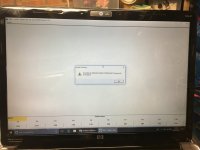
In fact I get the same error when I try to access any of the options in the communication menu. INPA works otherwise though (i.e. can read all engine parameters / DTC's etc)
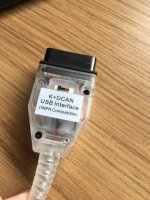
This is the lead I am using...
In fact I get the same error when I try to access any of the options in the communication menu. INPA works otherwise though (i.e. can read all engine parameters / DTC's etc)
This is the lead I am using...