Electronic Parking Brake Failure

https://www.gov.uk/vehicle-recalls-and-faults/report-a-serious-safety-defect

Report you problem to the DVLA. If many others are having the same problem.
Software should not go faulty on a safety critical item. There must be a design fault.
This is the emergency brake.
The least BMW should do is fix it for free. Get some advice from trading standards.

My business partners Zed brake failed. She had enough and traded it in for a Merc. Bit extreme but her Zed was a Friday afternoon car.
 
Hi Degenatron,

Is your generous offer still on? I'm Guildford base and could really do with some help in getting this sorted.

Thanks,
Sonny
 
Sonny_64 said:
Hi Degenatron,

Is your generous offer still on? I'm Guildford base and could really do with some help in getting this sorted.

Thanks,
Sonny

Hi, you can pm members after you’ve made 3 posts :thumbsup:
Rob
 
Thanks Rob!

I was watching a video that suggested the INPA software doesn't work with windows 7/10. Has anyone got it to work?

Cheers
 
Sonny_64 said:
Thanks Rob!

I was watching a video that suggested the INPA software doesn't work with windows 7/10. Has anyone got it to work?

Cheers
I've got it to work on my Win 10 machine using an XP image running in an Oracle VirtualMachine - I've probably got the image kicking around somewhere if you wanted to try it (the Oracle VM software is free)
 
OK got the diagnostic done today at an independent (£95) Faults found 6017 wheel speed sensor and 6030 parking brake control unit under voltage. Will need the software update as previously mentioned at a cost of £200 plus vat.
 
I would not pay BMW a penny to have this fixed. It a safety critical component that obviously shouldn't fail.
They have designed into a situation where software causes this critical failure, as this is the emergency brake.
No different to a faulty designed air bag.
You didn't wear out or break the software, they should sort for free.
 
Sorry I've not replied to this, but I do still have the laptop with necessary software & cable. I hope no-ones paid to have it fixed!

Located in Dorking, if anyone has the issue?
 
No problem, hopefully the update solves the problem for you.

As we head into winter and peoples batteries start to die, it's worth highlighting to others who are nearby (Surrey) that I can help!
 
Thank you so much for the files and tutorial! I just went to BMW santa monica yesterday and they want to charge me $290 for diagnostic and addtional $290 for system update which is insane. Just ordered INPA cable on amazon and hopefully I can fix it on my own.
 
Problem Update#1
I followed the instruction on the video:https://www.youtube.com/watch?v=z3GFE0qqsBI&t=201s
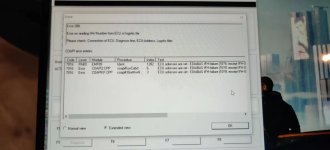
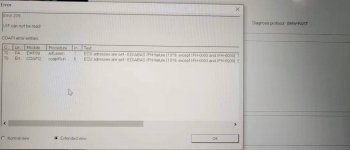
After setting up everthing, I connect it to my z4 but it is unable to update ZUSB and I get following errors:
car1.jpg
car2.jpg
Also the two dots on INPA didn't show up(the cable are set to COM1 with latency timer of 1 )

I believe there might be a problem with the connection but I don't know how to fix it, does anyone have any ideas?
 
youngZ4 said:
Problem Update#1
I followed the instruction on the video:https://www.youtube.com/watch?v=z3GFE0qqsBI&t=201s
After setting up everthing, I connect it to my z4 but it is unable to update ZUSB and I get following errors:

Also the two dots on INPA didn't show up(the cable are set to COM1 with latency timer of 1 )

I believe there might be a problem with the connection but I don't know how to fix it, does anyone have any ideas?

I wouldn't be too worried about the COM settings. I had a similar connection issue due to the cable I was using which has a switch for two different modes, maybe yours is similar?

degenatron said:
Sorted it finally, I had the switch on the cable the wrong way round. :headbang: It should be pushed towards the right.

So all I did was the method outlined in my previous post on page 8, then:

Once you have prepped winkfp with the e89 daten, just select comfort mode-> update ECU-> EMF89 Unverbaut-> Done-> Prog.ZB-Update. No need to enter VIN or ZB number. It will then read the existing software version from the car and show the new software version and ask if you want to update, so obviously say yes. Takes about 5-10 minutes and the parking brake will come back to life. Cruise control also working now too.

Also no need for an external power supply, just put the key in and press ignition on, without engine running. Battery SOC did drop from 56% to 33% though, so best to do it on a 'hot' battery I guess.
 
I wouldn't be too worried about the COM settings. I had a similar connection issue due to the cable I was using which has a switch for two different modes, maybe yours is similar?

I'm using this one(no switch): https://www.amazon.com/gp/product/B017IG81SQ/ref=ppx_yo_dt_b_asin_title_o01_s00?ie=UTF8&psc=1
Maybe I brought the wrong product? Which one are u using?
 
So software update done which didn't fix the issues but also needed a brake wear sensor and front brake pads even though they were only part worn and according to the mechanic "still good". £500 later and the light is off.
 
Nikfrape said:
So software update done which didn't fix the issues but also needed a brake wear sensor and front brake pads even though they were only part worn and according to the mechanic "still good". £500 later and the light is off.
did u wait for few days? It might take few days for the car to completely finish the update.
 
Hi, i had the same problem with my car, Electronic Handbrake Failure, however the handbrake still worked fine, but yellow warning light stayed on, followed all of the directions mentioned earlier, and updated, light stayed on, switched off and left car about an hour, got back in and viola, its now sorted, many thanks to all involved, brilliant forum, saved me a packet. :thumbsup:
 
youngZ4 said:
I wouldn't be too worried about the COM settings. I had a similar connection issue due to the cable I was using which has a switch for two different modes, maybe yours is similar?

I'm using this one(no switch): https://www.amazon.com/gp/product/B017IG81SQ/ref=ppx_yo_dt_b_asin_title_o01_s00?ie=UTF8&psc=1
Maybe I brought the wrong product? Which one are u using?

That's the problem with those eBay/Amazon cables, if you believe the description they should work but I see plenty of threads where people struggle with comms errors and failed flashes before buying a proper cable from BimmerGeeks and solving all their issues.

If you have it set to COM1 and the latency is set to 1 then there shouldn't be anything else to it. If you are running a virtual machine then make sure the USB device is passed through. If it still doesn't work then your best just getting a proper cable.
 
Back
Top Bottom