
You are using an out of date browser. It may not display this or other websites correctly.
You should upgrade or use an alternative browser.
You should upgrade or use an alternative browser.
E85 transport mode - Bristol
- Thread starter Bristolcot90
- Start date
barnesyboy
Member
ponchi101 said:colb said:Just compiled a list of the Creator 310 Menu Version 12.0
DRIVE MENU
...
CHASSIS MENU
...
IHKA/IHKR AC/Heater
...
Delete Transport Mode (No Function in Version 12)
Set Transport Mode (No Function in Version 12)
...
If your car is equipped with the module for the menu item then it should read it except the Transport Mode although this is in the menu.
Well, what my assumption that the car is on transport mode is because the entire AC/Heater auto module is NOT working, and I see that there is a module for that. Maybe that can be reset.
I will have to wait for the scanner to arrive and then play a bit with it. And then most likely get that K-line cable and install DISv57 and do the deletion that you found on YT. By now this is almost a point of honor NOT to take the car to the dealership.
That was the same with me, hence my descriptiono, of being obsessed. Local indie wanted £30 which was reasonable, but if something is within my capability I would sooner invest in the tool and do it myself, assuming the tool is not prohibitively expensive.
I just could not get a cable from ebay that worked hence the Foxwell. I plumped for that because I read on here it could do it.

Bristolcot90 (Andrew) brought his car over this morning to Zedshed Cymru, plugged the laptop into it and scanned it using BMW Scanner 1.4 software. Quite a few codes present besides the Transport Mode issue but they could have been old codes that have been in there for ages. Dealt with the Transport Mode first by using BMW Scanner 1.4 in the reprogramming menu of the module clicked on the 'Normal setting and it reverted the module to Normal and took the car out of Transport Mode instantly. As soon as it did the blower motor, heated rear screen and roof all became operational again. For those of you who have had problems clearing Transport mode I can now confirm BMW Scanner 1.4 will do the job.
Cleared the remaining codes we found but were left with one, intake air temp sensor which kept comming back, seems it needs replacing.
Whilst viewing live data to check the fuel trims we found the Maf was not reporting, checked the wiring and cleaned the sensor with Maf cleaner but that made no difference, it appears dead. Exhaust sensors viewed on the laptop showed them to be working but voltage range was not that active, may well be a result of the dead Maf sensor. Unplugged the Maf so the car runs on default settings to see if that made any difference to drivability on the journey back home, new Maf to be fitted, Bosch or Seimens oem suggested for replacement together with the intake air temp sensor. Will scan it again when new parts fitted to check Maf is indeed restored.
Cam cover gasket also needs replacing, its got a leak and the usual oil fumes as it burns on the exhaust. Once thats done it should be running like a top. Just needs a bit of love to get it to where Andrew wants it. As the car has over 100k on it some duff sensors come as no surprise even for a 2008 model, once sorted it should go on forever.
Cleared the remaining codes we found but were left with one, intake air temp sensor which kept comming back, seems it needs replacing.
Whilst viewing live data to check the fuel trims we found the Maf was not reporting, checked the wiring and cleaned the sensor with Maf cleaner but that made no difference, it appears dead. Exhaust sensors viewed on the laptop showed them to be working but voltage range was not that active, may well be a result of the dead Maf sensor. Unplugged the Maf so the car runs on default settings to see if that made any difference to drivability on the journey back home, new Maf to be fitted, Bosch or Seimens oem suggested for replacement together with the intake air temp sensor. Will scan it again when new parts fitted to check Maf is indeed restored.
Cam cover gasket also needs replacing, its got a leak and the usual oil fumes as it burns on the exhaust. Once thats done it should be running like a top. Just needs a bit of love to get it to where Andrew wants it. As the car has over 100k on it some duff sensors come as no surprise even for a 2008 model, once sorted it should go on forever.
Attachments

colb said:...Dealt with the Transport Mode first by using BMW Scanner 1.4 in the reprogramming menu of the module clicked on the 'Normal setting and it reverted the module to Normal and took the car out of Transport Mode instantly. As soon as it did the blower motor, heated rear screen and roof all became operational again. For those of you who have had problems clearing Transport mode I can now confirm BMW Scanner 1.4 will do the job....
Colb, you are going too fast!

Ok. Here is where I stand, and I will need some more guidance.
I am setting up an older notebook to run on Win XP and install DISv57. My problem, of course, is that I don't have the cable; I have been looking for it here in Bogota and it is nowhere to be found. Local e-Bay (it is called Mercado Libre here) sells it, but in reality it is people that order it and then deliver it to you, which I can do myself without their overhead.
Now you are talking about BMW scanner 1.4. I went on line and found some software, but I would appreciate to know if I am getting the right stuff:
This is a capture of it, INSTALLED in my Win 10 machine:
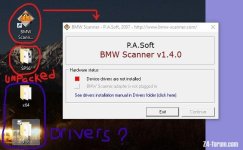
I got that software from here:
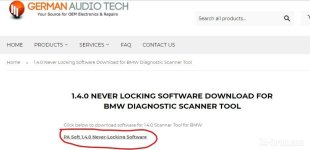
Now, you can see that the software will not run without both the cable AND the drivers. To install the drivers, you need to plug the cable and allow for Win XP to detect NEW hardware and then do the divers' installation. Of course, no cable, no way to test that, but in the same page as above, there is a link to the drivers, both x86 and x64:
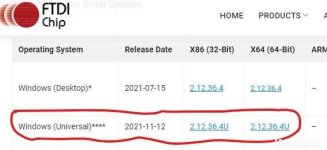
The question is: am I going the right route? I am going to the USA on the 19th and I can order the cable, and then start the whole thing with that little XP machine, but just to start saving some time.
Edit: Creator 310 on its way, but we have determined that will not do the TRANSPORT MODE trick. So it has to be DIS v57, or this new idea you are giving, Scanner 1.4.
Thanks again

Bristolcot90
Member
colb said:Bristolcot90 (Andrew) brought his car over this morning to Zedshed Cymru, plugged the laptop into it and scanned it using BMW Scanner 1.4 software. Quite a few codes present besides the Transport Mode issue but they could have been old codes that have been in there for ages. Dealt with the Transport Mode first by using BMW Scanner 1.4 in the reprogramming menu of the module clicked on the 'Normal setting and it reverted the module to Normal and took the car out of Transport Mode instantly. As soon as it did the blower motor, heated rear screen and roof all became operational again. For those of you who have had problems clearing Transport mode I can now confirm BMW Scanner 1.4 will do the job.
Cleared the remaining codes we found but were left with one, intake air temp sensor which kept comming back, seems it needs replacing.
Whilst viewing live data to check the fuel trims we found the Maf was not reporting, checked the wiring and cleaned the sensor with Maf cleaner but that made no difference, it appears dead. Exhaust sensors viewed on the laptop showed them to be working but voltage range was not that active, may well be a result of the dead Maf sensor. Unplugged the Maf so the car runs on default settings to see if that made any difference to drivability on the journey back home, new Maf to be fitted, Bosch or Seimens oem suggested for replacement together with the intake air temp sensor. Will scan it again when new parts fitted to check Maf is indeed restored.
Cam cover gasket also needs replacing, its got a leak and the usual oil fumes as it burns on the exhaust. Once thats done it should be running like a top. Just needs a bit of love to get it to where Andrew wants it. As the car has over 100k on it some duff sensors come as no surprise even for a 2008 model, once sorted it should go on forever.
I can’t thank you enough for your help today, was great to see your z4 and have something to aspire too!
I have done a little digging online and it looks like the air intake temperature may be a secondary function of the MAF, hopefully once I replace the MAF sensor this AIT fault will clear as well.
I’ve also been looking at a cheap refurbed laptop running windows 7 and BMW scanner 1.4 package online, worth its weight in gold from what I saw today.
ponchi101 said:colb said:...Dealt with the Transport Mode first by using BMW Scanner 1.4 in the reprogramming menu of the module clicked on the 'Normal setting and it reverted the module to Normal and took the car out of Transport Mode instantly. As soon as it did the blower motor, heated rear screen and roof all became operational again. For those of you who have had problems clearing Transport mode I can now confirm BMW Scanner 1.4 will do the job....
Colb, you are going too fast!
Ok. Here is where I stand, and I will need some more guidance.
I am setting up an older notebook to run on Win XP and install DISv57. My problem, of course, is that I don't have the cable; I have been looking for it here in Bogota and it is nowhere to be found. Local e-Bay (it is called Mercado Libre here) sells it, but in reality it is people that order it and then deliver it to you, which I can do myself without their overhead.
Now you are talking about BMW scanner 1.4. I went on line and found some software, but I would appreciate to know if I am getting the right stuff:
This is a capture of it, INSTALLED in my Win 10 machine:
scannerv140 1.jpg
I got that software from here:
scannerv140 2.jpg
Now, you can see that the software will not run without both the cable AND the drivers. To install the drivers, you need to plug the cable and allow for Win XP to detect NEW hardware and then do the divers' installation. Of course, no cable, no way to test that, but in the same page as above, there is a link to the drivers, both x86 and x64:
scannerv140 3.jpg
The question is: am I going the right route? I am going to the USA on the 19th and I can order the cable, and then start the whole thing with that little XP machine, but just to start saving some time.
Edit: Creator 310 on its way, but we have determined that will not do the TRANSPORT MODE trick. So it has to be DIS v57, or this new idea you are giving, Scanner 1.4.
Thanks again
This is the software and cable I have been looking at, which I believe is similar to what Colin has.
https://www.ebay.co.uk/itm/303916290158?mkevt=1&mkcid=1&mkrid=710-53481-19255-0&campid=5338624526&toolid=10001&customid=798fe931ffb0eec1d42dfe435f4cc006&gbraid=0AAAAADGzhXRdhMdjBqnP9hAqI3pGpqH7Y
Thanks again

ponchi go for the BMW Scanner 1.4 its the one posted by Andrew in the previous post above, going to be a lot easier to get that up and running than the BMW software. Scanner 1.4 will do all you want as we proved today with Andrews car and have the ability to read and clear all the other modules on your car. The screen shot you posted showing PA Soft and BMW Scanner 1.4 is the software. Get the package and use the cd that comes with it to load it on your PC following the instructions for installing the drivers it needs.
I find it very good and easy to use once its loaded on the laptop. The ebay link posted is a supplier located in Manchester UK, a lot of the others on ebay will be from China so postage takes longer. You should be able to find the package which includes the inteface and cable plus the software in the USA when you are there.
I find it very good and easy to use once its loaded on the laptop. The ebay link posted is a supplier located in Manchester UK, a lot of the others on ebay will be from China so postage takes longer. You should be able to find the package which includes the inteface and cable plus the software in the USA when you are there.
colb said:ponchi go for the BMW Scanner 1.4 its the one posted by Andrew in the previous post above, going to be a lot easier to get that up and running than the BMW software. Scanner 1.4 will do all you want as we proved today with Andrews car and have the ability to read and clear all the other modules on your car. The screen shot you posted showing PA Soft and BMW Scanner 1.4 is the software. Get the package and use the cd that comes with it to load it on your PC following the instructions for installing the drivers it needs....
Ok. Will do. Easily found in Amazon.com, and it works also for my E83 X3 (so it says). I will later decide if I also get a K-dcan cable, as if DISv57 is installed, there might be a little business there. The prices that BMW charges here are simply the famous wounded rhino.
Do you have it installed in an XP machine? I downloaded the software and installed it in this machine (W10, core i5) and, of course, I could not run the software because of the cable, but it was basically not even an installation as it was a "copy" to the C drive. XP will do, sure, but this one is a better machine.
colb said:Bristolcot90 (Andrew) brought his car over this morning to Zedshed Cymru, plugged the laptop into it and scanned it using BMW Scanner 1.4 software. Quite a few codes present besides the Transport Mode issue but they could have been old codes that have been in there for ages. Dealt with the Transport Mode first by using BMW Scanner 1.4 in the reprogramming menu of the module clicked on the 'Normal setting and it reverted the module to Normal and took the car out of Transport Mode instantly. As soon as it did the blower motor, heated rear screen and roof all became operational again. For those of you who have had problems clearing Transport mode I can now confirm BMW Scanner 1.4 will do the job.
Cleared the remaining codes we found but were left with one, intake air temp sensor which kept comming back, seems it needs replacing.
Whilst viewing live data to check the fuel trims we found the Maf was not reporting, checked the wiring and cleaned the sensor with Maf cleaner but that made no difference, it appears dead. Exhaust sensors viewed on the laptop showed them to be working but voltage range was not that active, may well be a result of the dead Maf sensor. Unplugged the Maf so the car runs on default settings to see if that made any difference to drivability on the journey back home, new Maf to be fitted, Bosch or Seimens oem suggested for replacement together with the intake air temp sensor. Will scan it again when new parts fitted to check Maf is indeed restored.
Cam cover gasket also needs replacing, its got a leak and the usual oil fumes as it burns on the exhaust. Once thats done it should be running like a top. Just needs a bit of love to get it to where Andrew wants it. As the car has over 100k on it some duff sensors come as no surprise even for a 2008 model, once sorted it should go on forever.
Is this the scanner and software combo you're referring to? https://bmwpasoft.com/ In addition to clearing Transport Mode, I think I need to program a headlight ballast. Do you think this will program as well? I had to replace one due to water getting in through the connector. I have an '08 E85 and I pulled it from a Chrysler.
mothy5000
The link you posted is BMW Scanner 1.4 but at an inflated price, they are far cheaper on ebay here
https://www.ebay.co.uk/itm/153170492942?hash=item23a9ac3e0e:g:0NUAAOSw9SVeUVs4&amdata=enc%3AAQAIAAAA4HkJAfQTuImtAdy5nGZwBJL456T6mDyPLQWfB02a0a%2Bv1aqmwIDthYHLTwzIN4Y8DGvnOL459FQx7PhzUvry55Z7pLGnZzDCSlCD2Me4Ah98qYSbSoyxpj0x2WeTYgipeoqMS0id%2F2SwnM2bjHo%2FSlJHlGoSLQSFKvUpg5MCuiZYzwGnwn7CzxOASYYEhsYLFzJPnDnX%2FEOszey8W%2FNWcSAoaRvrXs9y5IBVEHdhybuBM71MeC61%2B0n6OJN1%2FAXXwMuCVIu6s7Wmnrq4Vc8BsNSCcdDZ2IDgjH0dhDKZGRpf%7Ctkp%3ABFBM6O-f8Zhj
It will reset Transport mode as discussed earlier but will not delete it from the car, this has to be done using higher end diagnostics tools like Autel and Launch Tablets. BMW INPA, DIS and NCS Expert suite of programs should also be capable but is a pain to install and very clunky in use.
Not sure BMW Scanner 1.4 is able to program a headlight ballast, not noticed it in the menus when I have been using it.
Someone else may know the answer and come back now you have asked the question.
The link you posted is BMW Scanner 1.4 but at an inflated price, they are far cheaper on ebay here
https://www.ebay.co.uk/itm/153170492942?hash=item23a9ac3e0e:g:0NUAAOSw9SVeUVs4&amdata=enc%3AAQAIAAAA4HkJAfQTuImtAdy5nGZwBJL456T6mDyPLQWfB02a0a%2Bv1aqmwIDthYHLTwzIN4Y8DGvnOL459FQx7PhzUvry55Z7pLGnZzDCSlCD2Me4Ah98qYSbSoyxpj0x2WeTYgipeoqMS0id%2F2SwnM2bjHo%2FSlJHlGoSLQSFKvUpg5MCuiZYzwGnwn7CzxOASYYEhsYLFzJPnDnX%2FEOszey8W%2FNWcSAoaRvrXs9y5IBVEHdhybuBM71MeC61%2B0n6OJN1%2FAXXwMuCVIu6s7Wmnrq4Vc8BsNSCcdDZ2IDgjH0dhDKZGRpf%7Ctkp%3ABFBM6O-f8Zhj
It will reset Transport mode as discussed earlier but will not delete it from the car, this has to be done using higher end diagnostics tools like Autel and Launch Tablets. BMW INPA, DIS and NCS Expert suite of programs should also be capable but is a pain to install and very clunky in use.
Not sure BMW Scanner 1.4 is able to program a headlight ballast, not noticed it in the menus when I have been using it.
Someone else may know the answer and come back now you have asked the question.