
E85 Fans and Rear Widow Demister Not Working - Electric Roof and Heated seats do

gdsandy said:
Colb is the expert but tbh, this was simple. Usb stick that comes with the lead has a video explaining what to do.
Told you I'd be back.
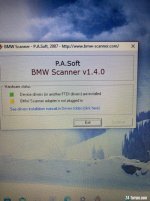
Mine seems to automatically load the drivers, but then it tells me the adaptor is not connected. It is?
The video seems to show different drivers being loaded but mine didn't give that option?
 
Is there a help file with instructions on how to load the drivers? you sometimes have to do it in a specific order.
 
Rockhopper said:
Is there a help file with instructions on how to load the drivers? you sometimes have to do it in a specific order.
Spent a couple more hours on two different laptops.
The issue seems to be the lead. I am not seeing the check box to say the scanner is plugged in, but when I put the lead into or out of the adaptor box thingummy it briefly flashes the light to say its connected, then goes out again.
About to contact the company to see what they say.
 
Rockhopper said:
Have you tired it with the lead plugged into the car?
Yup, exactly the same issue.
All drivers updated properly. Put the plug into the adaptor about 2-3mm and wiggle it and you can get a brief flash from the yellow light on the adaptor, but nothing more. It then says it's not connected and won't let you continue at all.

Honestly, I have completely replaced a steering column in less time than it's taking me to set up a simple software programme! :headbang:
 
Are you using the correct usb port on your laptop and have it configured to use the required driver file?
If its configured ok then once the cable is plugged into the laptop it should recognise it and the interface.
 
I checked with my son. He installed the drivers exactly as per the video. He said it is ket that you get the port assignment right for the USB connection on your machine that you will be using for the device.
 
gdsandy said:
I checked with my son. He installed the drivers exactly as per the video. He said it is ket that you get the port assignment right for the USB connection on your machine that you will be using for the device.
Can you ask him how it appeared when he first installed it? Mine immediately appeared with the drivers showing green, installed. The video seems aimed at W8.1 and shows no drivers installed, so you can follow the video straight though. This is possibly what is confusing me?
 
I just asked. He texted back:

I just followed exactly as the video told me to do and even when things looked correct before the step, I did the step anyway.
 
gdsandy said:
I just asked. He texted back:

I just followed exactly as the video told me to do and even when things looked correct before the step, I did the step anyway.
I'll give it a go in a while then. As others will testify I am something of an IT luddite. :roll:
 
[ref]gdsandy[/ref], [ref]colb[/ref], thanks for your assistance.
I have now been through this process with my neighbour who understands these things better than I.
We have tried it on two different Win 10 and one Win 8.1 laptops.
Exactly the same result every time.
IMG_4126.jpg
When I plug the lead into the adapter, as it goes in the first couple of mm, if I wiggle it I get a very brief flash of the yellow light, but that's all.
I'm convinced it's a connection problem but could be either part?

Seller says he doesn't know what is wrong and won't send out another one, but will refund me. Sending me a pre-paid label to return it.

Any other suggestions about the best place to get one and then sort the drivers etc?
 
Gents itโ€™s fixed. Went up town to a little computer shop and he found a compatible lead. Sure enough it works now.
 
Ace, thought it may have been a driver or port config problem surprised it was the cable but glad you sourced a replacement. Now go and have a play.
 
colb said:
Ace, thought it may have been a driver or port config problem surprised it was the cable but glad you sourced a replacement. Now go and have a play.
Spoke too soon.
Works perfectly on my daily laptop with Win 8.1.
Tried it on the Win 10 laptop I have cleared off purely for car stuff and when I get to the final part, the second driver update, the laptop tells me its encountered an error and has to reboot. Takes me back to the beginning every time.
 
How about running it on the W10 machine in compatibility mode
 
Back
Top Bottom