Sorry ignore the one I highlighted hah, didn't realise that til after I posted it. Is the aux method preferred over CD changer then?

You are using an out of date browser. It may not display this or other websites correctly.
You should upgrade or use an alternative browser.
You should upgrade or use an alternative browser.
E85/6 Z4M CarPlay/Android Auto with original hardware
- Thread starter tomscott
- Start date
Baris - Carphonics
Member
thecremeegg said:Sorry ignore the one I highlighted hah, didn't realise that til after I posted it. Is the aux method preferred over CD changer then?
It’s cleaner for sure. There is always that possibility the cd changer might fail and you won’t be able to get sound from the CarPlay.
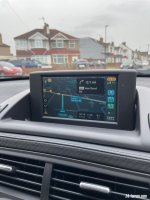
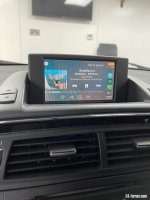
pvr said:How did you resolve the carpet problem?
No issue, having dsp, the carpet steps out anyway, so where the tuner goes was a polystyrene block that filled the void the tuner now sits.
I’m finished, just some tweaks to do, then I’ll do a full review when I’m back from a road trip though the Alps to Turin and back next week.
Will be exclusively playing Matt Monroe, Days like these on the Alpine passes.

Justino said:Sneak peak
Not finished yet.
IMG_8368.jpeg
Looking good.
Hertford, near me.
So a belated review of the CarPlay add-on that Baris has developed and fitted to my car.
I visited Baris on the way to the Eurotunnel prior to a week road trip through Europe, getting down as far as Aix on Provence and then back up through Italy, Switzerland, Germany, and Belgium.
The ability to have Waze on the dashboard screen was a real boon on the trip, and made the car feel so much more modern.
Initially I went with the Aux in route through a Bluetooth module rather than running a cable. After some fine tuning we found that using the CD cable route with a Bluemusic Bluetooth adapter gave a better quality of sound with my DSP setup. Using the Bluetooth adapter allows you to still use the cars existing Bluetooth phone connection.
I also had the TV retrofit cable installed so I could keep the original OEM screen menu format.
Operation is seamless, you flip between the OEM screen and the CarPlay screen by pressing the radio preset 5. This was handy for checking the car computer for remaining range to work out refuelling stops on the road trip. The SEL button is the back button in CarPlay. All other buttons work as expected, eg track skip.
To round up, Baris is a really nice guy, knows his stuff and nothing is too much trouble for him.
I visited Baris on the way to the Eurotunnel prior to a week road trip through Europe, getting down as far as Aix on Provence and then back up through Italy, Switzerland, Germany, and Belgium.
The ability to have Waze on the dashboard screen was a real boon on the trip, and made the car feel so much more modern.
Initially I went with the Aux in route through a Bluetooth module rather than running a cable. After some fine tuning we found that using the CD cable route with a Bluemusic Bluetooth adapter gave a better quality of sound with my DSP setup. Using the Bluetooth adapter allows you to still use the cars existing Bluetooth phone connection.
I also had the TV retrofit cable installed so I could keep the original OEM screen menu format.
Operation is seamless, you flip between the OEM screen and the CarPlay screen by pressing the radio preset 5. This was handy for checking the car computer for remaining range to work out refuelling stops on the road trip. The SEL button is the back button in CarPlay. All other buttons work as expected, eg track skip.
To round up, Baris is a really nice guy, knows his stuff and nothing is too much trouble for him.
pvr and Justino, Thank you!
Can you make and post some operational videos? Possibly on YouTube.
Have either of you added backup camera?
A concern I have, Is the display brightness adequate? I get that the display resolution is probably not going to be like a new car’s display would be, but is it bright enough?
Can you make and post some operational videos? Possibly on YouTube.
Have either of you added backup camera?
A concern I have, Is the display brightness adequate? I get that the display resolution is probably not going to be like a new car’s display would be, but is it bright enough?

Yes, it is bright enough with the roof open, that is certainly not a problem.
Resolution is fine for the size of the screen, I can see / read street names etc without problems. The voice control to actually set a route using Waze has been a great feature as well as what playlist I wanted to play on Spotify.
Don't have a camera added, don't actually know where on the E85 it would look ok to have
Resolution is fine for the size of the screen, I can see / read street names etc without problems. The voice control to actually set a route using Waze has been a great feature as well as what playlist I wanted to play on Spotify.
Don't have a camera added, don't actually know where on the E85 it would look ok to have
Baris - Carphonics
Member
Okiesnake said:pvr and Justino, Thank you!
Can you make and post some operational videos? Possibly on YouTube.
Have either of you added backup camera?
A concern I have, Is the display brightness adequate? I get that the display resolution is probably not going to be like a new car’s display would be, but is it bright enough?
You can adjust the brightness and mainly contrast of carplay via carplay itself and the television AV channel settings. So if your original nav screen is dark, you have something to adjust it for carplay.
Reverse camera ideally goes where the number plate is, just above it. I would recommend an adjustable camera, as the location is quite low.
The next trick is getting the cable down to the bumper from the boot. There is a grommet to the right side of the boot, closest to you. I normally go through that.

D.Bryce
Member
@Baris this is superb work and I’m super keen to get it done.
A few questions, I don’t have the Tv tuner but do have nav and the aux setting, I also have the carver dsp amp.
Do I need to buy/fit the tv tuner or the bracket or can it just be run off the aux setting ?
Assuming because it’s the original system no additional cables are required to power the amp.
Again, super piece of work for the community.
A few questions, I don’t have the Tv tuner but do have nav and the aux setting, I also have the carver dsp amp.
Do I need to buy/fit the tv tuner or the bracket or can it just be run off the aux setting ?
Assuming because it’s the original system no additional cables are required to power the amp.
Again, super piece of work for the community.
D.Bryce
Member
I’ve got the same setup as you with the blue music Bluetooth connection through the factory unit also have the dsp carver system.Justino said:So a belated review of the CarPlay add-on that Baris has developed and fitted to my car.
I visited Baris on the way to the Eurotunnel prior to a week road trip through Europe, getting down as far as Aix on Provence and then back up through Italy, Switzerland, Germany, and Belgium.
The ability to have Waze on the dashboard screen was a real boon on the trip, and made the car feel so much more modern.
Initially I went with the Aux in route through a Bluetooth module rather than running a cable. After some fine tuning we found that using the CD cable route with a Bluemusic Bluetooth adapter gave a better quality of sound with my DSP setup. Using the Bluetooth adapter allows you to still use the cars existing Bluetooth phone connection.
I also had the TV retrofit cable installed so I could keep the original OEM screen menu format.
Operation is seamless, you flip between the OEM screen and the CarPlay screen by pressing the radio preset 5. This was handy for checking the car computer for remaining range to work out refuelling stops on the road trip. The SEL button is the back button in CarPlay. All other buttons work as expected, eg track skip.
To round up, Baris is a really nice guy, knows his stuff and nothing is too much trouble for him.
Can you tell me what kit you have went for as the whole tv tuner thing has confused me. Read this full thread and not sure what I exactly need :roll:
Baris - Carphonics
Member
D.Bryce said:I’ve got the same setup as you with the blue music Bluetooth connection through the factory unit also have the dsp carver system.Justino said:So a belated review of the CarPlay add-on that Baris has developed and fitted to my car.
I visited Baris on the way to the Eurotunnel prior to a week road trip through Europe, getting down as far as Aix on Provence and then back up through Italy, Switzerland, Germany, and Belgium.
The ability to have Waze on the dashboard screen was a real boon on the trip, and made the car feel so much more modern.
Initially I went with the Aux in route through a Bluetooth module rather than running a cable. After some fine tuning we found that using the CD cable route with a Bluemusic Bluetooth adapter gave a better quality of sound with my DSP setup. Using the Bluetooth adapter allows you to still use the cars existing Bluetooth phone connection.
I also had the TV retrofit cable installed so I could keep the original OEM screen menu format.
Operation is seamless, you flip between the OEM screen and the CarPlay screen by pressing the radio preset 5. This was handy for checking the car computer for remaining range to work out refuelling stops on the road trip. The SEL button is the back button in CarPlay. All other buttons work as expected, eg track skip.
To round up, Baris is a really nice guy, knows his stuff and nothing is too much trouble for him.
Can you tell me what kit you have went for as the whole tv tuner thing has confused me. Read this full thread and not sure what I exactly need :roll:
The tv tuner is what houses the CarPlay and makes everything work on the screen for it. The tv tuner was a factory option. Some cars already have it, some don’t
Cars with a factory amplifier will have the bracket there for the tv tuner as it’s part of the amplifier bracket.
Do you have factory Bluetooth hands free? If so, does it work?
If you do and it works, then it’s just a matter of adding the tv tuner/carplay in, and keeping your blue music connected to your phone, for music and everything will be controllable via the CarPlay.
The tv tuner shares the same connection as the navigation unit, so you can just unplug it and connect the tv tuner instead. They both act as video modules for the screen.
Or I can provide a retrofit cable, so you can keep the original navigation unit still connected to the system. The cable just piggy backs off the navigation unit blue connector and connects directly into the tv tuner. Simple connection.
If you have a cd changer you will need to remove the centre console to remove the navigation unit to get access to the back of it.
If you don’t have a cd changer, you can just about access it from the rear of the car.
D.Bryce said:I’ve got the same setup as you with the blue music Bluetooth connection through the factory unit also have the dsp carver system.Justino said:So a belated review of the CarPlay add-on that Baris has developed and fitted to my car.
I visited Baris on the way to the Eurotunnel prior to a week road trip through Europe, getting down as far as Aix on Provence and then back up through Italy, Switzerland, Germany, and Belgium.
The ability to have Waze on the dashboard screen was a real boon on the trip, and made the car feel so much more modern.
Initially I went with the Aux in route through a Bluetooth module rather than running a cable. After some fine tuning we found that using the CD cable route with a Bluemusic Bluetooth adapter gave a better quality of sound with my DSP setup. Using the Bluetooth adapter allows you to still use the cars existing Bluetooth phone connection.
I also had the TV retrofit cable installed so I could keep the original OEM screen menu format.
Operation is seamless, you flip between the OEM screen and the CarPlay screen by pressing the radio preset 5. This was handy for checking the car computer for remaining range to work out refuelling stops on the road trip. The SEL button is the back button in CarPlay. All other buttons work as expected, eg track skip.
To round up, Baris is a really nice guy, knows his stuff and nothing is too much trouble for him.
Can you tell me what kit you have went for as the whole tv tuner thing has confused me. Read this full thread and not sure what I exactly need :roll:
I was about to reply and suggest Baris can explain better, but see he has already done so.
As you have the Bluemusic, you are partly there already. This from my experience is the best bluetooth option for our cars - others I tried created interference which the Bluemusic cured.
If you have DSP, as Baris says, the TV bracket is not needed as it is already there. On mine there was a foam block filling the void where the retro fit TV Tuner with carplay now sits.
To help also, I went for the piggy back cable, so I can revert to OE sat nav look and the car computer section, a small extra cost, but worth it.
I didn't have a CD changer, so access was available from the rear.
Thanks for confirming that as my new M looks like it has that foam filler as well looking at the shape of carpet.
It was just missing on the si which was a problem, I am going to move the tuner to the M and probably buy the two cables again to avoid having to pull all that out.
It was just missing on the si which was a problem, I am going to move the tuner to the M and probably buy the two cables again to avoid having to pull all that out.
Baris - Carphonics
Member
AMB85 said:Not sure how old this thread is as unless I'm being stupid it has no dates/times of posts?
This is something I want to do on my Z4MR but would want it installing, where are you based Baris and is that something you can do for me?
Cheers
Sure, I’m based in north London, Enfield.
