Diagnostic tool. ISTA+. Review

ponchi101

Member
 Bogota
What is needed.
A VERY LARGE drive (the software is very large)
A cable, either a DCAN or an ENET interface.

Installation.
Finding the software on line is just a matter of a good search, as some other BMW forums have links to it. However, the issue is the download. The entire package comes well over 12 GB, and then installation will bring the entire package to over 100GB. So, most people have placed the software on cloud servers and in order to download this amount of software you will need an account. There are some pages that will SELL YOU the Software and provide you with a one-click install; if you have some spare cash, around 15 pounds will spare you the entire installation. However, I personally do not recommend that. The software is available and the installation is not that hard. If you are the kind of person that shies away from a software install, most likely you will not like ISTA+ anyway.

The pros. ISTA+ can be installed on an external drive. :driving: I did it on an external HD but, due to the size, I would recommend installing it on a removable SD. A 128 will do for only diagnostics (at 60GB) but if you want the full package, you will need another 100GB. So go for a 256GB.
ISTA + COMES WITH AN EXTENSIVE USERS MANUAL!!!!!
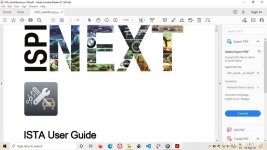
ista manual.jpg
And when I say extensive, I mean 92 pages long extensive. It is a major plus, compared to other diagnostic tools which expect you to be some sort of magician and grasp their entire spectrum of tools as if by magic.
 
USE.
I used ISTA+ with a regular DCAN cable, as that is the interface for the E Series. If you want to use it for a F or G series, you will need a ENET cable; this is just the same 20-pin cable but with a J45 interface, i.e. ethernet interface. Why did BMW decide this is beyond my scope of knowledge. As most modern laptops rely on simple USB's (or USB C) you may have to get a NEW ENET cable and a USB to ETHERNET adapter. The options are many. If you want to use this as a tool for servicing other vehicles, you will need multiple cables.

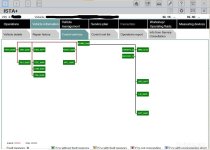
The interface for ISTA+ is way more modern than any of the other software I have tested. It is actually kind of pretty:
ISTAStart.jpg

I can't tell how all the functions interact, because there are 92 pages of them (in the UM). One trick: the GUI has a fixed aspect ratio, so if you have a screen less than 14 In, the operation buttons will be not visible. There is no regular FULL SCREEN icon, so it took me a while to figure it out: DOUBLE CLICK on the top ribbon and you get the full view. That makes working with ISTA+ easier.

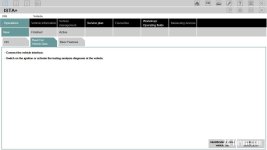
An initial screen will let you run a full diagnostics:
ista GUI2.jpg

From then on, you are on your own, together with your manual. It is obvious that ISTA+ is the most powerful of all software.

Summary
It can be found for free, and it is very powerful. But some caveats are there:
1. It can diagnose E Series cars but WILL NOT PROGRAM ANYTHING in them. The software claims it can program F & G series, but not having one of them, I can't vouch for it.
2. This is pirated software. As I do not live in a civilized country, I could not care less; but if you are in Europe or some portions of the USA, you may want to consider this issue.
3. Buy the proper cable for YOUR type of car. E Series use DCAN, F & G use ENET. Or the DCAN plus the adapter. Your choice.
4. It is funny in that it works based on OPERATIONS. By that it means that you can start a diagnosis of one car, switch to another, and the operations in the first one remain in the memory. You can do as many as three. But when you are done, you need to delete them, otherwise it will not accept more operations. Not a big issue, but just a pointer.
5. I can't tell what sort of programming can be done in F & G series. But it looks like almost anything is possible.
6. I started this entire education on diagnostic tools because my TRANSPORT MODE was stuck. This software is a replacement for D57 (the previous standard) but, as ISTA+ it cannot program E-series, D57 could still be of use. But for that, I would rather recommend Scanner V1.4.
7. Read the manual, if you really want to work with this.
 
I have just come across this, thanks very much for the review! Are you aware whether an OBD Link MX+ bluetooth adaptor will work with ISTA+ on an E85?
 
EViS said:
I have just come across this, thanks very much for the review! Are you aware whether an OBD Link MX+ bluetooth adaptor will work with ISTA+ on an E85?

I really don't know. You mean something like:
Do the entire connection to the car via BlueTooth? Plug an adapter in the car, and connect to the laptop via it?
ANYTHING can be done these days; but that would take some major interface knowledge to get going (I think).
 
chanlon1 said:
@ponchi101 what specification of laptop do you need?

I run mine on a very simple machine. Asus VivoBook, W10 (22h2), 8G RAM, 256 ROM SSD.
I would load ISTA on an SD and load it when you need it. It is not as if you are going to diagnose the car every day (unless you will be working with this).
 
ponchi101 said:
USE.
I used ISTA+ with a regular DCAN cable, as that is the interface for the E Series. If you want to use it for a F or G series, you will need a ENET cable; this is just the same 20-pin cable but with a J45 interface, i.e. ethernet interface. Why did BMW decide this is beyond my scope of knowledge. As most modern laptops rely on simple USB's (or USB C) you may have to get a NEW ENET cable and a USB to ETHERNET adapter. The options are many. If you want to use this as a tool for servicing other vehicles, you will need multiple cables.

The interface for ISTA+ is way more modern than any of the other software I have tested. It is actually kind of pretty:
ISTAStart.jpg

I can't tell how all the functions interact, because there are 92 pages of them (in the UM). One trick: the GUI has a fixed aspect ratio, so if you have a screen less than 14 In, the operation buttons will be not visible. There is no regular FULL SCREEN icon, so it took me a while to figure it out: DOUBLE CLICK on the top ribbon and you get the full view. That makes working with ISTA+ easier.

An initial screen will let you run a full diagnostics:
ista GUI2.jpg

From then on, you are on your own, together with your manual. It is obvious that ISTA+ is the most powerful of all software.

Summary
It can be found for free, and it is very powerful. But some caveats are there:
1. It can diagnose E Series cars but WILL NOT PROGRAM ANYTHING in them. The software claims it can program F & G series, but not having one of them, I can't vouch for it.
2. This is pirated software. As I do not live in a civilized country, I could not care less; but if you are in Europe or some portions of the USA, you may want to consider this issue.
3. Buy the proper cable for YOUR type of car. E Series use DCAN, F & G use ENET. Or the DCAN plus the adapter. Your choice.
4. It is funny in that it works based on OPERATIONS. By that it means that you can start a diagnosis of one car, switch to another, and the operations in the first one remain in the memory. You can do as many as three. But when you are done, you need to delete them, otherwise it will not accept more operations. Not a big issue, but just a pointer.
5. I can't tell what sort of programming can be done in F & G series. But it looks like almost anything is possible.
6. I started this entire education on diagnostic tools because my TRANSPORT MODE was stuck. This software is a replacement for D57 (the previous standard) but, as ISTA+ it cannot program E-series, D57 could still be of use. But for that, I would rather recommend Scanner V1.4.
7. Read the manual, if you really want to work with this.

Thanks Ponchi great write up.

I have a 2008 3.0si E85, and also have the transport mode stuck on after a low battery. I take it you couldn't fix with ISTA+ . So what did you use to resolve? D57?
 
Be aware transport mode although in the Creator 310+ Scanner will not function to reset transport mode. May become functional with later software updates.
BMW Scanner 1.4 is by far the simplest Scanner and limited coding that is available for Windows laptop version 7upwards. That has the ability to reset transport mode but cannot delete it to get rid of it altogether. Dealers at PDI should have deleted it but they didn’t, smell of money making in the future was the reasoning I suspect.
I also use a Launch tablet Scanner which has the ability to delete transport mode, it removes the transport mode from all of the cars modules that get closed down when low battery conditions trigger transport mode. At £300 for a Chinese version of Launch its a bit expensive but it works on worldwide car manufacturers not just BMW.
I got 2 years free updates with mine after that you have to buy a subscription for continued updates. It will still function with the last updates if you don’t subscribe for updates.
 
Shadbolt83 said:
...

Thanks Ponchi great write up.

I have a 2008 3.0si E85, and also have the transport mode stuck on after a low battery. I take it you couldn't fix with ISTA+ . So what did you use to resolve? D57?

Just to agree with Colb. For the money, and the range of functions, go with Scanner V1.4. Easily found in Amazon, and will run on any regular W10 machine. I gather it will also run in W11. And it will clearly reset and disable transport mode, not only for the A/C but for all modules that have it.
 
Back
Top Bottom