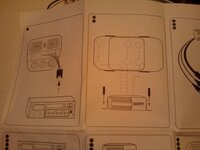
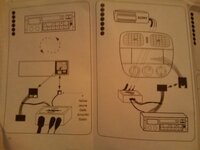
Connects2 Aux-In

alex85

Active member
 Wirral
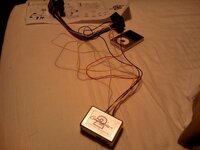
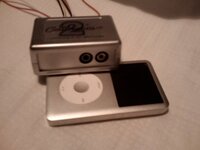
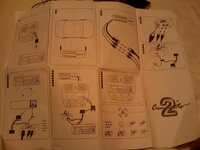
Just had this delivered...
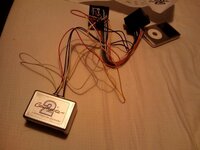
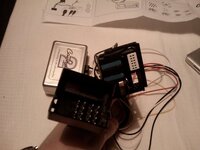
IMAG0003.jpg
IMAG0004.jpg
IMAG0005.jpg
IMAG0006.jpg
IMAG0007.jpg
IMAG0008.jpg
IMAG0009.jpg
IMAG0010.jpg

Obviously not had a chance to try and fit it as my car is at the dealers being worked on.

I decided to go for aux in due to my new work phone having a 3.5mm headphone jack and it being loaded with my music - so it wont always be the ipod that is being played through it.

Now it confuses me...

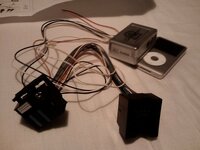
I expected a connector for the cd player input on the back of the headunit and for that to lead to the aux in box...

But there are two connectors. I can't get my head around it? Maybe I am being really daft... has anyone fitted this and is it easy?
 
I'm guessing it similar to IceLink plus in that the small 12 pin plus replaces the one for the changer, you will probably find you need to disconnect the changer though if you have one.
 
This looks as though it's supposed to be used inline with the original head unit connector... So, you take the plug out the back of the head unit, plug it into the Connects2 socket and plug the other end of the Connects2 loom into the back of the head unit.

There are two things I don't understand though:

1. They seem to be tapping into the white plug (the one that plugs into the big 40 pin head unit plug) rather than the black one alongside it. I thought the Aux input was in the black plug, along with the CD changer wires?
2. What does this get you over the normal Aux input? With that, you just take the black plug out the back, extract the pins from plug in the aux-in kit and insert them into the corresponding holes in the existing plug. that way you keep the cd changer and add the aux.
 
Spandex, you are right it's inline and uses the small white 12 pin plug.

Dont know what this offers over AUX, not a lot more I wouldnt have thought TBH
 
Fek.

It plugs inline as suspected and when you hit 'mode' it shows cd1-track1 but no sound... if you push button 2-6 it says no disc.

Weird. Dont quite know what to do next.
 
Was there also a 12 pin black plug alongside the 12 pin white plug in your original main plug? If so, it looks like you should take that out and put it into the same space on the inline thing (so it's connected into the back of the head unit, where it was before, but in the new main plug). This is because the socket on the inline loom seems to have the area for the two 12 pin plugs blanked out.
 
The black plug would be there is you have SatNav or Bluetooth. If you do have bluetooth you may have to swap some pins around as with the IceLink Plus
 
I got the BMW official assembly hooked up to my iPhone but had to set up the playlists a little differently. My playlists are BMW1<text1> and BMW2<text2>. I thought that Apple posted something on this topic here:

http://support.apple.com/kb/TA27749?viewlocale=en_US#13

under How do I make a BMW playlist in iTunes?. Maybe that's the problem you're having? Curiously, the car also recognizes podcasts when effectively forcefed by pre-selecting on the iPod before plugging it in.

coverZ4
 
srhutch said:
The black plug would be there is you have SatNav or Bluetooth. If you do have bluetooth you may have to swap some pins around as with the IceLink Plus

I wish I could remember how I did my aux-in (I got the standard BMW one). I do remember that it came with a black plug on it with three pins populated. These three pins matched up to three unused ones on the original black plug so I just extracted them and clicked them into place on that.... I was sure that the CD changer was also on the black plug, but it may well have been the bluetooth.
 
Alex,

Here is a link for the head unit pin outs for:

Cars up to 03/2006: http://www.shipkiller.com/files/BMW_Z4_Errata/Audio_Stuff/Radio%20Pinout%20as%20of%2003-2006.pdf
Cars from 03/2006: http://www.shipkiller.com/files/BMW_Z4_Errata/Audio_Stuff/Radio%20Pinout%20upto%2003-2006.pdf

and a picture of the back of the unit. http://www.shipkiller.com/files/BMW_Z4_Errata/Audio_Stuff/Buisness%20Pinout.jpg
 
The pinouts are a bit vague as none of them specifically mention the location of the aux-in pins. This topic shows the black plug as the one that has the aux-in on it, and also mentions that it is shared with the cd changer pins:

http://www.z4-forum.com/forum/viewtopic.php?f=12&t=1483&hilit=input+aux
 
Still none the wiser, will do it at the weekend when I get a chance to have a play in the light im hoping its easy!
 
Well its not working, I see what you are saying about the little plugs but no matter what, its showing as a cd changer but not playing.

I think its something to do with the Parrott bluetooth to be honest, and the way that is hooked up using a wiring harness behind the head unit. BT is more important than iPod unfortunately.

So therefore, it is for sale.
 
Back
Top Bottom