
You are using an out of date browser. It may not display this or other websites correctly.
You should upgrade or use an alternative browser.
You should upgrade or use an alternative browser.
Can all Idrive E89's play music over Bluetooth, or post 2011 cars only?
- Thread starter sunnydays
- Start date
Lil_g_1234
Member
Can get it retrofitted for a couple of hundred quid. May be worth taking into account when buying the car.

No not all, only those that have the Enhanced Bluetooth.
It can be retrofitted but it's not cheap as you'll need a new MULF unit and find someone that has the proper coding kit for the MULF unit (normal coding doesn't work on this unit).
A much cheaper alternative would be the Tune2Air Bluetooth receiver, it basically turns your phone into an iPod but without connecting it directly via a lead. If you have an iPhone then you'll have track titles and artist info on the iDrive screen, alas though if you have an Android then you won't receive this display. It is good though as it gives you control via the steering wheel buttons and at only £100 is much cheaper and easier to fit than a retrofitted MULF.
Or, you could go all the way and fit an Android touchscreen for loads of features above standard (works with both iDrive and non-iDrive cars), for more info click the link in my signature below
It can be retrofitted but it's not cheap as you'll need a new MULF unit and find someone that has the proper coding kit for the MULF unit (normal coding doesn't work on this unit).
A much cheaper alternative would be the Tune2Air Bluetooth receiver, it basically turns your phone into an iPod but without connecting it directly via a lead. If you have an iPhone then you'll have track titles and artist info on the iDrive screen, alas though if you have an Android then you won't receive this display. It is good though as it gives you control via the steering wheel buttons and at only £100 is much cheaper and easier to fit than a retrofitted MULF.
Or, you could go all the way and fit an Android touchscreen for loads of features above standard (works with both iDrive and non-iDrive cars), for more info click the link in my signature below
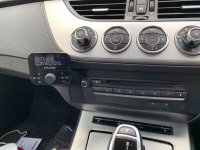

Just resurrecting this thread with a question about the Bovee Tune2Air adapter.AnubisZed said:No not all, only those that have the Enhanced Bluetooth.
It can be retrofitted but it's not cheap as you'll need a new MULF unit and find someone that has the proper coding kit for the MULF unit (normal coding doesn't work on this unit).
A much cheaper alternative would be the Tune2Air Bluetooth receiver, it basically turns your phone into an iPod but without connecting it directly via a lead. If you have an iPhone then you'll have track titles and artist info on the iDrive screen, alas though if you have an Android then you won't receive this display. It is good though as it gives you control via the steering wheel buttons and at only £100 is much cheaper and easier to fit than a retrofitted MULF.
Or, you could go all the way and fit an Android touchscreen for loads of features above standard (works with both iDrive and non-iDrive cars), for more info click the link in my signature below
I'm not sure how this would work in my car. I have a USB socket in the glove box, which I've used to transfer music from a usb stick to the car's hard drive, and under the arm rest I have a 12V socket and a 3.5mm aux input. Looking at the Tune2Air adapter, it appears that it needs to plug into a USB and 3.5mm socket, but I don't have these together anywhere. Does this mean I don't have the 'ipod' feature in my car, so this adapter won't work? I will see if I can dig up any userguides/instructions/videos for the tune2air which might answer the question but thought I'd ask here as well.
Edit: looking at my car's features/options, I can't see anything that mentions ipod integration. If I don't have this option I guess the Tune2Air is no use?
Hi All,
I had this problem in my car and purchased the following from Amazon: https://www.amazon.co.uk/gp/product/B06Y2D1ZX8/ref=ppx_yo_dt_b_asin_title_o04_s01?ie=UTF8&psc=1
Kinivo BTC480 Bluetooth Hands-Free Car Kit
Leave the car on aux, connects within a few seconds of turning on the car, works perfectly for me, and less than £30. Handles calls and music with next, previous and answer/hangup button.
I had this problem in my car and purchased the following from Amazon: https://www.amazon.co.uk/gp/product/B06Y2D1ZX8/ref=ppx_yo_dt_b_asin_title_o04_s01?ie=UTF8&psc=1
Kinivo BTC480 Bluetooth Hands-Free Car Kit
Leave the car on aux, connects within a few seconds of turning on the car, works perfectly for me, and less than £30. Handles calls and music with next, previous and answer/hangup button.
enzed4 said:Just resurrecting this thread with a question about the Bovee Tune2Air adapter.
I'm not sure how this would work in my car. I have a USB socket in the glove box, which I've used to transfer music from a usb stick to the car's hard drive, and under the arm rest I have a 12V socket and a 3.5mm aux input. Looking at the Tune2Air adapter, it appears that it needs to plug into a USB and 3.5mm socket, but I don't have these together anywhere. Does this mean I don't have the 'ipod' feature in my car, so this adapter won't work? I will see if I can dig up any userguides/instructions/videos for the tune2air which might answer the question but thought I'd ask here as well.
Edit: looking at my car's features/options, I can't see anything that mentions ipod integration. If I don't have this option I guess the Tune2Air is no use?
I believe the USB is just to get power to the Tune2air, you can add a 12V to USB adaptor in the car and then attach the Tune2Air in the USB adaptor (for power) and the 3.5mm for the sound. I might be wrong, if so someone will correct me!
The Tune2Air will NOT work without the combined AUX/USB socket. The AUX is for the sound and the USB is for power and the control side of it. It has to be the combined socket and coded accordingly.
Any other bluetooth adaptor will work but you wont have control of it via the stereo or steering wheel buttons.
Any other bluetooth adaptor will work but you wont have control of it via the stereo or steering wheel buttons.
This is exactly what I thought. Thanks Dave.AnubisZed said:The Tune2Air will NOT work without the combined AUX/USB socket. The AUX is for the sound and the USB is for power and the control side of it. It has to be the combined socket and coded accordingly.
Any other bluetooth adaptor will work but you wont have control of it via the stereo or steering wheel buttons.
Back to the drawing board. Still waiting for the car yard to provide a BT A2DB solution that I paid for 9 months ago. Just sent them another email reminder now. :x
Hi - new to me E89. Just figured out how to use a flash drive to play my music. I was looking at the option linked by Limmys10 above I'm thinking that will allow me to stream spotify for some new music. Cool 8)
Now I'm wondering if this will let me display google maps ... or am I just dreaming silly impossibilities now ? :roll:
PS
When trying to get the idrive to recognize the flash drive a restart was needed. That threw me off for a bit...
I'm thinking that will allow me to stream spotify for some new music. Cool 8) Now I'm wondering if this will let me display google maps ... or am I just dreaming silly impossibilities now ? :roll:
PS
When trying to get the idrive to recognize the flash drive a restart was needed. That threw me off for a bit...
Spawny lad
Member
I have a tune2air i dont use anymore if anyones intrested.
Spawny lad
Member
A aux and usb socket is req,d
In case anyone is interested in the flash drive method. I put hours of music on a small flash drive. The iDrive recognizes this as auxiliary and steering wheel controls volume, pause, next. Phone works as usual interrupting the music. Took a 2.5 hour drive and never heard the same song twice or one I didn't like
This also requires a USB in the centre storage tray/cup holder? Not the glove box USB? I think without the centre console aux/USB option I'm pretty limited for anything more than just music on the hard drivescootr said:In case anyone is interested in the flash drive method. I put hours of music on a small flash drive. The iDrive recognizes this as auxiliary and steering wheel controls volume, pause, next. Phone works as usual interrupting the music. Took a 2.5 hour drive and never heard the same song twice or one I didn't like


 Scotland 🏴
A
Anonymous
Guest
Zed Baron said:don't know if its already been mentioned.... if you have idrive then you have a hard-drive built in, which you can load all your music on, you can either copy onto it via usb in the glovebox or if you have a cd in you can copy that to the hard-drive.
You can but there are two limitations..
Space available is about 12 gb which maybe a limitation for those with big music libraries...
The encoding method that BMW uses to load the idrive jukebox is poor quality so playback will be poorer than mp3 /wma via usb or even Bluetooth playback from an iPhone..
Does anyone know how to get music from an iPhone or iTunes onto a flash drive?
Upload the iphone music to a PC and then load on a flashdrive. This should be pretty straight forward. Easier if you have itunes on the PC you can make playlists and then send them to a flash drive. In my case I wanted all my songs so I just selected a bunch of songs ( 10 or 12 at a wack) and dragged them to the flash drive and repeat until they were all copied over.Silverstar said:Does anyone know how to get music from an iPhone or iTunes onto a flash drive?
Don't see why you could not play a flash drive from the glove box. I think the glove box port is the primary port so it is easily selected as AUX import... But as mentioned quality is slightly reduced once loaded to the radio HD.
My new used car had a bunch of great music on the drive already