Bluetooth phone prep - no speaker sound (iPhone 12) SOLVED

veryverydarkblue

Member
 London
I recently dug out the Bluetooth code for my facelift E85 and successfully paired my iPhone 12 for phone calls. It all works perfectly, other than the minor snag that there is no audio... The microphone links up perfectly, however I can’t hear dial tones or the person on the other end of the line (i.e. it doesn’t play through the speakers). Does anyone know how the phone prep links through to the speakers, and what could cause this not to work properly?

Changes from stock, which could be linked are:
- The headunit was changed from business Nav to business CD (but still syncs with the phone book, shows phone when all a call etc. So I’m assuming no issue there)
- I’ve replaced the CD changer with a bluemusic connector for music. For testing i tried with this both paired and unpaired - it switches fine when connected to both bluemusic and the car when a call comes in.
- Aux in has been fitted in the ash tray

Current thoughts are, 1) does the Bluetooth prep phone audio leverage any CD changer wiring? 2) does a modern iPhone output an incompatible audio stream?

Has anyone had success/ issues with this setup, or ideas of what could be failing for me?
 
Hi

I had issues with my bluetooth not pairing at all- which was a degradation of the wiring in at the join from where it runs from the storage box into the rear of the car under the cd changer area

Not sure if that would be the start of your issues but its worth a preventative check anyway?

Also- even though I fixed mine, and got BT pairing, I cant link my iphone 12 (assumed its too new for the 2003 tech)
 
bigwinn said:
Hi

I had issues with my bluetooth not pairing at all- which was a degradation of the wiring in at the join from where it runs from the storage box into the rear of the car under the cd changer area

Not sure if that would be the start of your issues but its worth a preventative check anyway?

Also- even though I fixed mine, and got BT pairing, I cant link my iphone 12 (assumed its too new for the 2003 tech)

Thanks bigwinn - it’s worth a try. You’ve also reminded me that i did play about under the in-built phone holder (with the intention of possibly removing it) a while back.
 
I think it's basically because of Bluetooth protocol mis-match. Your phone is just too new for the outdated system on the car.
 
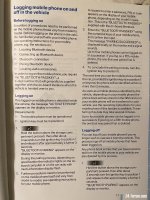
Hi. I had the same problem when I tried to connect my phone. Someone told me to make sure the ignition is off (it doesn’t specify on the manual to do that) whilst pressing the Bluetooth button (rear console) then turn the engine on whilst still pressing the button until it successfully connects. You have a few seconds to type the PIN number. Hopefully should fix the problem. I have an iPhone 12 Pro and also have the bluemusic connected to the cd changer. You have to clear paired devices on the car’s Bluetooth first. Worked for me. I hope it works for you too. I’ve only had my e85 for 3 weeks but I’ve had no Bluetooth problems since I connected successfully.
 
Oh do this first—- check you have it on the right setting on your phone. Settings>Bluetooth>bmw… (click on i)>device type>car stereo
 
missvee said:
Oh do this first—- check you have it on the right setting on your phone. Settings>Bluetooth>bmw… (click on i)>device type>car stereo
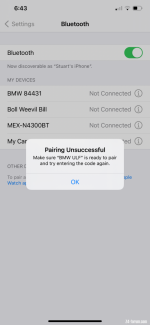
I thought that would be a solution for me but I get no ‘I’ next to BMWULF
 
Sorry it won’t work for you. Not sure if you have the manual but I’ll post this here anyway. I might have missed a few steps on my last post. It took me a few attempts to succeed!
 

Attachments

  • 4553807A-1AF5-4DEB-84A2-2389F9828444.jpeg
    4553807A-1AF5-4DEB-84A2-2389F9828444.jpeg
    239.7 KB · Views: 452
Original issue (for me) solved. It turns out that there was a phone-prep connector that had been previously disconnected from the head unit, swapped for the aux in and was hiding in the loom. I’ve now swapped back to the built in phone and now have seamless Bluetooth music (bluemusic) and phone connection through the built in mic and speakers with an iPhone 12.
 
Back
Top Bottom