
You are using an out of date browser. It may not display this or other websites correctly.
You should upgrade or use an alternative browser.
You should upgrade or use an alternative browser.
bluetooth pairing
- Thread starter acerboo
- Start date
Are you 100% sure you have the bluetooth installed and not just the bluetooth preperation?
Someone will be along in a second to correct me, but if you dont have the bulge in the carpet in the boot your unlikely to have the full kit. I will try track down the picture!
Someone will be along in a second to correct me, but if you dont have the bulge in the carpet in the boot your unlikely to have the full kit. I will try track down the picture!
You have the keycode ok that you need to type into your phone?
Try a few combinations of pressing the cars pairing button while turning the ignition on. That usually tricks it into life when I do it.
Once displayed the getting you phone searching and keying in the pair number is simple enough.
Once displayed the getting you phone searching and keying in the pair number is simple enough.
gannet said:isnt it press and hold for 3 seconds... then turn the ignition while holding and then keep holding for a further 3 seconds?
never had any trouble with mine.
Correct. Mine paired fine using this method. As long as you have the 4 digit code to key in to key in to your phone, you should be up and running. Once connected, you'll have to keep it connected for a couple of minutes so that it transfers your contacts to the car. Took me a few minutes to transfer when I first did it - im so popular :roll:
What worked for me (07 Z4C) was to hold the BT button down for 3 seconds, then turn the key to position 3 (ie start the engine) and then releasing the BT button after a further 3 seconds. It wouldn't work with the key in positions 1 or 2, I think the manual suggested position 2. It had me  for a while that one
Hope it works for you!
for a while that one Hope it works for you!
Mattt said:Bluetooth prep = bluetooth doesn't it?
I thought so but it appeared bluetooth prep just means you have the wiring in place and the buttons on the stearing wheel. You dont have the ULF (?) module in the boot which is seen by the "bulge".
speaker?acerboo said:i definately have a bulge! and a speaker
think bluetooth prep means different things in the US.. as always.
if you have the flap with the eject box, and if you have nav you can see Telephone on the menu, you have BT.
acerboo said:driving me mad! done everything the book says but just cannot get the "bluetooth pairing" to come up on the screen any ideas? (tried beatingit with a hammer but that didnt work either!)
I had similar problems at the beginning, I coutned 3 secs sometimes longer etc.
Correct method- U need to hold the centre button in the flap behind the seat for 3 secs, turn on the ignition and just before the sat nav screen opens if u have one then take ur hand off and the bluetooth pairing appears. If u dont have sat nav, u need to let go before the cd player starts. Good luck.
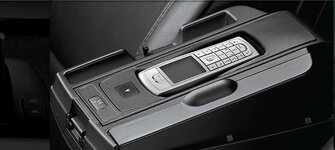
acerboo said:will try that but what is the button behind the seat i thought the button is on the steering wheel
The button on the steering wheel is when the phone is paired to speak or call or answer calls. Hope it works for u.