Audio Question

Jasonn

Member
Evening all,

I picked up my shiny 2016 Z4 from the car dealer last night and have been having a tinker trying to get music to stream from my android (Samsung S9) in the same way that I can with my wife's 2014 X3.

I've got the idrive on the zed, but I can't seem to find any way to stream the music, I've gone through the forum and there seems to be a conflict as to whether this is possible or not. I've got idrive and the "professional" radio so it seems weird that I can do this on an older BMW but not this one - has anyine got any ideas? I'm not fussed about the artwork as I generally look at the road when I'm driving
 
You will need the enhanced Bluetooth option in order to stream from your device. This is different to normal Bluetooth for taking phone calls.
 
See if you can find a BMW vin decoder online (someone on here could possibly recommend a good one), it will list exactly what options your car had when it left the factory.
 
As Zed Baron suggests you need to decide the VIN which will generate a list of apparently overlapping / contradictory systems on your car...

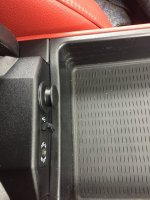
Depending on that list you could have the option to play music from your phone via this usb interface and/or 3.5mm plug in the the central armrest..

Decode VIN first..

https://www.mdecoder.com/
 
Thanks for the VIN decoder, no enhanced Bluetooth (bloody annoying the older X3 does).

Hopefully as I learn more about the zed, I'll be able to contribute rather than just leaching for info
 
Jasonn said:
Thanks for the VIN decoder, no enhanced Bluetooth (bloody annoying the older X3 does).

Hopefully as I learn more about the zed, I'll be able to contribute rather than just leaching for info

Have you got usb..then you can usually treat the android phone as a usb stick and play from there..
 
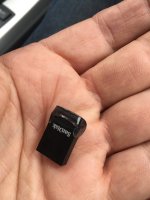
Or you might like this if you have the USB input in the centre consol......It's almost invisible, you can leave it in your car permanently, holds thousands of tracks. Leaves your phone free in your pocket or as a sat nav if you haven't got built in (and calls of course).

I bought a 20Gb memory stick, the physically smallest I could find.
I load it with high qual MP3s, hundreds, thousands of tracks, CDs via itunes on my Mac and plug it into the USB in the centre armrest storage.
It is so small, it's not going to get snapped off, I just leave it there until I want to change the contents which will be a long time.

To organise the tracks create folders. Each could be for a whole CD, a playlist or a genre and give them a title.
On the radio screen using the button corresponding with 'Dir" (Directory), select the folder title, scroll through the CD/folder titles and hit the knob to select that playlist. Then scroll down to the first track in that list and hit the knob to start play.
From then on track changes, fast forward, volume is all controlled from the steering wheel.

Once you create the filing system this is so convenient. No need for large wav. aiff. files, high rate mp3s sound great.

Incoming and out going phone calls still auto mute the music and the parking sensors reduce the volume.
 

Attachments

  • IMG_3907.jpg
    IMG_3907.jpg
    208.6 KB · Views: 982
  • IMG_3908.jpg
    IMG_3908.jpg
    132.2 KB · Views: 982
Loxford said:
Or you might like this if you have the USB input in the centre consol......It's almost invisible, you can leave it in your car permanently, holds thousands of tracks. Leaves your phone free in your pocket or as a sat nav if you haven't got built in (and calls of course).

I bought a 20Gb memory stick, the physically smallest I could find.
I load it with high qual MP3s, hundreds, thousands of tracks, CDs via itunes on my Mac and plug it into the USB in the centre armrest storage.
It is so small, it's not going to get snapped off, I just leave it there until I want to change the contents which will be a long time.

To organise the tracks create folders. Each could be for a whole CD, a playlist or a genre and give them a title.
On the radio screen using the button corresponding with 'Dir" (Directory), select the folder title, scroll through the CD/folder titles and hit the knob to select that playlist. Then scroll down to the first track in that list and hit the knob to start play.
From then on track changes, fast forward, volume is all controlled from the steering wheel.

Once you create the filing system this is so convenient. No need for large wav. aiff. files, high rate mp3s sound great.

Incoming and out going phone calls still auto mute the music and the parking sensors reduce the volume.


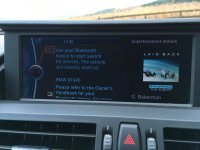
I did that with windows media player..5000 tracks 400 albums on a 32gb usb ..the one issue is that I couldn’t get it to consistently display the artwork, appreciate its a first world problem :rofl:

Do you get all the artwork?
 
I've only got the pro audio system which shows the CD/Playlist title and the track titles.
No built in Sat Nav. Would the artwork would show up there? If it does import it, of course.
I can't say I need it, I'm not going to look at the artwork while driving!
 
Loxford said:
I've only got the pro audio system which shows the CD/Playlist title and the track titles.
No built in Sat Nav. Would the artwork would show up there? If it does import it, of course.
I can't say I need it, I'm not going to look at the artwork while driving!

I think it’s crucially important to have the artwork displayed I feel something is missing if not, I must have spent over 100 hours trying to get playlists and artwork to consistently work across 3 vehicles and 2 TVs :rofl: :thumbsup:
 

Attachments

  • 7580BF2B-C0B4-4153-8BB3-F0354880CABC.jpeg
    7580BF2B-C0B4-4153-8BB3-F0354880CABC.jpeg
    282.6 KB · Views: 941
It would be nice, everything is a lot more accessible on that screen but when I bought the car this summer, I couldn't see anything that compared for the price, I snapped it up.
Only driving old cars with nothing more than a heater and a radio this was a whole new thing and I had no idea that little glove compartment on the dash might have been anything else. I guess what I don't have you don't miss.
 
Loxford said:
It would be nice, everything is a lot more accessible on that screen but when I bought the car this summer, I couldn't see anything that compared for the price, I snapped it up.
Only driving old cars with nothing more than a heater and a radio this was a whole new thing and I had no idea that little glove compartment on the dash might have been anything else. I guess what I don't have you don't miss.

It’s been discussed before but IMHO cars without the goodies do go for a lot less than the ones that are ā€˜fully loaded’

It’s not easy with BMW to work out the mystique of all the options.. :thumbsdown:

Having spent many hours in cars/aircraft looking at blanks in instrument panels / car layouts I’m one for ā€˜fully loaded’ where I can be on my boys toys content.. :thumbsup:
 
Back
Top Bottom