

Since I got the Z4 G29 (M40i) with the fancy HK audio option (0688 Harman/Kardon Surround Sound system), I’ve been pretty underwhelmed by the sound quality.
I’m no audiophile wizard, but I do enjoy blasting tunes during my daily drives and especially on longer trips, which this roadster makes pretty fun. The sound really should match the thrill of driving this car. I’m not against a bit of DIY tinkering or modding, as long as it doesn’t mess with the car’s original design.
So, off I went on my epic quest to upgrade the sound quality!
First thing I noticed: the bass was both weak and annoyingly rattly. The rattling happened even at low volumes with all equalizer and tone settings on neutral in iDrive. Plus, the sound felt muffled and unclear, like some instruments were playing hide and seek. Enabling Logic7 helped a bit, but it sacrificed soundstage and didn’t fix the missing-in-action instruments or clarity issues.
There’s tons of advice online about tweaking equalizer settings or messing with amp settings to disable ASD and enable B&W sound profiles (using bimmercode or similar software), but none of that gave me the magic fix. Also, turning off ASD messed with BMW iDrive’s over-the-air updates and enabling the B&W sound option threw a Booster configuration error (which might or might not actually disable something).
Since the rattling was driving me nuts, I tackled that first. Check out this post speaker vibration in M40i when playing music for the nitty-gritty, and big thanks to Z4CCC for sharing his endeavors and pictures. Adding anti-drumming plate and sound insulation seriously cut down on the rattles. But the rattling wasn’t completely silenced... more on that later.
Next up, I installed an ATF Match Up 10DSP amp using the 9-channel UPGRADE cable harness PP-BMW 1.9RAM-HK. The amp was a leftover from my previous car modifications. The harness lets you connect the Match amp and you have to add an Extension Card MEC ANALOG IN for the Harman Kardon system with RAM and Booster modules. For the G29 Z4, the MEC card connects the center channel output of the OEM RAM amp. ATF suggests setting the MEC card’s high-level input to High Voltage Range (jumper max 30 / 8 Volts), but that’s actually wrong—it triggers a "center channel wiring error," probably due to resistance issues. Setting it to max 11 / 3.5 Volts works fine with no error. The extension card isn’t mandatory; if you don’t mind the error message and want to save some cash, you can leave the center channel unplugged (I did that while waiting for the card). The Match amp is probably better suited to create a new center channel from the front left and right signals anyways. Just make sure the booster inputs (jumper Input G-H) are set to 32 Volts since the booster drives the subwoofers and uses a high voltage signal (around 26 Volts at max volume). Installing the amp isn’t rocket science—plenty of videos online—but you do have to remove at least two trunk panels and fiddle with connectors to install the harness. The trickiest part was running the power cable (3rd panel removal required)...
Once the amp was in, I started with all gains at minimum (max input volts) in the ATF pc-tool software (upgraded from version 5 to 6 along the way) and did some serious input measurements. Note that Logic7 and B&W measurements were taken with bass, 100 and 200 Hz maxed out in iDrive settings, which explains the roughly 3 dB bump below 200 Hz; measurements were done using REW, an AMI interface and a Superlux ECM-999 mic playing pink noise at 96kHz from USB.
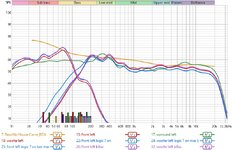
Input signal measurements (1/3rd smoothing applied) and observations:
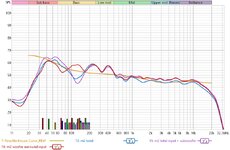
With all that info, I tried (see graph below for speaker output measurements, again 1/3rd smoothing applied):
Some takeaways:
 ) to share my EQ settings here, but when using the surround signal as inputs for the subwoofers and tweaking gains, timing, crossover filters and EQ the improvements over the OEM system are clear to me.
I tried shelf filters to fix the high-frequency drop (above 10 kHz) and smooth out what seems like a crossover flaw in the OEM RAM + Booster combo—but none were very successful.
After all that, I thought I’d hit the best possible setup given my limited audio tuning skills and gear. Plenty of bass, but still... not totally happy with the crispness of the sound and a bit of rattling remains, though I believe it’s not from rattling panels this time.
So, the epic quest continues... (part 2 coming soon)!
I’m no audiophile wizard, but I do enjoy blasting tunes during my daily drives and especially on longer trips, which this roadster makes pretty fun. The sound really should match the thrill of driving this car. I’m not against a bit of DIY tinkering or modding, as long as it doesn’t mess with the car’s original design.
So, off I went on my epic quest to upgrade the sound quality!
First thing I noticed: the bass was both weak and annoyingly rattly. The rattling happened even at low volumes with all equalizer and tone settings on neutral in iDrive. Plus, the sound felt muffled and unclear, like some instruments were playing hide and seek. Enabling Logic7 helped a bit, but it sacrificed soundstage and didn’t fix the missing-in-action instruments or clarity issues.
There’s tons of advice online about tweaking equalizer settings or messing with amp settings to disable ASD and enable B&W sound profiles (using bimmercode or similar software), but none of that gave me the magic fix. Also, turning off ASD messed with BMW iDrive’s over-the-air updates and enabling the B&W sound option threw a Booster configuration error (which might or might not actually disable something).
Since the rattling was driving me nuts, I tackled that first. Check out this post speaker vibration in M40i when playing music for the nitty-gritty, and big thanks to Z4CCC for sharing his endeavors and pictures. Adding anti-drumming plate and sound insulation seriously cut down on the rattles. But the rattling wasn’t completely silenced... more on that later.
Next up, I installed an ATF Match Up 10DSP amp using the 9-channel UPGRADE cable harness PP-BMW 1.9RAM-HK. The amp was a leftover from my previous car modifications. The harness lets you connect the Match amp and you have to add an Extension Card MEC ANALOG IN for the Harman Kardon system with RAM and Booster modules. For the G29 Z4, the MEC card connects the center channel output of the OEM RAM amp. ATF suggests setting the MEC card’s high-level input to High Voltage Range (jumper max 30 / 8 Volts), but that’s actually wrong—it triggers a "center channel wiring error," probably due to resistance issues. Setting it to max 11 / 3.5 Volts works fine with no error. The extension card isn’t mandatory; if you don’t mind the error message and want to save some cash, you can leave the center channel unplugged (I did that while waiting for the card). The Match amp is probably better suited to create a new center channel from the front left and right signals anyways. Just make sure the booster inputs (jumper Input G-H) are set to 32 Volts since the booster drives the subwoofers and uses a high voltage signal (around 26 Volts at max volume). Installing the amp isn’t rocket science—plenty of videos online—but you do have to remove at least two trunk panels and fiddle with connectors to install the harness. The trickiest part was running the power cable (3rd panel removal required)...
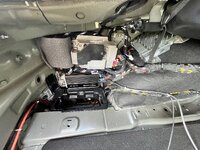 | 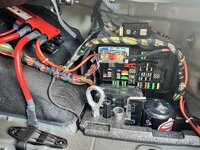 |
Once the amp was in, I started with all gains at minimum (max input volts) in the ATF pc-tool software (upgraded from version 5 to 6 along the way) and did some serious input measurements. Note that Logic7 and B&W measurements were taken with bass, 100 and 200 Hz maxed out in iDrive settings, which explains the roughly 3 dB bump below 200 Hz; measurements were done using REW, an AMI interface and a Superlux ECM-999 mic playing pink noise at 96kHz from USB.
Input signal measurements (1/3rd smoothing applied) and observations:
- Logic7 (blue lines) shows about a 2.5-3 dB drop above 200 Hz compared to flat non-Logic7 (red lines).
- B&W profiles (purple lines) are almost identical to flat non-Logic7 (red lines).
- When summing midrange and subwoofer frequency responses there’s a big dip between 80 and 200 Hz in all profiles, which can be slightly reduced by max boosting frequencies at 200 Hz and below (see blue lines).
To me, that means the OEM RAM amp and Booster’s crossover filters don’t quite match. - Looks like the OEM RAM amp and Booster use some kind of “house curve” (no surprise). For fun, I added the ResoNix REW target Smoothed curve 6.9.25 (orange line) just because I like it.
P.S. I measured the Match amp inputs, so comparing to a house curve might not be super relevant since you would expect the inputs to be flat and really want to compare speaker outputs to such curves, but hey, it looks cool on the graph. - The green line “surround left”? Turns out two extra outputs from the OEM RAM amp are wired in the PP-BMW harness as inputs to the Match amp (surround left and right). Testing shows this is an unmodified, unamplified signal. With the standard ATF setup for BMW G29, these “surround” signals just pass through to the Match amp outputs but then stop because there’s no wiring on the car side of the OEM RAM amp connector. To match surround signals’ levels to the front speakers, input voltage for these channels must be set to minimum 4 volts (max input gain) for inputs E and F.
With all that info, I tried (see graph below for speaker output measurements, again 1/3rd smoothing applied):
- OEM RAM front signal for front speakers and OEM Booster subwoofer signal for subs (purple line).
- Summed OEM RAM front + OEM Booster subs signals for both front and sub outputs (blue line).
- OEM RAM front for front speakers and OEM RAM surround for subwoofers (red line).
Note: when using the surround signal for subwoofer used a lowpass filter set at 150-180 Hz -24 dB/Oct (forgot exact setting for doing this measuring) to roughly match assumed midrange highpass filter while tweaking Match amp gains to match a certain house curve (orange line).
Some takeaways:
- Match amp output definitely needs EQ.
- The 80-200 Hz dip seen in input measurements also shows up in speaker measurements when using OEM Booster subwoofer signal as input (either summed with front signal or solo).
- Using the OEM RAM amp’s “surround” signal for subwoofer input helps reduce the dip but probably adds some cancelation to be taken care of.
Bonus: using the “surround” signal for subs bypasses ASD sounds without disabling ASD since you’re not using Booster signals anymore.
) to share my EQ settings here, but when using the surround signal as inputs for the subwoofers and tweaking gains, timing, crossover filters and EQ the improvements over the OEM system are clear to me.I tried shelf filters to fix the high-frequency drop (above 10 kHz) and smooth out what seems like a crossover flaw in the OEM RAM + Booster combo—but none were very successful.
After all that, I thought I’d hit the best possible setup given my limited audio tuning skills and gear. Plenty of bass, but still... not totally happy with the crispness of the sound and a bit of rattling remains, though I believe it’s not from rattling panels this time.
So, the epic quest continues... (part 2 coming soon)!
Last edited:


 Scottish Borders
 )
)