
 Attleborough, Norfolk
Off to look now.Do you have 2 orange twisty wires that go to the side of the battery

Off to look now.Do you have 2 orange twisty wires that go to the side of the battery
Happy to do a WhatsApp and then report updates to this post for others in the future.OK then: reverse your numbers.
Then looking at my list and imagining it is yours in reverse we find (using my numbers, with yours in brackets) that 1(18) through to 8 (11) are the same.
9 (10) is Blue/Brown - I suspect yours is too, but looks grey?
13(6), 14 (5) and 15 (4) are the same.
Now we'll look at the colours left over:
Brown/Red - 10 on mine, unplugged on yours
Brown - 11 on mine, unplugged on yours
Red - 12 on mine, 3 on yours
White/Black - 16 on mine, 7 on yours
White/Brown - 17 on mine, 8 on yours
Blue/Black - 18 0n mine, 9 on yours
So that leaves two odd orange wires in your 1 and 2 which don't exist anywhere on mine. Maybe been added to bypass the two brown ones?
So, if it were me, I think your next step would be to repin the plug to match my list (making sure you have it the right way up), then disconnect the two orange wires and refit the two borwn ones in their correct places)
You should then end up with a plug with gthe same order as in my list and as per the wiring diagram.
Be useful to find out where the two orange wires go wouldn't it.
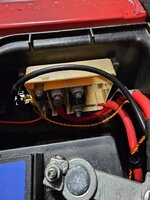
Also check the cutout switch beside the battery to be sure that hasn't been tampered with.
CAVEAT! I OFFER ALL THIS ADVICE WITH THE BEST INTENTIONS, BUT IT IS YOUR DECISION IF YOU ARE PREPARED TO RISK A BIG BANG!!!


This isn't sci-fi, more Sci-guess.................. but don't tell @10stb@enuff_zed I’m following the thread like a good sci-fi movie. The amount of knowledge you have of these is just mind blowing. Kerp up the good work and fingers crossed @10stb will get everything sorted
Having rechecked after turning the connector the correct wayOK then: reverse your numbers.
Then looking at my list and imagining it is yours in reverse we find (using my numbers, with yours in brackets) that 1(18) through to 8 (11) are the same.
9 (10) is Blue/Brown - I suspect yours is too, but looks grey?
13(6), 14 (5) and 15 (4) are the same.
Now we'll look at the colours left over:
Brown/Red - 10 on mine, unplugged on yours
Brown - 11 on mine, unplugged on yours
Red - 12 on mine, 3 on yours
White/Black - 16 on mine, 7 on yours
White/Brown - 17 on mine, 8 on yours
Blue/Black - 18 0n mine, 9 on yours
So that leaves two odd orange wires in your 1 and 2 which don't exist anywhere on mine. Maybe been added to bypass the two brown ones?
So, if it were me, I think your next step would be to repin the plug to match my list (making sure you have it the right way up
You should then end up with a plug with gthe same order as in my list and as per the wiring diagram.
Be useful to find out where the two orange wires go wouldn't it.
Also check the cutout switch beside the battery to be sure that hasn't been tampered with.
CAVEAT! I OFFER ALL THIS ADVICE WITH THE BEST INTENTIONS, BUT IT IS YOUR DECISION IF YOU ARE PREPARED TO RISK A BIG BANG!!!
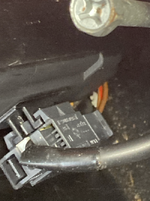
 , my colours are exactly the same as yours......with the exception that the brown and brown/red wires are disconnected with the orange and orange/yellow in their place.
Ah ok, so if you can confirm the two new wires go to that battery connector we're good with that.Having rechecked after turning the connector the correct way
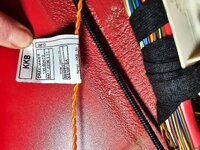
It looks like new wiring (lable on it attached for id) and I think it goes to the unit next to the battery.
So maybe the brown and brown/red were removed for a reason. Doesn't explain why the air bag warning light was taped over though
 )
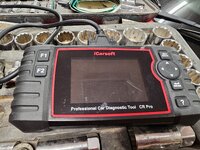
)This is the code reader my mate lent me. Whilst I'm grateful to borrow it, I dont think it sees much.Ah ok, so if you can confirm the two new wires go to that battery connector we're good with that.
Next step then is to get the code reader on and see if you can read any of the modules. If you can't see any then the SIM85 has a problem.
I'm thinking you have an SBSL issue at least though.
Without being able to get codes we are stuck.
Don't just do a system scan as that may mask the fact it didn't see the modules. Go into each of the three modules, one at a time, and tell me what you get.

It is indeed. As long as no immediate rush? I can bring a box full of modules, plugs and looms and we can work out way through it all.This is the code reader my mate lent me. Whilst I'm grateful to borrow it, I dont think it sees much.
I plugged it in last night knowing that there were air bag issues and the only thing it flagged was accelerator sensor as I took the pedal out when I removed the carpets.
Whilst I'm OK with some things, I think this side of it may be getting above my intelligence level.
I'd like to take you up on your offer to help sort, if it is still there
Looks like we’ll be taking this off line for a while until I can get down there and have a play with this airbag system. We will update with hopefully a successful outcome later on.@enuff_zed I’m following the thread like a good sci-fi movie. The amount of knowledge you have of these is just mind blowing. Kerp up the good work and fingers crossed @10stb will get everything sorted
HeyI have a spare good loom if needed
Hey BigwinnI have a spare good loom if needed


SureHey
Hey Bigwinn
Can I take you up on the offer of the loom please. enuff_zed has my mobile number that I can ask him to pass on to you so that we can organise cost and postage.
Many thanks

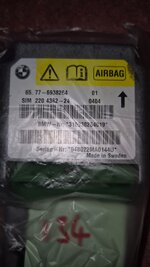
If it helps, I have a compatible central airbag module.
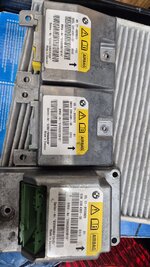
I’d suggest putting an ad up for the set of three matching ones (but not the one with broken pins).Sorry to hijack
Read with interest. Checked my spare modules.
Seems I have a matching full set.
I've checked againts the number @enuff_zed posted on page 4.
EDIT. The central module here, although I suspect it to be good, 2 pins have broken off, so if someone has a dud central module, maybe the pins can be transferred.
I still have the other central module that matches though.
View attachment 289243

 Finland

 Loughborough